Turn any exam into a
graded assignment in seconds.
Upload a photo, PDF or Word file of an exam and let AI build a ready-to-share assignment — questions, math formulas and the answer key included. Students answer on any device, and every submission is graded automatically into a live gradebook. No marking by hand, no separate tool.
From exam file to graded results in three steps
Upload or build
Drop in an exam image, PDF or Word file and let AI generate the questions — or build them yourself.
Share a link or QR
Set correct answers and points, then share a link or QR code. Students answer on any device.
Auto-grade & analyze
Submissions are marked instantly into a live gradebook. Grade essays by hand and export to CSV.
Upload the exam. AI writes the assignment.
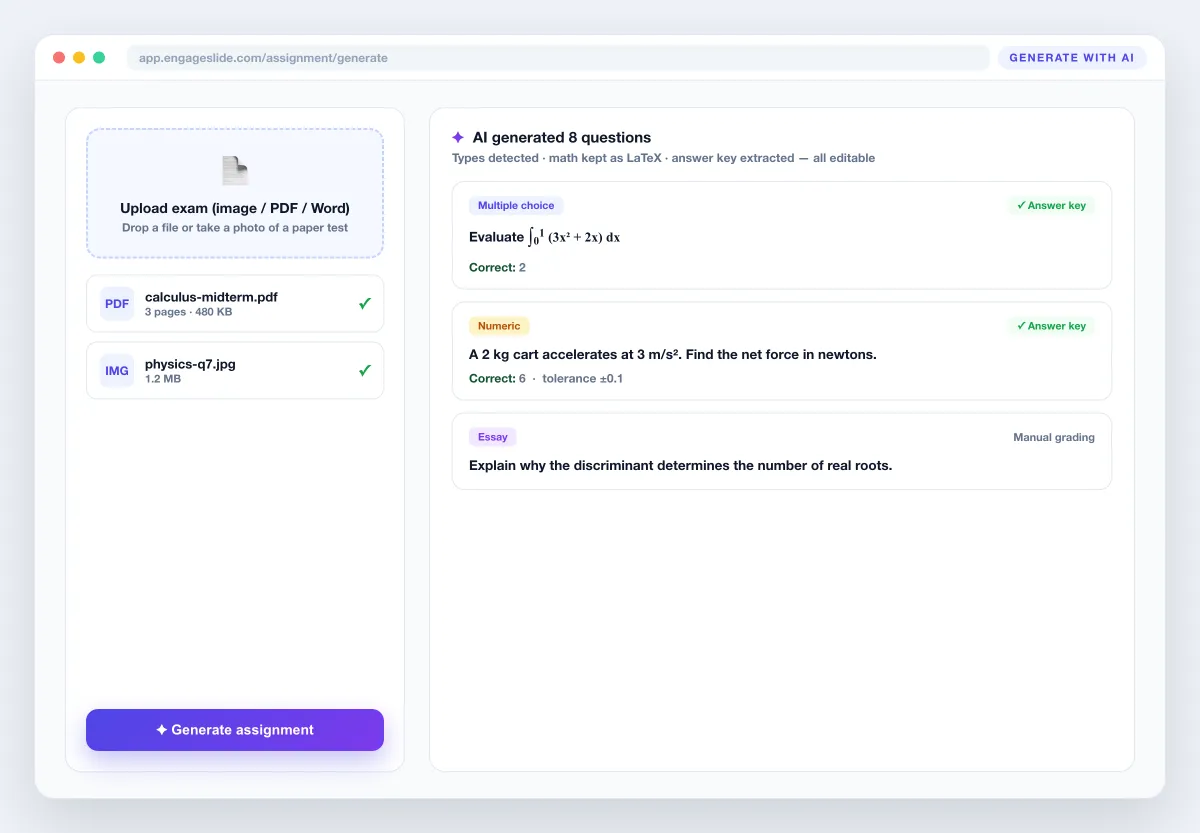
This is the part that saves hours. Point your phone at a paper test, export a past exam to PDF, or drop in a Word document — the AI reads every question, keeps math as LaTeX, works out whether each item is multiple choice, numeric, short answer or an essay, and fills in the answer key when the file has one. It even handles exams in other languages and keeps them in their original language. You get a fully editable draft, not a black box.
- ✓Reads photos, scanned PDFs, Word (.doc/.docx) and typed exams
- ✓Preserves formulas, fractions and symbols as real math
- ✓Detects question types and extracts the answer key
- ✓Every generated question stays fully editable
Correct answers, points and real math — built in.
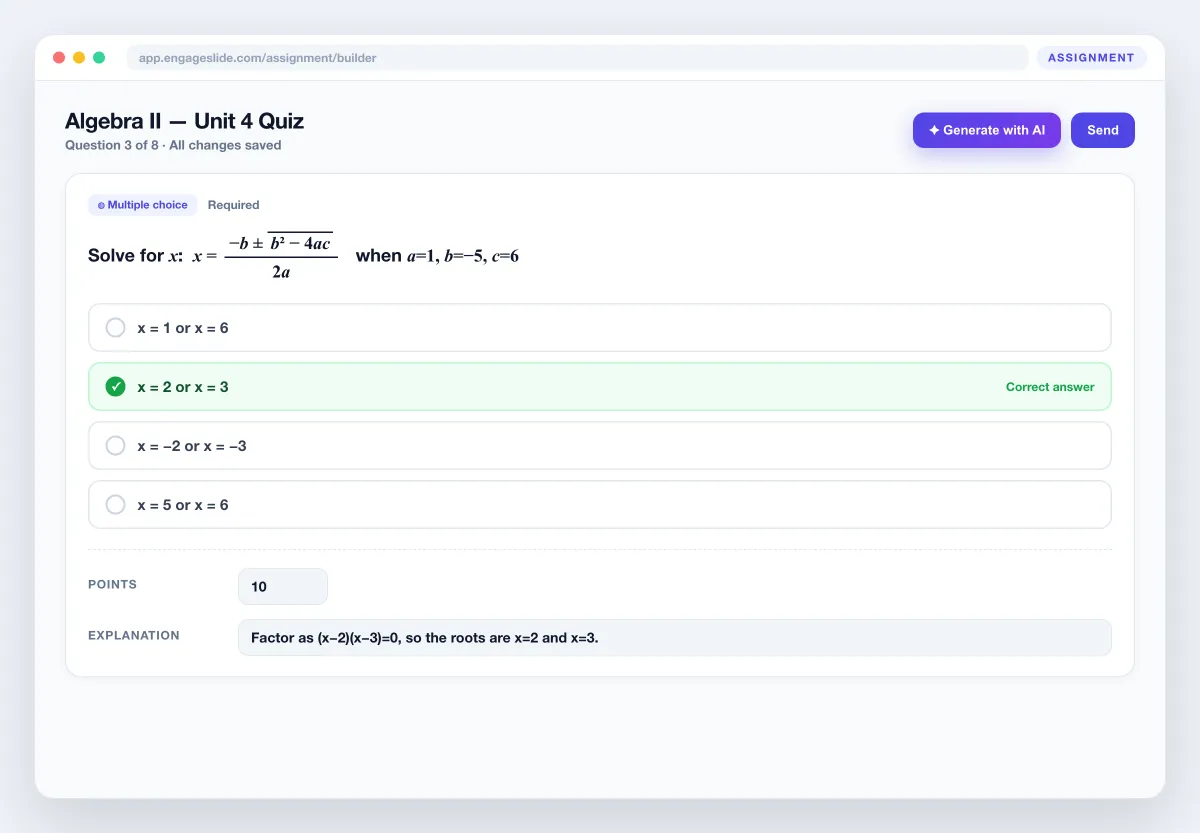
Add questions, mark the correct answer, set points per question and write an explanation students see after they submit. A built-in math editor with a live preview lets you drop formulas into any question or option, and you can attach an image, video or audio clip for listening tasks and diagrams. Everything autosaves as you type.
Every submission, marked the moment it arrives.
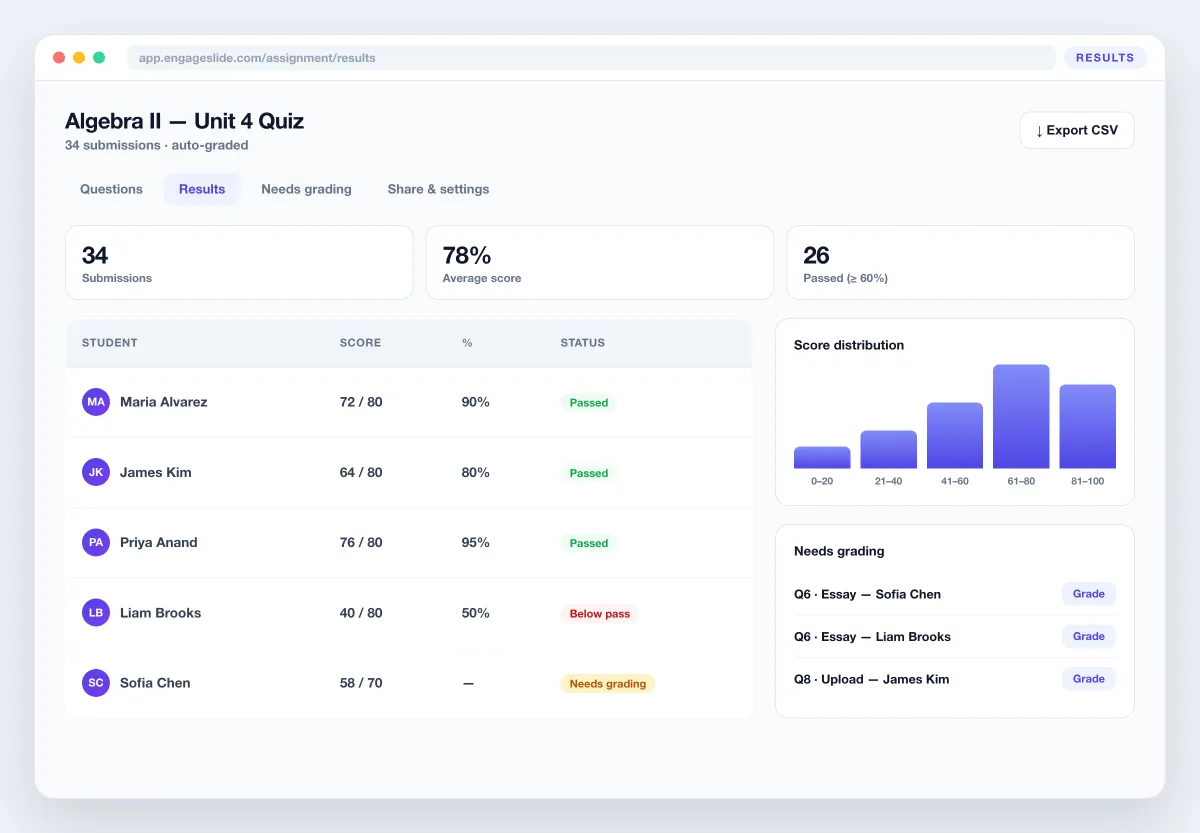
Multiple choice, checkboxes, short answer, numeric and math questions are graded instantly against your answer key — with tolerance for rounding and case-insensitive text matching. Essays and file uploads land in a Needs grading queue where you enter a score by hand. Watch the gradebook fill in real time, see a score distribution and the most-missed questions, and export everything to CSV for your records or your LMS.
- ✓Instant scoring with per-question right/wrong breakdown
- ✓Needs-grading queue for essays and uploads
- ✓Score distribution and one-click CSV export
A clean, mobile-first test they can take anywhere.
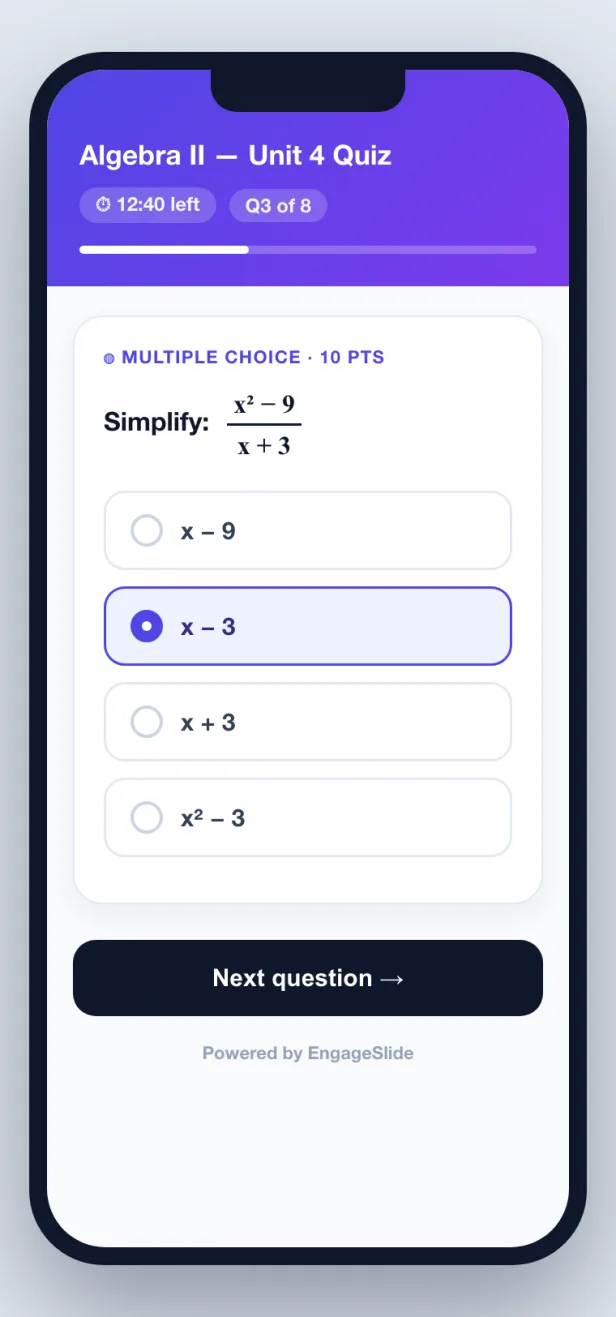
One question per card, formulas rendered inline, and the right input for every type — options to tap, a text or number box, or a math field for formula answers. Set a countdown time limit, control how many attempts are allowed, and choose whether students see the correct answers and explanations after submitting, only after the due date, or never. No app, no login — just a link or a QR code.
No app, no login
Students open a link in any browser.
Type real formulas
A math field for equation answers.
One assignment tool, real classroom uses
However you assess, EngageSlide grades it for you — with AI doing the heavy lifting.
Homework & take-home quizzes
Send graded homework students complete at their own pace, marked before they hand it back.
Digitize a paper exam
Photograph an old test and let AI turn it into an online, auto-graded assignment in seconds.
Math & science practice
Use the math editor and numeric tolerance for algebra, physics and chemistry drills.
Formative checks & exit tickets
Run a quick graded check after a lesson and see who understood on the spot.
Language & listening tests
Attach audio or video to questions for listening comprehension and speaking prompts.
Certification & onboarding
Set a pass score and time limit for training checks, then export results for compliance.
Frequently asked questions
Can AI create an assignment from an exam file?
Yes. Upload an exam as an image, PDF or Word file and the AI extracts the questions, keeps every formula as LaTeX, detects each question type, and fills in the answer key when the file contains one. You review and edit everything before sharing.
Are assignments graded automatically?
Multiple choice, checkboxes, short answer, numeric and math-expression questions are graded instantly. Essays and file uploads go to a Needs grading queue where you enter a score by hand. Every result appears in a live gradebook you can export to CSV.
Does it support math and formulas?
Yes. A built-in math editor with a live KaTeX preview lets you add formulas to any question or option, and students can type formula answers in a math field. Equations, fractions, roots and matrices render crisply on any device.
Do students need an account to submit?
No. Students open a link or scan a QR code and answer on any device — no app download and no login required.
How is an assignment different from a survey?
A survey collects opinions with no right answer; an assignment has correct answers, points, math support and AI exam import, so it is graded automatically. Read the full guide to learn more.
Stop marking by hand.
Start grading with AI.
Build a graded assignment, let AI turn any exam into questions, and watch scores arrive in real time — all inside EngageSlide.