
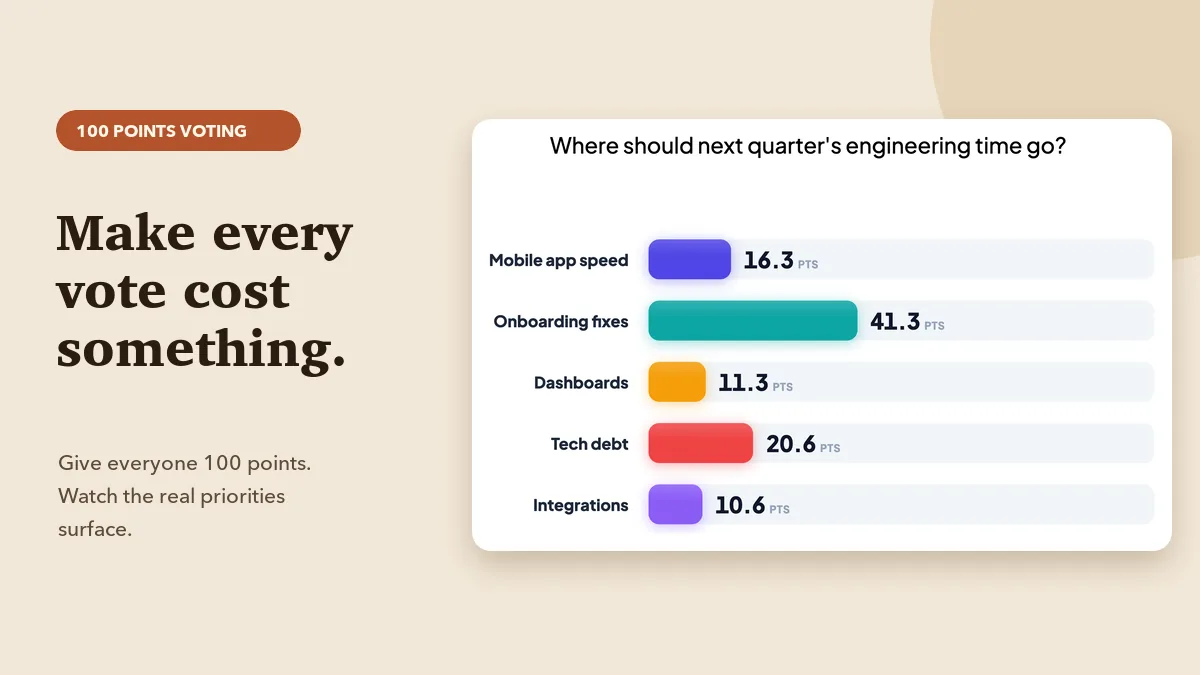
Ask a room "Which of these should we do first?" and almost everyone picks something reasonable. The poll comes back with a clear winner, the meeting moves on, and three weeks later you find out half the team cared far more about the option that "lost". Single-vote polls are fast, but they throw away the most useful thing in any group decision: how strongly people feel. 100 points voting fixes that. Everyone gets a fixed budget of 100 points to spread across the options, so every point given to one idea is a point taken from another. This guide explains why it works, when to use it, how to run it live in EngageSlide, and how to read the results without fooling yourself.
Why a single vote hides what people really think
A standard poll asks each person for one choice. That's fine for "Pizza or tacos?" but it breaks down as soon as the options are real trade-offs competing for the same time, money or attention. Three problems show up again and again:
- No intensity. Someone who mildly prefers option A and someone who thinks A is critical both count as one vote.
- No second choices. If most people's runner-up is the same option, a poll never shows it. That option can be the strongest shared priority and still look like it came last.
- Rating everything "high". Switch to a rating scale and you get the opposite problem: people give 4 or 5 stars to everything, and every bar looks the same.
A fixed budget removes all three. You can't rate everything highly because you only have 100 points. You can't hide a strong second preference because the points are visible. And you can show intensity by putting 60 points on one thing instead of 25.
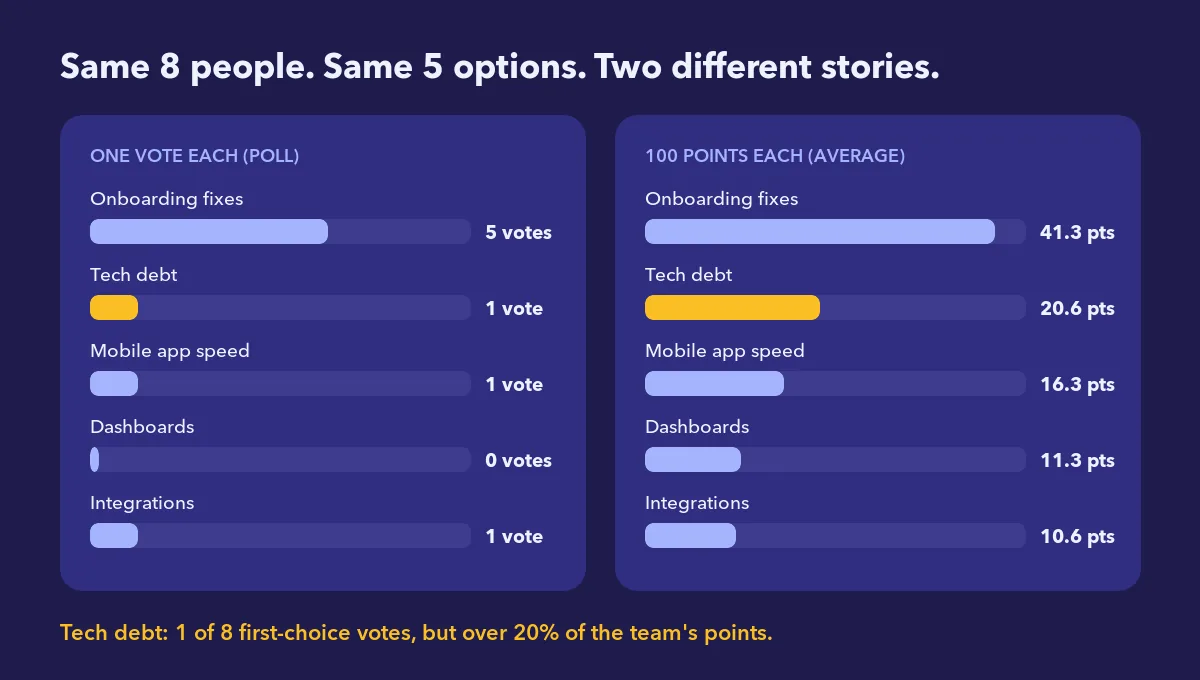
The example above uses the same eight people and the same five options. In a one-vote poll, tech debt gets a single first-choice vote and looks like a footnote. With 100 points, it takes more than 20% of the group's budget and comes in a clear second. Same people, different story, and the second story is the one you'll have to live with.
What 100 points voting is (and where it comes from)
The idea goes by several names: the 100-dollar test, dot voting with a budget, or cumulative voting. In cumulative voting, voters split several votes across candidates or pile them all on one. Product and agile teams use the same idea to rank backlogs. The rules are simple:
- Each participant has exactly 100 points.
- They spread the points across the options in any way they like, including 0 for some options and 100 for one.
- The group result is the average number of points each option received.
Because the total is fixed, the result reads like a budget split: "If this room ran the roadmap, about 40% would go to onboarding, 20% to tech debt…". That's a much easier conversation to have than "option A won 5–3".
When to use it, and when not to
Great fits
- Roadmap and backlog prioritization. Features, bets or epics competing for the same quarter.
- Budget and headcount splits. Where should training money, marketing spend or hiring go?
- Retrospective actions. After a retro produces eight improvement ideas, 100 points shows which two the team will actually commit to.
- Workshops and strategy days. Turning a long list of brainstormed ideas into a short list without the loudest voice deciding.
- Customer and stakeholder sessions. Learning what users value most, not just what they "like".
Poor fits
- Yes/no decisions. With two options, a simple poll is clearer.
- Options that aren't truly competing. If you can do all of them, forcing a trade-off creates a fake conflict.
- Long lists. Past about seven options, people spread points thinly and the signal fades. Shortlist first.
- Questions with a correct answer. Use a quiz for those.
How to run 100 points voting in EngageSlide
EngageSlide has a dedicated 100 Points slide type, so you don't need a spreadsheet or sticky dots. Participants join from their phones with a QR code or join code, and the results build live on the shared screen. It sits alongside polls, ranking, the 2×2 grid and other question types in the interactive presentation tool.
Step 1: Add the slide
Create a new slide and choose 100 Points from the slide types ("Distribute a total of 100 points among different options"). Type your question as a real trade-off, for example "Where should next quarter's engineering time go?" rather than "What do you like?"
Step 2: Write the options
Add 3–7 options. Keep them at the same level of detail ("Onboarding fixes", "Tech debt", not one epic next to one bug fix) and make them clearly different from each other. Short labels read best on the big screen. You can give each option its own colour so it's easy to follow from the phone to the results chart.
Step 3: Pick your settings
- Time limit to keep the activity moving; 60–90 seconds is usually enough for five options.
- Hide results so early answers don't pull later ones. Reveal when everyone has submitted.
- Stop submissions to close voting before you discuss.
- An optional image if the options need context, such as a mock-up or a chart.
Step 4: Let people allocate
On their phones, participants see a large "Points left" counter that starts at 100, then one card per option with minus/plus buttons, a number field and a slider. The counter updates as they go, and they can't give out more than 100 points in total.
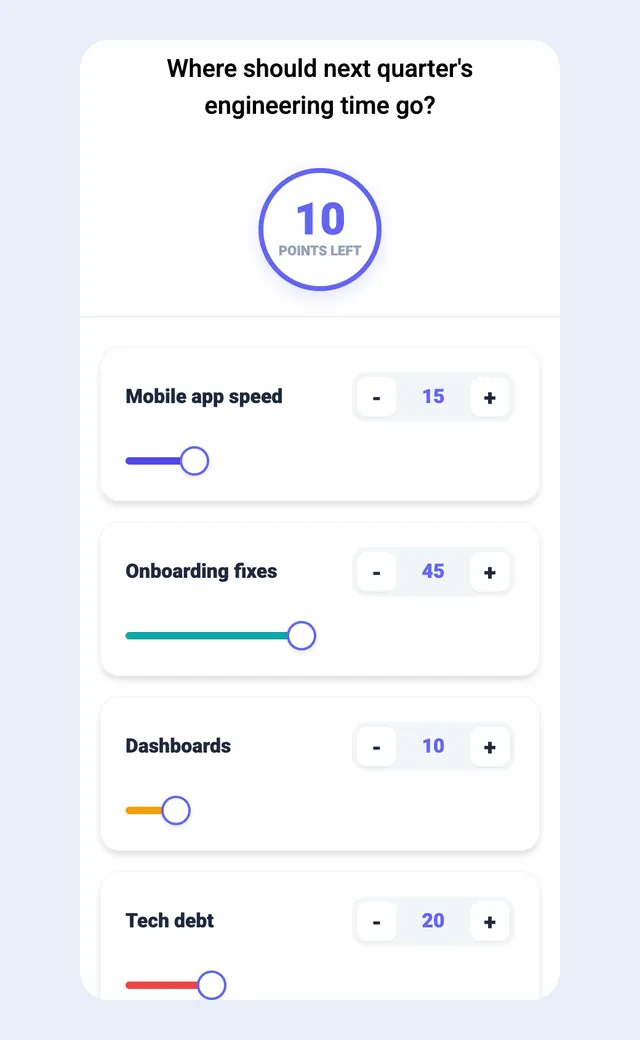
Tell people before they start: "Spend all 100. A zero is a real answer." Unspent points lower every average and blur the result.
Reading the results honestly
On the presenter screen, each option gets a bar showing its average points, animated as answers arrive. Averages are useful, but they can hide things. Before you call a winner, check three points:
- The gap, not just the order. 41 vs 20 is a clear mandate. 22 vs 20 is a tie, so treat it as one.
- Split opinions. A middling average can come from a split room: some people gave 40, others gave 0. That's a disagreement to discuss, not a lukewarm option. The presentation report shows each participant's allocation, so you can spot these splits after the session.
- The long tail. Options under about 10 points on average rarely deserve your time this round. Saying that out loud is one of the most useful outcomes of the exercise.
A poll tells you what people chose. 100 points voting tells you what they'd give up to get it, and that's the information a real decision needs.
Facilitation tips that make it work
- Agree the options first. Spend a few minutes making sure everyone understands each option. Points spent on a misunderstood option are wasted.
- Vote silently, then talk. Allocate before discussing so the first opinion in the room doesn't anchor everyone else.
- Ask the extremes to explain. "Who put 40 or more on tech debt? What do you see that others don't?" This turns the chart into a conversation.
- Re-vote if the discussion changes minds. Duplicate the slide and run it again. The shift between rounds is often the most convincing evidence you'll get.
- Watch for tactical voting. Some people will put all 100 on one item to push it up. That's allowed, and it shows real intensity, but if several people do it, ask why.
- Close the loop. Say what you'll do with the result and when. People take the next round seriously only if this one changed something.
Pair it with the 2×2 grid
100 points voting shows what the group values. It doesn't show what each option costs. That's why it works well next to a 2×2 grid for prioritization: first ask the room to plot options by impact and effort, then give them 100 points to spend on the shortlist. The grid removes the obvious time-wasters, and the points settle the trade-off between the good options that remain. If the decision is simpler, the poll, discuss and re-vote loop from using live polls for group decisions may be all you need. For more ready-made scenarios, see five ways to use the 100-point question.
A quick template you can reuse
- Frame (2 min): state the constraint: "We can fund roughly two of these this quarter."
- Clarify (5 min): walk through the 4–6 options; merge duplicates.
- Allocate (90 sec): 100 Points slide, results hidden, time limit on.
- Reveal and discuss (10 min): top two, any split options, the long tail.
- Re-vote if needed (90 sec): duplicate the slide and compare.
- Decide and record (3 min): name owners and the next check-in.
Twenty minutes, a clear ranking, and a record of how strongly the room felt. That's much better than a show of hands. Browse more facilitation ideas on the EngageSlide blog.