
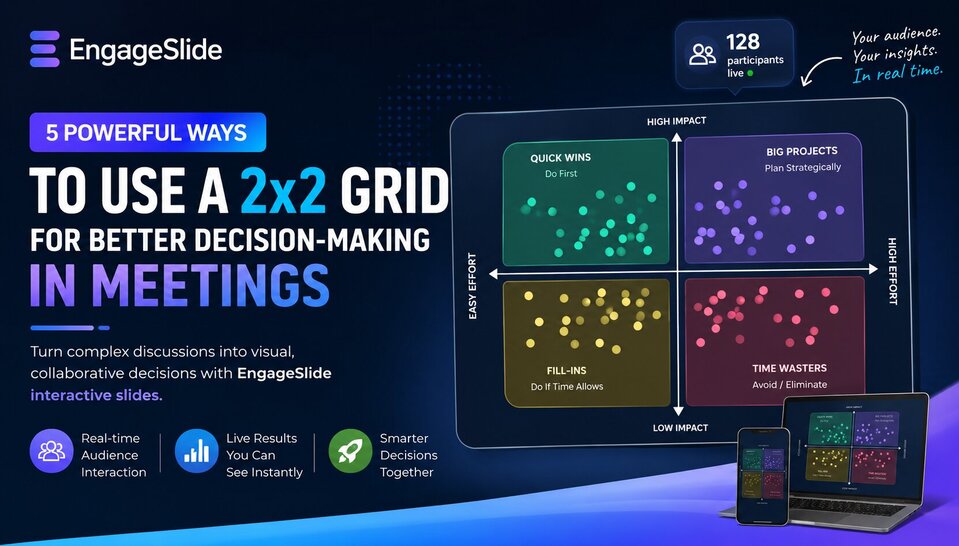
Meta Description: Discover how the 2x2 Grid feature in EngageSlide transforms complex discussions into engaging, data-driven decisions. Create interactive slides and interactive presentations with real-time audience participation.
Introduction
In today’s fast-paced workplace, complex decisions rarely fit into a simple “Yes” or “No.” Teams often need to evaluate ideas based on multiple factors such as impact, cost, risk, and execution effort. That’s exactly why EngageSlide created the 2x2 Grid interactive slide — a powerful visual framework that helps teams analyze information collaboratively during live presentations.
With its clean four-quadrant design and real-time audience interaction, the 2x2 Grid makes discussions more transparent, engaging, and productive. Whether you’re leading a workshop, strategy session, or team meeting, this type of interactive presentation helps participants quickly identify priorities and reach alignment.
Here are 5 effective ways to use a 2x2 Grid in your next presentation.
1. Priority Matrix: Impact vs. Effort
This is one of the most common and effective uses of a 2x2 Grid in product management and project planning.
When your team has too many ideas but limited resources, create an interactive slide with:
- Y-Axis: Impact (Low → High)
- X-Axis: Effort (Easy → Difficult)
Ideas placed in the High Impact / Low Effort quadrant represent “Quick Wins” — the tasks your team should prioritize immediately. Meanwhile, low-impact, high-effort tasks can be deprioritized to avoid wasting resources.
Using EngageSlide, participants can place ideas directly onto the grid in real time, turning brainstorming sessions into collaborative decision-making experiences.
2. Risk Assessment: Impact vs. Probability
Traditional risk lists are often difficult to interpret and discuss. A 2x2 Grid makes risk analysis visual and actionable.
Set up your grid as:
- Y-Axis: Severity of Impact
- X-Axis: Likelihood of Occurrence
As audience responses appear live on the screen, your team can instantly identify “danger zones” — risks that are both highly probable and highly damaging.
This interactive presentation format encourages participation while helping organizations focus on the risks that matter most.
3. Eisenhower Matrix: Team Time Management
The Eisenhower Matrix is a classic productivity framework that works exceptionally well in workshops and training sessions.
Divide the grid into four categories:
- Important & Urgent → Do immediately
- Important & Not Urgent → Schedule
- Not Important & Urgent → Delegate
- Not Important & Not Urgent → Eliminate
With EngageSlide’s real-time collaboration features, teams can collectively categorize tasks and discuss priorities together, making productivity training more engaging and memorable.
4. Skill Matrix: Evaluating Team Capabilities
HR teams and managers can use a 2x2 Grid to visualize employee development needs.
Suggested setup:
- Y-Axis: Importance of the Skill
- X-Axis: Current Team Proficiency
Skills that appear in the High Importance / Low Proficiency quadrant highlight the areas where training and hiring should be prioritized.
Instead of static spreadsheets, EngageSlide transforms skill assessments into dynamic interactive slides that encourage participation and strategic discussion.
5. Brand Positioning: Price vs. Quality
In marketing and strategy meetings, understanding how customers perceive your brand compared to competitors is essential.
Configure the grid with:
- Y-Axis: Product or Service Quality
- X-Axis: Price Level
Ask participants or customers to position brands directly on the grid during your presentation. Watching data points move in real time gives you valuable insights into market perception and competitive positioning.
This type of interactive presentation helps marketers gather instant audience feedback in a visually compelling way.
Why Use the 2x2 Grid Feature in EngageSlide?
Premium Visual Design
EngageSlide offers a modern quadrant layout with smooth rounded corners and responsive design optimized for both large screens and mobile devices.
Real-Time Audience Interaction
Hundreds of audience responses can appear instantly as animated data points, making meetings more dynamic and engaging.
Easy Customization
Quickly customize axis labels, min/max values, colors, and presentation settings with just a few clicks.
Built for Interactive Presentations
Unlike static charts, EngageSlide turns every 2x2 Grid into a collaborative experience that increases audience engagement and participation.
Conclusion
A 2x2 Grid is more than just a chart — it’s a structured thinking framework that simplifies complex decisions. With EngageSlide, this framework becomes interactive, visual, and highly engaging for modern teams and presenters.
Whether you’re running workshops, strategic planning sessions, team retrospectives, or training programs, EngageSlide helps you create smarter and more impactful interactive presentations.
Ready to make better decisions with your audience?
Try creating your first 2x2 Grid interactive slide with EngageSlide today.