
Ask a room full of people to raise their hands if they disagree with the new plan, and you will usually see a sea of polite, motionless arms. It is not that nobody disagrees — it is that few people want to be the visible outlier. Anonymous polls remove that social cost. When respondents know their name is not attached to an answer, they tell you what they actually think, not what they think you want to hear. This guide explains what anonymous polls are, the psychology behind why they work, exactly when to use them (and when not to), and how to run one in EngageSlide in a couple of clicks.
What Are Anonymous Polls?
An anonymous poll is a live or asynchronous question where individual responses are collected and displayed without identifying who said what. The audience still sees the aggregate result — the bar chart, the word cloud, the average score — but no single answer can be traced back to a specific person. This is different from a named poll, where the host can see that "Sarah picked option B" or where results are tied to a login. Anonymity is about the link between a person and their answer, not about hiding the results themselves.
Most modern audience-response tools, EngageSlide included, let you toggle anonymity per poll rather than forcing one mode across a whole session. That flexibility matters, because the right choice depends entirely on what you are asking and why.
Why Anonymity Changes the Answers You Get
The core reason anonymous polls produce more candid data is a well-documented effect called social desirability bias — the tendency to answer questions in a way that will be viewed favourably by others. When people believe their response is attributable, they soften criticism, overstate agreement with the leader in the room, and round their self-reported behaviour toward whatever seems socially acceptable. Strip the name away and that pressure largely disappears.
Anonymity also supports psychological safety — the shared belief that it is safe to speak up without fear of embarrassment or punishment. In hierarchical settings especially (a junior employee polled in front of executives, a student polled in front of the whole class), the fear of looking wrong or disloyal is real. An anonymous poll gives everyone an equal, consequence-free voice.
The goal of an anonymous poll is not secrecy for its own sake — it is honesty. You are trading the ability to follow up with a specific person for a dataset you can actually trust.
When to Use Anonymous Polls
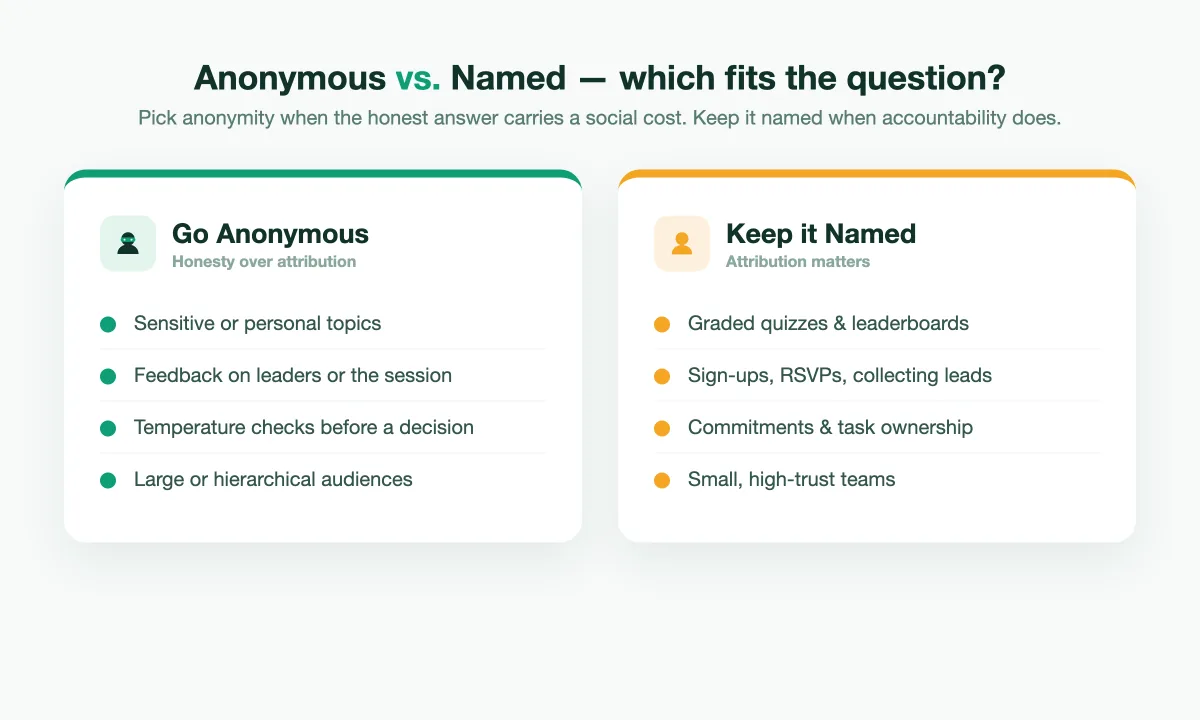
Reach for anonymity whenever the honest answer might carry a social or professional cost. Common high-value scenarios include:
- Sensitive or personal topics. Mental health check-ins, questions about workplace stress, diversity and inclusion, salary satisfaction, or anything people would hesitate to say out loud.
- Feedback on leadership or the session itself. "How clear was today's presentation?" gets a far more useful answer when the presenter cannot see who rated it a 2.
- Gauging real opinion before a decision. Before a team commits to a direction, an anonymous temperature check surfaces quiet doubts that would never appear in an open discussion.
- Icebreakers and confessions. "What's your biggest fear about this project?" or a light "Who has never seen Star Wars?" — anonymity lowers the stakes and boosts participation.
- Large or hierarchical audiences. All-hands meetings, town halls, and classrooms where speaking up in front of everyone feels risky.
These are also the moments where participation rates climb: people who would stay silent in a named poll happily tap an answer when they know it is untraceable. If your goal is honest input from the widest possible slice of the room, anonymity is usually the right call. For a deeper look at wording that reinforces this, see our guide on writing poll questions that get honest answers.
When Named Responses Are Better
Anonymity is a tool, not a default. There are clear cases where you want responses tied to people:
- Graded quizzes and assessments. If you are scoring individuals or running a competitive quiz with a leaderboard, you obviously need to know who answered what.
- Follow-up is the point. Collecting sign-ups, volunteers, or leads — "Who wants to join the beta?" — requires names or emails.
- Accountability matters. Commitments, RSVPs, and task ownership work better when they are attributable.
- Small, high-trust teams. In a group of five people who already speak freely, anonymity can feel oddly clinical and add little.
A good rule of thumb: if the honest answer is something a person would be comfortable saying out loud to the group, a named poll is fine. If it isn't, go anonymous.
How to Run an Anonymous Poll in EngageSlide
EngageSlide makes anonymity a per-question setting, so you can mix candid, anonymous check-ins with named quizzes in the same deck. Here is the flow:
- Create a poll slide. Add a multiple-choice, word cloud, open-ended, or scale question to your presentation — or build a standalone form with the online survey maker if you want to collect responses outside a live session.
- Turn on anonymous responses. In the slide's settings, enable the anonymous option so no name or identifier is stored against each answer.
- Let people join with a code or QR. Participants scan the QR code or enter the join code — no account or login required, which reinforces the sense that answers are private.
- Show the live results. As votes land, the aggregate chart or word cloud updates in real time on the shared screen. The room sees the collective picture; nobody sees individual attribution.
- Export the aggregate. After the session, download the results for your report. You get the numbers and trends, without any personal data to safeguard.
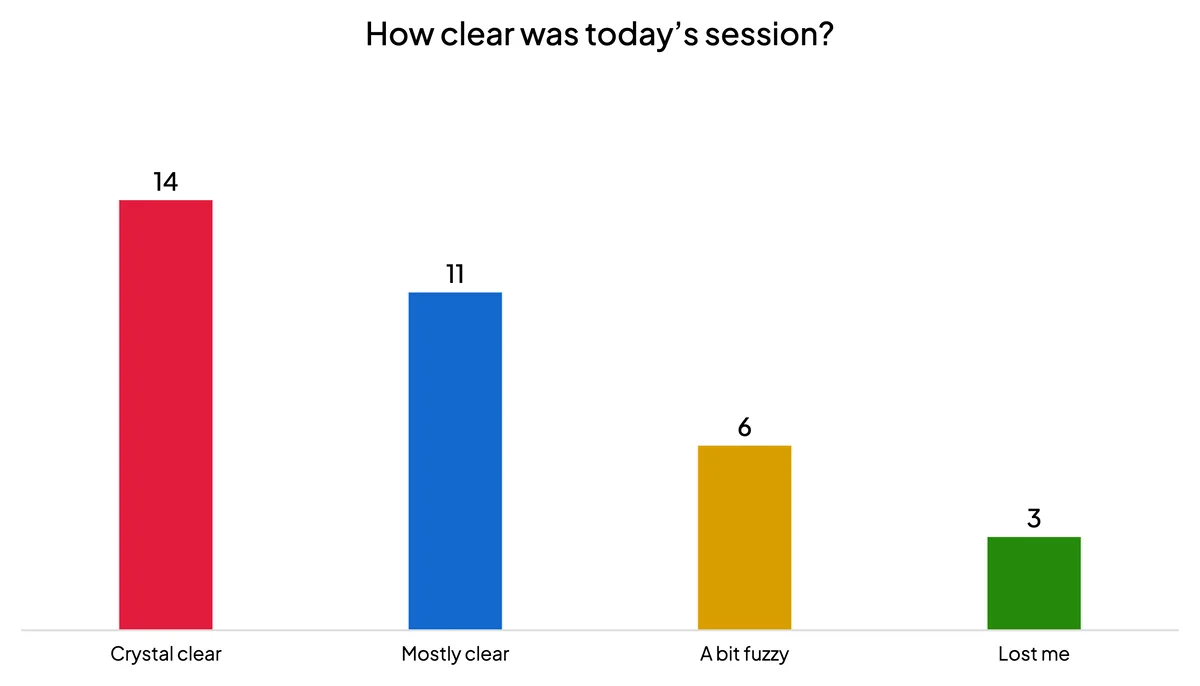
Because it is a per-slide toggle, you can open a workshop with an anonymous "How confident do you feel about this topic?" scale, run a scored quiz in the middle, and close with an anonymous feedback poll — all in one presentation. New to live polling entirely? Start with our Live Polling 101 beginner's guide and then layer anonymity on top.
Tips to Get the Most From Anonymous Feedback
Anonymity removes the fear, but a few habits make the data even better:
- Say it's anonymous, out loud. People only answer honestly if they believe the promise. State clearly that responses are not tracked before you launch the poll.
- Keep questions neutral. A leading question ("Don't you agree the new plan is great?") poisons even an anonymous poll. Phrase options in a balanced way.
- Act on what you hear. Nothing kills future participation faster than asking for candid feedback and then ignoring it. Close the loop by sharing what changed as a result.
- Combine methods. Use an anonymous scale to measure sentiment, then an anonymous open-ended word cloud to capture the "why" behind the number.
Used deliberately, anonymous polls turn a quiet, agreeable room into a source of genuinely useful truth — the kind of feedback that helps you make better decisions instead of just confirming what you already assumed. Pick anonymity when honesty carries a cost, keep it named when accountability does, and you will get the right answer every time.