

Ask any teacher where their week goes and the answer usually isn't "teaching." It's the stack of homework on the kitchen table at 11 pm, the red pen, and the spreadsheet you fill in afterwards. Marking is necessary work, but most of it is mechanical: checking whether answer 4 is B, whether a number is right, whether "photosynthesis" is spelled correctly. That is exactly the part a computer does better than a tired human. This article looks at where grading time really goes, which parts auto-grading can take off your plate, and how to set up auto-grading assignments in EngageSlide so the hours you save are real, not theoretical.
Where grading time actually goes
Most teachers underestimate their grading load because it's spread across evenings and weekends in small chunks. Break a typical homework round into its parts and you usually find three buckets:
- Objective marking. Multiple choice, true/false, a number, a single word or formula. Each answer takes seconds, but multiply by 10–20 questions and 100–150 students and it becomes hours.
- Judgement marking. Short essays, explanations, worked solutions, uploaded photos of written work. This is where your expertise matters.
- Admin. Adding up totals, typing scores into a gradebook, chasing missing work, handing papers back.
Only the second bucket genuinely needs you. The first and third are repetitive and error-prone, and they're what eats the evening. Research on teacher burnout consistently points to workload outside class hours as a major driver, so reclaiming even part of it matters.
A realistic example: one week, 150 students
Take a secondary teacher with five classes of 30 students who sets one 12-question homework per week: ten objective questions and two short written answers. Using conservative estimates — about two minutes to mark the objective part of a paper, about a minute per short written answer, and 30 seconds to key each score into a gradebook — the week looks like this:
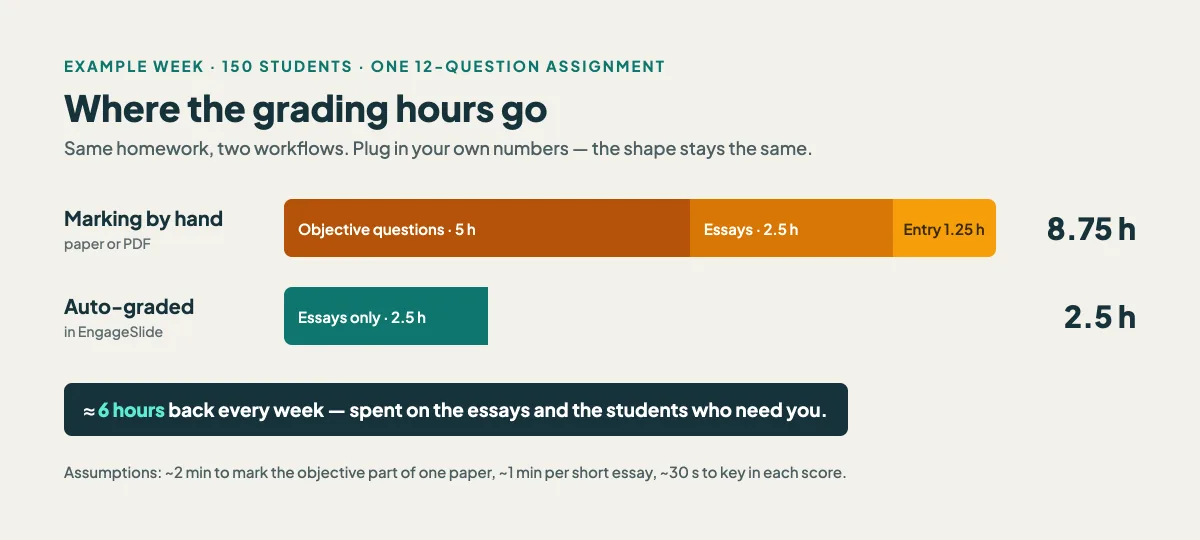
By hand, that's roughly 8.75 hours. With the objective questions and score entry automated, what remains is the 2.5 hours of reading written answers — the part worth your attention anyway. Your own numbers will differ, but the shape usually holds: the mechanical work is the majority of the time, and it's the part that disappears.
What auto-grading can (and can't) do for you
Honest expectations make the savings stick. In EngageSlide's AI assignment maker, each question type is handled like this:
- Multiple choice and dropdown are scored instantly against the answer you marked as correct.
- Checkboxes (select all that apply) get partial credit: a student who picks some of the right options and no wrong ones earns a proportional share of the points. Picking a wrong option earns zero, so guessing everything doesn't pay.
- Numeric answers accept a tolerance. Set the answer to 60 with a tolerance of 0.5 and anything from 59.5 to 60.5 is marked correct — no more debating rounding.
- Short text is matched against a list of accepted answers, ignoring capitalisation and extra spaces, so "Na", "na" and " NA " all count.
- Math expressions are typed with a built-in math editor (fractions, powers, roots render properly) and matched against the accepted forms you list, such as x+3 and 3+x.
- Essays and file uploads are not auto-scored. They are flagged Needs grading in the gradebook, where you type the points in and the student's total updates.
That last point is deliberate. Auto-grading is not about replacing your judgement on a student's reasoning; it's about removing everything that isn't judgement, so the time you do spend goes to the answers that deserve it.
How to set it up so it actually saves time
1. Start from what you already have
Building a quiz from scratch costs time too. If you already have a worksheet or past paper, upload it — PDF, image, or Word file — and the AI reads it into questions, including the correct answers when the document has an answer key. You review and fix, rather than type. This is the step that makes the first week's setup cheaper than a normal photocopy-and-mark cycle.
2. Choose question types for the answer, not for habit
If the answer is a number, use a numeric question with a tolerance instead of multiple choice — you get a truer check of the skill and it still grades itself. If the answer is a single term, use short text with two or three accepted spellings. Keep essays for the questions where the explanation is the point.
3. Add the accepted variants up front
Most "the computer marked it wrong" complaints come from missing variants. Spend thirty seconds per short-text or math question listing the forms you'd accept: x+3, x + 3, 3+x. That thirty seconds saves you re-marking the whole class later.
4. Write the explanation once
Each question can carry a worked-solution explanation. Write it once and every student sees it after submitting (if you choose "show answers after submitting"), instead of you writing the same margin note 30 times. We cover this feedback loop in detail in how to give students instant, personalized feedback on assignments.
5. Set the rules once, then stop policing
In the assignment settings you choose a due date, how many attempts are allowed (1, 2, 3 or 5), an optional time limit in minutes, a pass score, and when answers are revealed: after submitting, after the due date, or never. Late submissions and extra attempts are handled by the settings, not by you replying to emails.
The gradebook: where the admin time disappears
Once students submit through the link or QR code, results land in the gradebook as they arrive. You see the number of submissions, the class average and the maximum score at the top, then one row per student with their total. Expand a row to see every answer with its points, and fill in any essay marks right there.
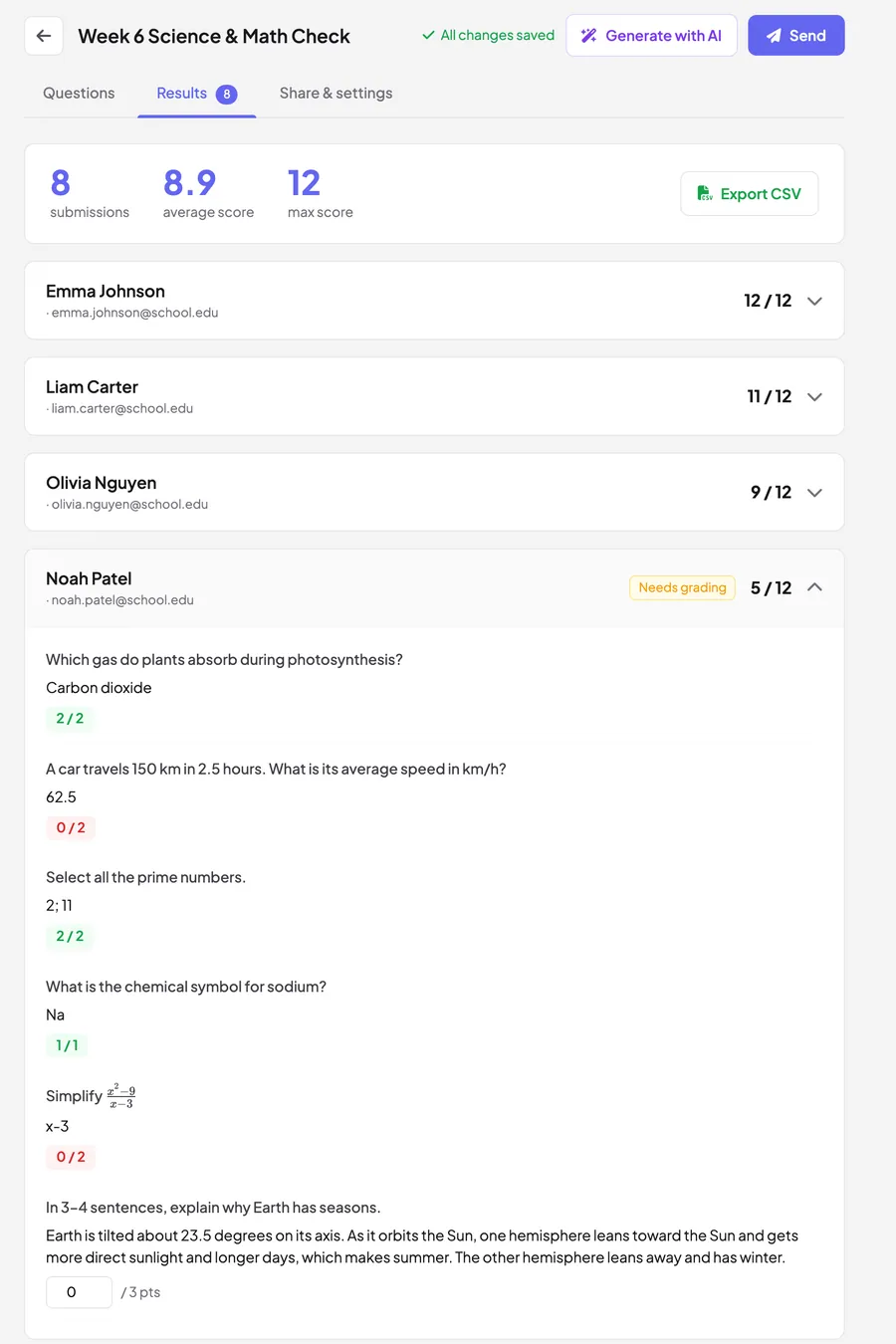
Notice what's missing: no adding up, no transferring marks. When you're done, Export CSV gives you a spreadsheet of names, emails and scores ready for your school's system. That removes the entire third bucket from the example above.
Auto-grading doesn't make you a less careful teacher. It moves your care from checking whether answer 7 is C to reading the two paragraphs where a student actually showed you how they think.
Spend the saved hours where they count
The real payoff isn't just a free evening — it's what the data lets you do next lesson. Because every answer is already scored, patterns are visible immediately: if most of the class missed the same numeric question, that's your warm-up tomorrow. This is formative assessment without the lag of a week-long marking cycle.
Some practical ways teachers use the reclaimed time:
- Targeted reteach. Open class with a quick live poll on the question most students got wrong, then work through it together.
- Better written feedback. With the objective part done, you can give the essays proper comments instead of a rushed tick.
- More frequent, smaller checks. When a 10-question check costs you nothing to mark, you can set one after every topic instead of once a unit. Frequent low-stakes practice is one of the most reliable ways to improve retention.
- Pre-class work that actually gets checked. Assign a short auto-graded task before a lesson and read the results before the bell — the approach behind the flipped classroom done concretely.
Common mistakes that eat the savings
- Using short text where numeric fits. "60 km/h", "60", and "60.0" are three different strings but one number. Numeric questions with a tolerance avoid the argument.
- Too many essays. If every question is open-ended, you've rebuilt the paper stack in digital form. Keep written answers for where reasoning matters.
- Skipping the review of AI-imported questions. The AI reads your document well, but always check the correct answers before sending — a wrong key auto-grades the whole class wrong.
- Revealing answers too early with multiple attempts. If students get two attempts, set answers to show after the due date so the second attempt isn't just copying the first reveal.
Getting started this week
Pick the homework you're setting anyway. Upload it, check the answer key, switch any number answers to numeric with a small tolerance, add accepted variants to short-text questions, and share the link. When the submissions come in, grade only what's flagged Needs grading, export the CSV, and compare the time with last week. For more ideas on assessment and classroom engagement, browse the EngageSlide blog.