
Almost every interactive presentation tool advertises a free plan, and almost every free plan has a catch. Sometimes it is a cap on how many people can join. Sometimes the best question types are locked. Sometimes the limit resets once a month, right when you need it most. This guide looks only at free interactive presentation tools and spells out exactly where each free plan stops, so you can pick the one that fits your next session instead of finding the wall halfway through it.
All plan details below were checked against each vendor's own pricing or help pages at the time of writing (October 2026). Plans change often, so treat the numbers as a snapshot and confirm on the vendor's site before an important event.
What "free" actually means for these tools
Free plans tend to be limited in one or more of four ways. Knowing which kind of limit you are dealing with matters more than the headline price.
- Audience cap. A maximum number of people per session, per event or per month. This is the limit most likely to hurt on the day.
- Feature gates. Some question types, exports or imports are reserved for paid plans, so the free version can feel like a demo.
- Per-event quotas. A fixed number of polls or quizzes per event, regardless of audience size.
- Monthly allowances. A participant budget that is shared across every presentation you run in a month and only resets on a set date.
A tool with a small audience cap but no feature gates is great for practising and small groups. A tool with a big audience but tight per-event quotas is better for a one-off town hall. Neither is "best" in general; it depends on your room.
The free plans, side by side
EngageSlide
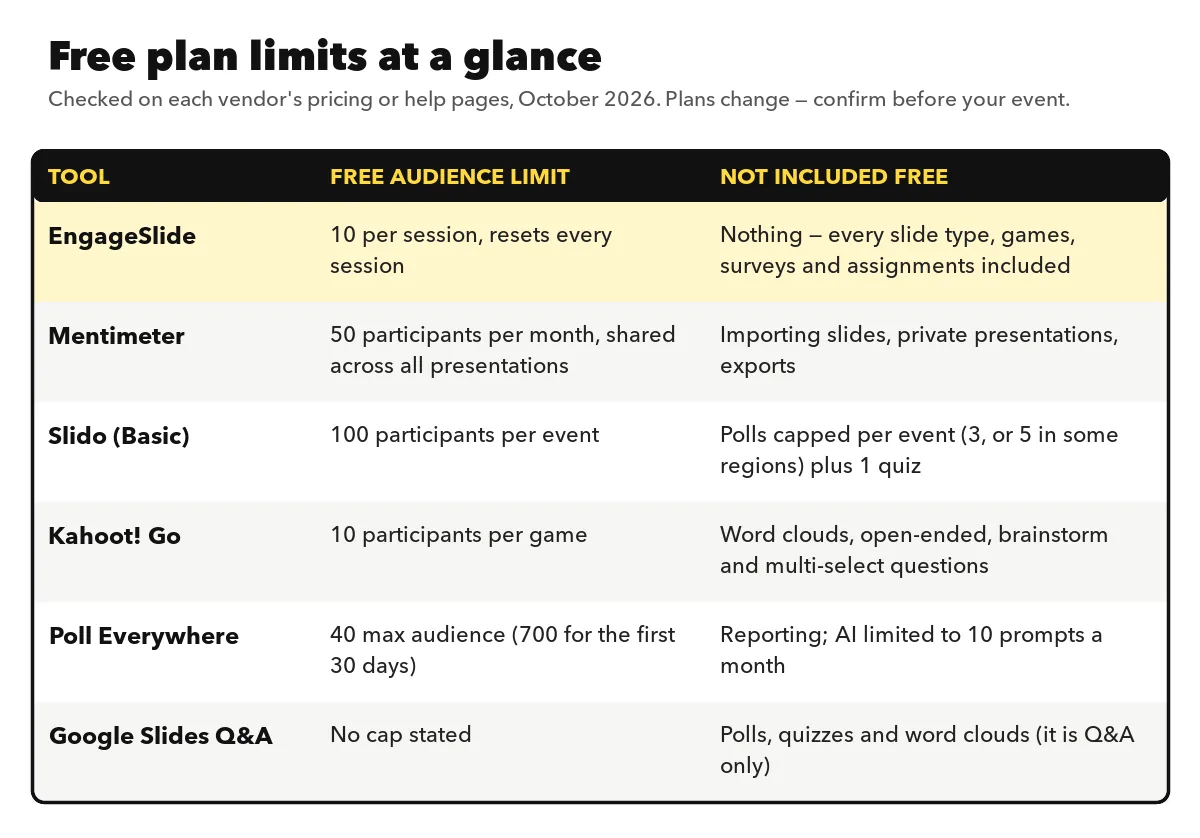
EngageSlide's free plan includes every slide type: live polls, quizzes with a leaderboard, word clouds, Q&A with upvotes, ranking, scales, open-ended questions and party games like Zombie Race, Duck Race and Draw & Guess. Nothing is held back as "Pro only". The limit is the room size: up to 10 live participants per session. It also covers the work before and after a session (surveys and graded assignments) and works inside PowerPoint, Google Slides and Microsoft Teams. When you outgrow 10 people, paid plans start at $4.79 a month, with Basic for 100 participants and Pro for up to 5,000.

Best for: trying every feature before you commit, classrooms with small groups, team meetings, workshops and rehearsing a big session with a few colleagues. You can see the full feature set on the EngageSlide interactive presentation tool page.
Mentimeter
Mentimeter's free plan includes AI help, its Q&A feature and a wide range of question types. Its pricing page lists the free participant allowance as 50 participants per month, counted across all the presentations you run that month and reset on your signup date. Importing existing slides, private presentations and exports are not part of the free plan. The cheapest paid plan, Basic, was listed at $11.99 per presenter per month, billed yearly. If you are weighing it up, our Mentimeter alternative page compares the two in detail.
Slido
Slido's free Basic plan is built around events. According to Slido's own support team, a Basic event allows up to 100 participants, unlimited audience questions and upvotes, and a small number of polls per event (three, or five in some regions) plus one quiz. That makes it strong for audience Q&A at a single talk, but tight if you want to poll repeatedly through a long session. More on how it compares in our Slido alternatives guide and on the Slido alternative page.
Kahoot!
Kahoot!'s free plan for schools, Kahoot! Go, allows up to 10 participants per game and sticks to the basic question types. Word clouds, open-ended and brainstorm questions and multi-select answers are reserved for paid plans. For workplaces, Kahoot! 360 lets you open a free account to test it, and its cheapest paid plan (Pro Start) was listed at $19 a month for up to 50 participants. See our Kahoot alternative page if you want quiz energy with every question type included on the free plan.
Poll Everywhere
Poll Everywhere's free plan lets you create unlimited questions with a 40-person maximum audience (raised to 700 for your first 30 days) and 10 AI prompts a month. Reporting sits on paid plans, which start at $10 a month.
Google Slides Q&A and Google Forms
If you already present in Google Slides, the built-in audience Q&A is free. Viewers open a link, ask questions (optionally anonymously) and up- or downvote each other's questions. It is Q&A only, though: no polls, quizzes or word clouds, and the Q&A view closes shortly after you end the slideshow. Google Forms fills the gap for surveys before or after a session, but it is not a live, on-screen experience.
Which free tool fits which situation
- You want to test everything before paying. Pick a plan without feature gates. With EngageSlide you can build a full session, quizzes, games and all, and run it with up to 10 people.
- One big Q&A at a conference talk. A per-event plan with a high participant cap, like Slido Basic, or Google Slides Q&A if you only need questions.
- A small class or team that meets every week. Watch out for monthly allowances: 50 participants a month runs out after one or two sessions with a group of 25. A per-session cap that resets every time is easier to live with.
- Quiz-heavy sessions. Check which quiz formats are free. Basic multiple choice is common; type-in answers, matching, puzzles and fill-in-the-blank often are not.
- You need a survey or homework too. Most presentation tools stop at the end of the session. If you would otherwise juggle a separate form builder, a tool that includes surveys and assignments saves a lot of copy-pasting.
How to get more out of any free plan
Rehearse on free, run live on paid only when needed
Build and rehearse everything on the free plan with a few colleagues on their phones. Upgrade only for the month you run the large session, then drop back down.
Spend your limits on the moments that matter
If polls are capped per event, use them where the answers change what you say next: the opening temperature check, the mid-point understanding check and the closing action question. Use open discussion or a show of hands for the rest.
Split big groups
For training with 30 people and a 10-person cap, run the interactive part in breakout teams, each with one phone, and ask teams to answer together. Team answers often spark better discussion than individual ones anyway.
Keep your content portable
Write questions in a plain document first. If you outgrow a tool, you can move to another without rebuilding from memory.
The best free plan is the one whose limit you will not hit in your real sessions. Count your audience, count your questions, and check whether the allowance resets per session, per event or per month.
Signs it is time to pay
A free plan is the right choice until it starts shaping your session instead of serving it. Upgrade when you regularly turn people away at the door, when you remove good questions because you ran out of polls, or when you spend time exporting and re-entering results by hand. At that point the cost of a plan is usually smaller than the time you lose working around it. Compare what you would pay per month on the EngageSlide pricing page with the other options above.
If you are new to the category, it is worth reading how audience response systems evolved from clickers to phones: the core idea has not changed, only how easy it is to start. For a broader look at the alternatives, see the best Mentimeter alternatives, or browse more guides on the EngageSlide blog.