
A classroom escape room turns a review lesson into a mission. Instead of answering questions one by one for points, teams are "locked in" and every correct answer becomes the code that opens the next door. The clock is ticking and nobody wants to be the team still stuck in room one. This guide explains how a digital classroom escape room works in EngageSlide, how to build one in a few minutes, and how to run it so the game teaches as much as it entertains.
What is a classroom escape room?
A commercial escape room is a physical game where a group solves puzzles to get out of a themed room before time runs out. Teachers love it because it rewards what group work should build: talking a problem through and checking each other's reasoning. The paper-and-padlock version, though, means buying locks, printing clues and resetting boxes between classes.
A digital version keeps the tension and drops the hardware. In EngageSlide, Escape Room is a slide type: the big screen shows the dungeon, phones become the locks, and there is nothing to reset — press Play again for the next class.
How Escape Room works in EngageSlide
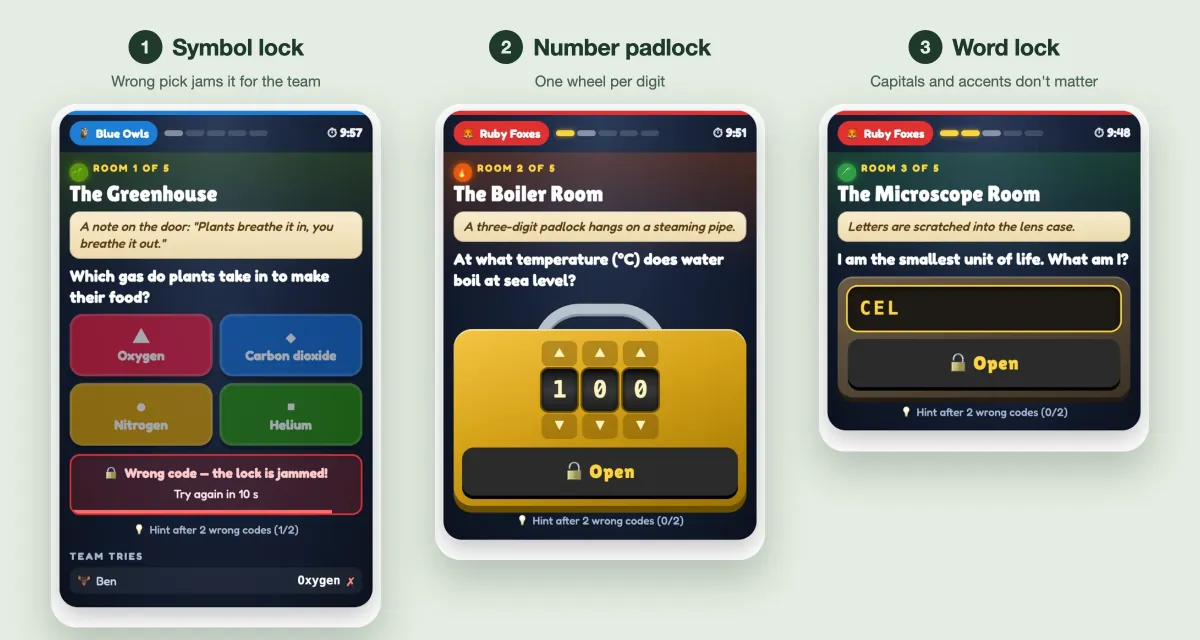
An Escape Room slide is a dungeon of 2 to 8 rooms in a row. Each room has exactly one lock, and the lock is a question whose answer is the code that opens the door to the next room. There are three kinds of lock:
- Symbol lock. A choice question with 2 to 4 answers shown as big coloured shape buttons. Ideal for concepts and common misconceptions.
- Number padlock. A brass padlock with one wheel per digit (up to 8 digits) that students turn with arrows or a swipe. Perfect when the answer is a calculation, a count or a famous year.
- Word lock. A word plate students type into. Capitals, accents and punctuation don't matter, and you can accept several answers, such as "Khufu, Cheops".
Teams share one lock
Students join with the usual join code and are placed in teams — Ruby Foxes, Blue Owls, Green Frogs and so on — or play solo. Everyone on a team sees the same room on their own phone, and anyone can try a code. Every try appears under "Team tries" on all teammates' phones, so the group knows exactly who guessed what.
The shared lock makes it collaborative. A wrong code jams the lock for the whole team for a few seconds, so random guessing costs everyone. The phones show "Wrong code — the lock is jammed!" with a countdown — usually the moment a team starts talking.
Hints with a price
Each room can have a hint. It becomes available after two wrong codes on that lock and adds 30 seconds to the team's escape time. Teams must weigh the cost — think for another minute, or pay and move on? Struggling teams get a way forward without the teacher stepping in.
The big screen: a dungeon to escape
While phones show the locks, the projector shows the whole dungeon in 2.5D. Each room is dressed after its name — a greenhouse, a boiler room, a library, a lab, a treasure vault or a crypt — and every closed door carries a padlock. Every team is a character. When a team cracks a lock, its character picks up the key, the door swings open and it runs into the next room. Team progress, the clock and a news feed ("Ruby Foxes opened door 2!") keep the room buzzing.

The first team out of the final gate wins. If the time runs out first, the team that got furthest wins, and between teams in the same room, the one that got there first is ahead. The results open with a podium and a class report: how many teams escaped, how many codes were tried, the wrong codes per room and the hardest lock.
How to build your escape room in minutes
Add an Escape Room slide from the Games tab of the slide picker. A new slide starts with a ready-made sample, "Escape the Science Lab", so you can test the flow straight away. Then make it your own in one of three ways.
Option 1: Generate it with AI
Click Generate with AI, type a topic such as "The water cycle", choose the level (Primary school, Middle school, High school, University or Adults / training) and pick 3 to 8 rooms. The AI writes a title, a short story and one lock per room in your interface language, mixing the lock types and making each room a little harder than the last. A second pass then fact-checks every code and rewrites any that are wrong or arguable — number locks in particular are kept to exact whole numbers such as counts or simple calculations. Always read the codes before you play. For more on building content from a prompt, see EngageSlide AI.
Option 2: Start from a template
Three templates are built in: Escape the Science Lab, The Math Vault and Lost in the Library. They make good models for your own rooms.
Option 3: Write each room yourself
Write a one- or two-sentence story that sets the scene ("The lab doors slam shut…"); it appears on the start screen and on every phone. Then click a room and give it:
- A name, like "The Boiler Room", plus an optional clue line.
- A lock type and question. For a symbol lock, type the answers and mark the right one; for a number padlock, type the digits; for a word lock, list the accepted answers separated by commas.
- A room style (optional). Leave it on Auto to match the name, or choose Laboratory, Library, Boiler room, Greenhouse, Treasure vault or Crypt.
- A hint (optional) that nudges without giving the code away.
You need at least two complete rooms to start. The full walkthrough, with every screen, is in the Escape Room help article, and there is a one-minute Escape Room video tutorial on YouTube.
Settings that shape the game
- Game time. 5, 10, 15, 20 or 30 minutes (10 by default). During play you can add a minute or end early.
- Play in. Solo or 2 to 6 teams (4 by default). Players join the smallest team, and you can press Shuffle teams before you start.
- Wrong code jams the lock. Off, 10, 20 or 30 seconds. Longer jams push teams to discuss before they guess.
- Background music. Several tracks, from Dark Dungeon to Happy Quest for younger classes, or no music at all. It plays on the big screen only, so a room full of phones stays quiet.
Two details matter for fairness. The codes never reach the phones — they receive only the question and, for a symbol lock, the options — so nobody can peek. And latecomers can still join: in team mode they join the smallest team and continue from that team's room.
Running a great escape room lesson
Before the game
Seat each team together and give them a minute to read the story. Four to six rooms with mixed lock types make a strong ten-minute game. Put the easiest lock first so every team gets out of room one, and keep the hardest for last — that's where the finish gets exciting.
During the game
Resist the urge to help. Walk the room and listen: the jam countdown and the shared "Team tries" list generate exactly the kind of reasoning out loud that cooperative learning aims for. If a team is truly stuck, point them to the hint rather than the answer.
After the game
The class report is your debrief. Open it, read out the hardest lock and ask the teams who cracked it to explain how. Five minutes on that lock targets the exact idea the class found difficult.
The best classroom escape rooms are built from the content itself: the calculation is the number code, the key term is the word, the misconception is the wrong symbol. When the answer is the key, every door the class opens is something it has learned.
Ideas for your first escape room
- End of a unit. Generate a six-room escape room on the topic and let teams race through it as a review.
- Maths. Number padlocks fit calculations naturally — the answer is the code.
- Language classes. Word locks for vocabulary, spelling and grammar, with several accepted answers.
- Training. A themed escape room about safety rules or company history.
If you like the self-paced, team-against-team feel, pair it with a Treasure Hunt review game or one of these classroom team games for review.
Frequently asked questions
Does Escape Room change my quiz leaderboard?
No. It is a game with its own results — escape time and rooms reached — so it leaves your quiz scores alone. Every game is saved and appears under Past games and in the report.
Ready to lock your class in? Explore the Escape Room slide and build your first dungeon for the next review lesson.