

Most classroom team games run into the same problem. You split thirty students into six groups, one group answers while five wait, and by the third round half the room has stopped paying attention. Review time turns into watching time. There is a simpler format that keeps every student working on every question: split the class into just two big teams and let every single answer count. Below: why two teams work, how to keep them fair with uneven numbers, question tips per subject, and a 10-minute end-of-lesson plan using the Tug of War slide in EngageSlide.
Why two big teams beat six small groups
Small-group games feel cooperative, but in practice they spread attention thin. Only one group plays at a time, the strongest student in each group tends to answer for everyone, and the rest drift. Two big teams flip that around because both teams answer every question at the same moment, each student on their own phone.
- Nobody waits. Every question goes to the whole class at once, so there is no "your turn is in four rounds" dead time.
- Every student counts. A team's strength is built from each member's own answer, so no one can hide behind the class expert.
- Everyone does the recall. Each student has to pull the answer from memory, not just hear someone else say it. That is retrieval practice, and the testing effect shows it beats re-reading notes for long-term memory.
- One shared goal. With only two sides, the rivalry is simple and loud, and students cheer for classmates they don't normally work with. It is a light version of what research on cooperative learning calls positive interdependence: my team only does well if we all do.
If you are still deciding between team and individual formats in general, our comparison of team quizzes vs individual quizzes covers the trade-offs. This article focuses on the classroom review case, where two teams are usually the best choice.
How Tug of War turns review into a two-team game
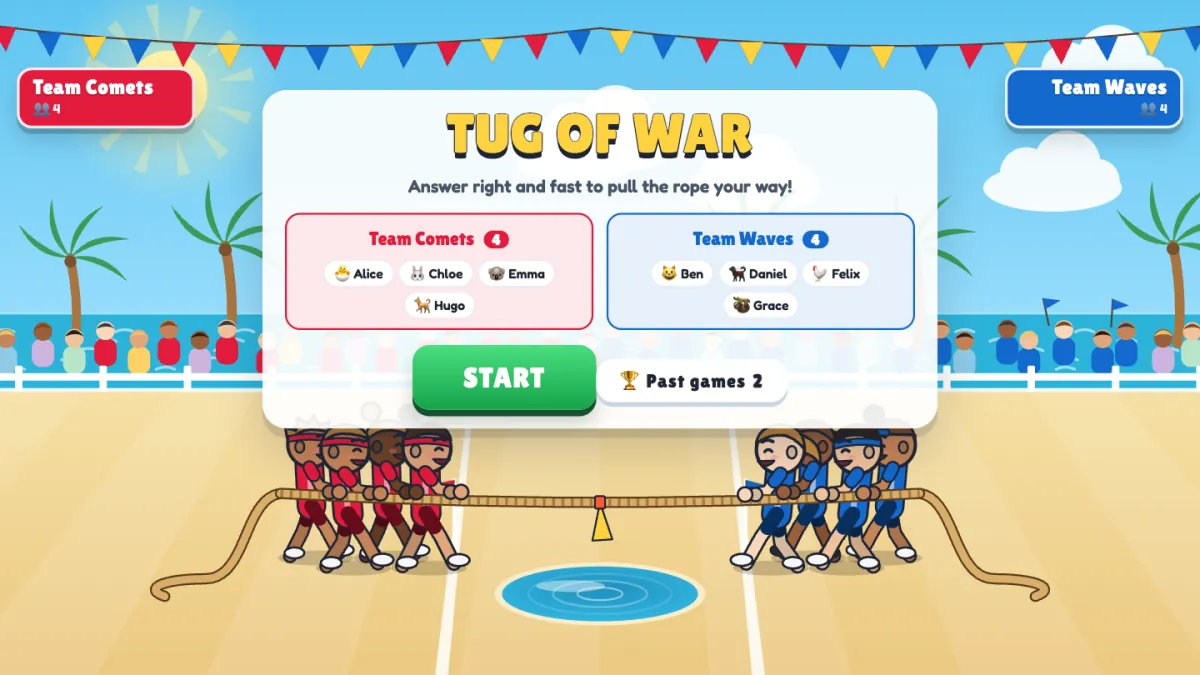
Tug of War is a game slide in EngageSlide's interactive presentation tool. Students join on their phones with your code and become pullers on a rope on the big screen. In a quiz battle, each question gives the teams pull power: correct answers pull, and faster answers pull harder. When the answer is revealed, the rope yanks towards the stronger team. Pull the flag over your line for a K.O., or lead when the questions run out. The full walkthrough of modes and settings is in our Tug of War team quiz game guide, so here we'll stick to what matters for teachers.
After each reveal there is a short HEAVE: every phone turns into a big tap button and the whole team taps to pull a little further. It burns off energy and lets students who missed the answer help straight away.
Fair teams, even when the class size is uneven
Real classes rarely split neatly: someone is absent, someone arrives late, or you have 27 on the register. Tug of War is built to stay fair anyway.
Pull is averaged per student
For every question, the team's pull power is added up and then divided by the number of players on that team. A team of 13 does not beat a team of 14 just by having one more person, and a smaller team that answers well can beat a bigger team that doesn't. Because the total is divided by the whole team, a student who doesn't answer adds nothing and lowers the average. That gives you a natural, friendly reason for teammates to make sure everyone actually answers.
Teams balance themselves as students join
In the settings, Teams are picked has two options. With Automatically, each new player joins the smaller team, so the sides stay balanced without you moving anyone. A latecomer who joins mid-game also lands on the smaller team and plays from the next question. With By players, students choose their side on their phone before the game starts. Use automatic picking for review so friendship groups can't pile onto one side.
Tapping is fair too
The HEAVE is averaged per player as well, and taps are capped at about 13 per second per phone. A student with a very fast thumb, or an auto-clicker, cannot win the game alone. The heave adds energy, but correct answers still decide most of the rope.
Writing review questions that work on a rope
Each question can have 2–4 answers, and speed matters, so the best questions can be read and answered in a few seconds. Save the long multi-step problems for homework and use Tug of War for quick recall. To add a whole set at once, click Paste list and paste one question per line in the format Question | *Correct | Wrong | Wrong. The asterisk marks the right answer.
Question tips by subject
- Science. Test vocabulary and cause and effect: "What gas do plants release during photosynthesis?" Use common misconceptions as wrong answers (carbon dioxide vs oxygen) so the reveal teaches something.
- Maths. Use mental-maths questions with one clear number answer, like "15% of 80?" Make the wrong answers the results of typical mistakes, such as 1.2 or 120, so you can see which mistake the class makes.
- History. Ask about order and causes rather than exact dates: "Which came first?" or "What was the main cause of…?" Two-answer questions work well for "before or after" checks.
- Languages. Use translation and verb forms: "Which is the past tense of 'go'?"
Order them easy to hard
Questions are played in the order you list them. Start with two easy wins so every student gets on the rope, put the core content in the middle, and finish with the hardest question so the game builds to a close finish. Six questions is a good length for a lesson ending. Fewer questions means bigger yanks, so even a short game can end in a K.O.
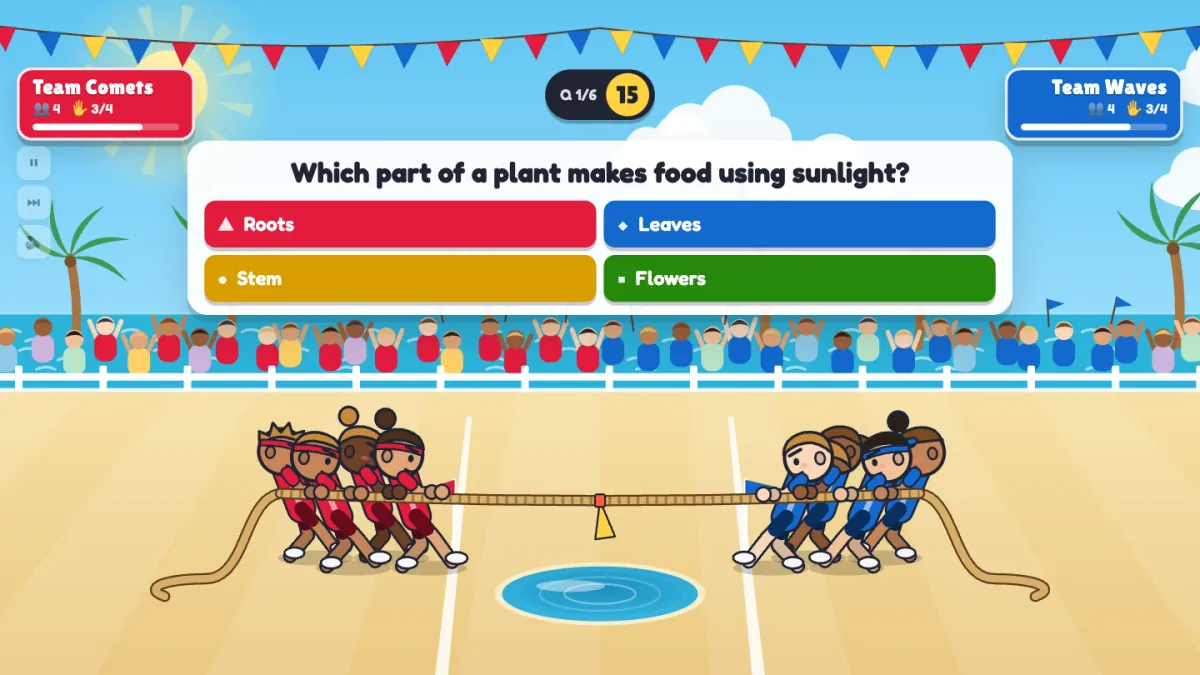
During a question, each team banner shows how many teammates have answered, like 3/4 above. The question closes early once everyone has answered, so a focused class moves quickly. The time per question can be set from 10 to 60 seconds. Around 20 seconds suits most review questions, and 30 seconds is better for younger students or longer wording.
A 10-minute end-of-lesson plan
Here is a plan you can drop into the last ten minutes of almost any lesson. Build the Tug of War slide once, paste in six questions from today's lesson, and present it when the main teaching is done.
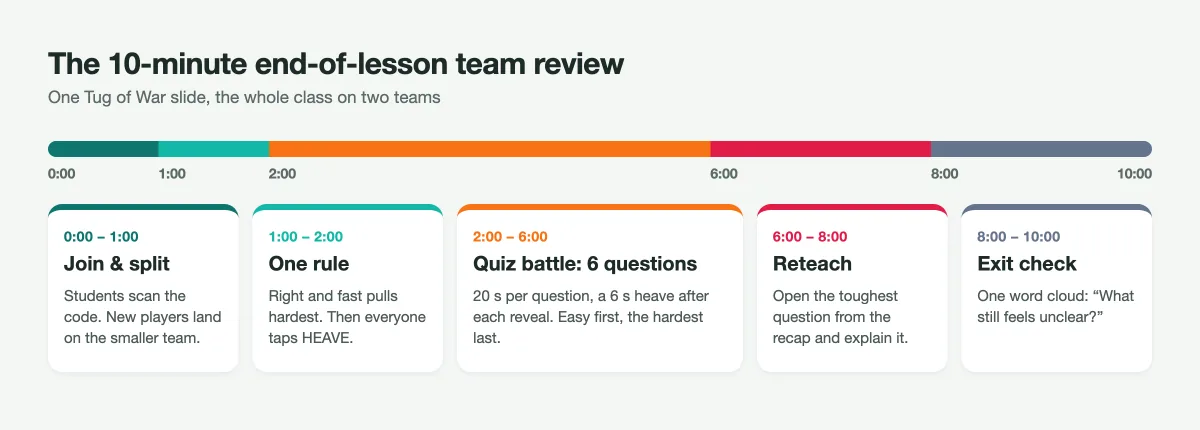
- 0:00–1:00 Join and split. Show the slide and let students join with the code. With automatic picking, the two team lists fill up evenly on screen.
- 1:00–2:00 Explain one rule. "Right answers pull, faster answers pull harder, and everyone on your team counts. After each answer, tap HEAVE." That's all students need to know.
- 2:00–6:00 Quiz battle. Press START. Six questions at 20 seconds each, with a 6-second heave after each reveal, fit in about four minutes. You can pause or skip ahead with the controls on the slide.
- 6:00–8:00 Reteach. The final screen shows the winner, the top three pullers on each team, a momentum chart and the toughest question, the one the class found hardest. Go straight to it: ask why the popular wrong answer was tempting, then explain the right one.
- 8:00–10:00 Exit check. Finish with a word cloud slide such as "What still feels unclear?" and use the answers to plan the next lesson's warm-up.
Two big teams, every student answering every question, and a pull that is averaged per student: that is how you get whole-class review where nobody waits and nobody hides.
Tips from the classroom
- Name the teams after your topic. Team names and colours are set on the slide. "Team Comets vs Team Waves" works, but "Mitochondria vs Chloroplasts" gets a laugh and reinforces the unit.
- Pick a theme for the season. Sunny Meadow drops the losing team into a mud pit, Beach Party into a water channel and Snow Day into an ice hole.
- Celebrate both MVPs. The recap names the top pullers on each team, so the losing side has someone to applaud too.
- Use a tap battle as a brain break. Switch the mode to Tap battle (no questions) for a 30-second energiser between two heavy activities.
- Keep the history. Every finished game is saved. Reopen it from the Past games button inside the slide or in the Report to compare classes or show a rematch result.
Want more ways to review without a single student sitting out? Try a self-paced option with our Treasure Hunt review game, or browse more ideas on the EngageSlide blog.