
You spent weeks on the talk. The room was full, people nodded, a few laughed at the right moments — and then everyone walked out. A week later you have a stack of business cards, a blurry photo of your last slide and no idea who in that room was actually interested. If you present to sell, recruit, fundraise or grow a community, the presentation is only half the job. The other half is knowing who was there and what they cared about.
This guide shows how to collect emails and qualified leads during a live presentation — without a clipboard at the door, without a “please fill in our form later” slide nobody fills in, and without making the session feel like a sales pitch. Every step uses features that already exist in EngageSlide’s survey and audience-information tools.
Why the old way of collecting leads fails
Most presenters still rely on one of three habits, and each one leaks leads:
- The sign-up sheet. Handwriting is hard to read, half the emails bounce, and only people sitting near the sheet ever see it.
- The last-slide QR code to a form. By the time it appears, people are packing their bags. Completion rates are usually tiny.
- The badge scan at the booth. Great for trade shows, useless for a webinar, a workshop or a talk at someone else’s event.
The common problem is timing. All three ask for contact details when attention is lowest. The fix is to ask at the moment people are most willing to give it: when they join the session, and again when they are engaged and curious.
People don’t mind sharing an email. They mind sharing it for nothing. Collect details at the door, earn interest during the talk, and ask for the next step only from people who raised their hand.
Step 1: Ask for details when people join
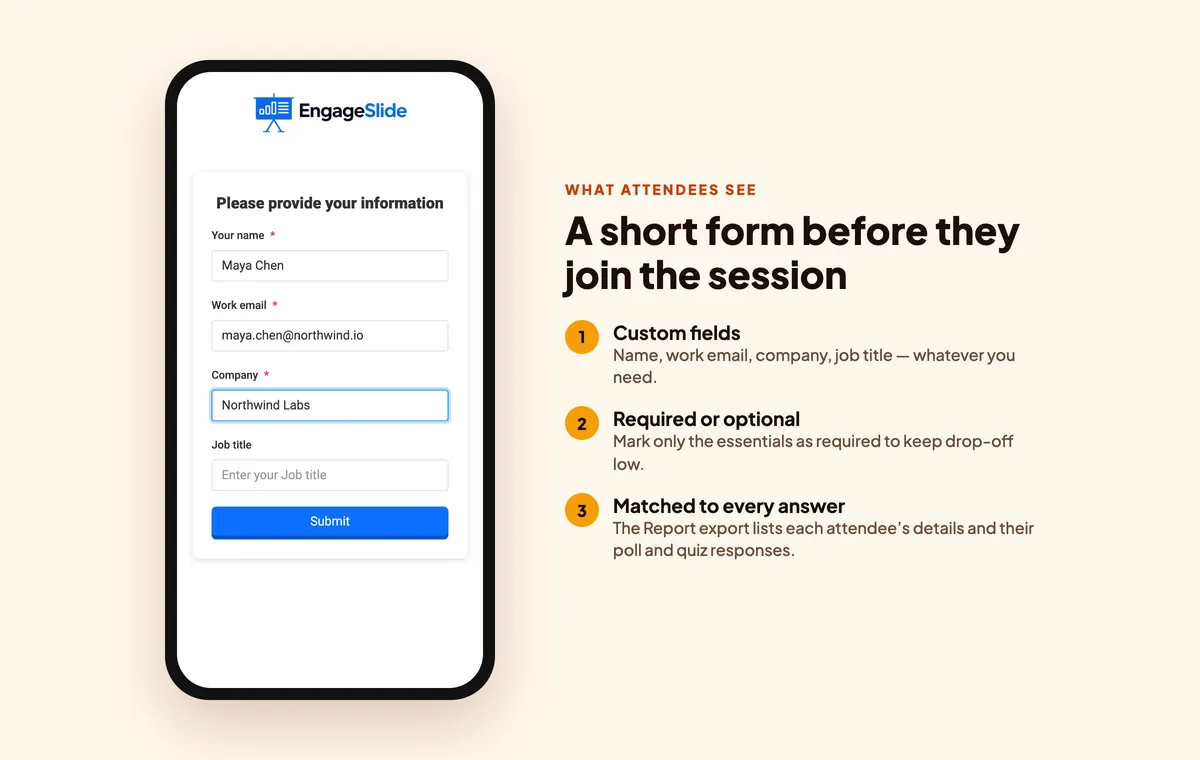
In EngageSlide, open your presentation settings and turn on Collect Audience Information. You can add any fields you need — the name field is there by default, and you add others such as “Work email”, “Company” or “Job title”. Each field can be marked Required or left optional.
When attendees scan the QR code or enter the join code, they see a short form before the first slide appears. Because it is the entry point to the session they came for, completion is close to universal — far higher than any end-of-talk form.
How many fields should you ask for?
Fewer than you think. Every extra required field costs you some attendees. A practical rule:
- Required: name and work email. That is enough to follow up.
- Optional: company and job title. Many people will fill them in anyway, and you can enrich the rest later.
- Never at the door: phone number, budget, company size. Ask those later, and only from people who opted in.
Tell people why you are asking. A one-line note on your opening slide — “We’ll email you the slides and recording” — turns a data grab into a fair exchange. Keep your privacy notice and consent wording in line with the rules that apply to your audience, such as the EU’s GDPR.
Step 2: Let interaction do the qualifying
An email address tells you who someone is. Their answers tell you what they need. This is where a live presentation beats any static landing page: people will happily tell you their biggest problem if you ask it as a poll.
Build three or four interactive slides that are useful for the audience and reveal buying signals:
- Challenge poll. “What slows your team down the most?” with 3–5 options. The results are good content for your talk and a clear signal of pain for your sales team.
- Timing question. “When are you planning to change your current tool?” — this quarter, this year, not planning to.
- Priority ranking. A ranking slide where people order features or topics. Great for product talks.
- Knowledge quiz. A short, fun quiz with a leaderboard keeps energy high, and scores show who really understands the topic.
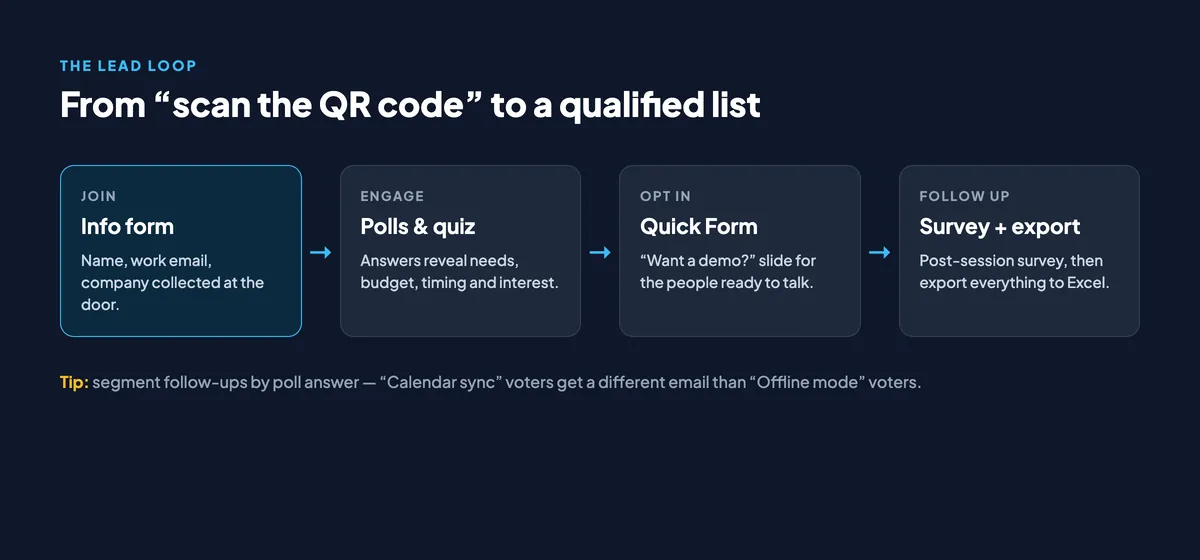
Because every attendee already identified themselves at the door, each vote belongs to a known person. That turns a poll from a crowd statistic into a list of named prospects: the 14 people who picked “Calendar sync” and said “this quarter” are your warmest leads.
Step 3: Offer a clear next step with a Quick Form
Near the end — ideally right after your strongest insight, not on the very last slide — add a Quick Form slide. It works like a mini form inside the presentation: you choose the fields and attendees fill them in on their phones.
Use it for a single, specific offer:
- “Want a 20-minute demo? Leave your preferred time.”
- “Get the full benchmark report — which team size are you?”
- “Join the beta — which platform do you use?”
Only people who are genuinely interested will fill it in, and that is the point. This group becomes your priority follow-up list. Everyone else still gets the recording and slides you promised.
Step 4: Follow up with a survey — while the talk is still fresh
After the session, send a short feedback survey. In EngageSlide you can build a survey with question types such as multiple choice, linear scale, dropdown and short answer, turn on collect emails, and link it to your presentation so it shows on the last slide. Two or three questions are enough:
- How useful was this session? (1–5 scale)
- What topic should we cover next?
- Would you like someone to contact you? (Yes / Not now)
If you want more ideas for the questions themselves, see our guide to event feedback survey questions. The survey results page gives you a summary view and individual responses, and you can download the emails as CSV.
Step 5: Export, segment and follow up within 48 hours
Open the presentation’s Report page and click Export Excel. The file includes an Audiences sheet with every attendee’s details — including your custom information fields — and a Responses sheet with what each person answered on each slide. Match them by attendee and you have a lead list with context.
Segment before you send anything:
- Hot: filled in the Quick Form or said “contact me” in the survey. Personal email from a real person within 24 hours.
- Warm: picked a strong problem or near-term timing in the polls. Send content that matches the problem they chose.
- Everyone else: the recording, the slides and one relevant resource. No hard sell.
Speed matters more than polish. A short, specific email that references the attendee’s own poll answer (“You mentioned onboarding takes too long — here’s how two teams cut it in half”) beats a generic “thanks for attending” newsletter every time.
Where this works best
- Webinars. Attendees already expect to register, so the join form feels natural. Pair it with the tactics in our guide to polls and Q&A for two-way webinars.
- Conference talks. You rarely get the organiser’s attendee list. Your own join form gives you the people who actually sat through your session.
- Workshops and training. Collect details once and use them for certificates, follow-up material and future sessions.
- Product launches and demos. Poll answers become direct product feedback, tied to named users.
If you are specifically looking at quizzes as a lead magnet, our earlier comparison of free quiz tools for lead generation covers that angle in more depth.
Common mistakes to avoid
- Asking for too much, too early. A six-field required form at the door loses people before your first slide.
- Selling during the polls. Poll questions should be genuinely interesting for the room. The moment they feel like a sales survey, participation drops.
- Forgetting to deliver. If you promised slides, send them. Broken promises burn the lead faster than silence.
- Waiting a week. Lead quality decays quickly. Plan your follow-up emails before the event, not after.
A simple checklist for your next talk
- Turn on Collect Audience Information with 2 required and 1–2 optional fields.
- Add a line on your first slide explaining what people get in return.
- Build 3–4 polls or quiz questions that are useful for the room and reveal needs.
- Add one Quick Form slide with a single, specific offer.
- Link a short survey that collects emails and asks “Can we contact you?”
- Export from the Report page, segment into hot, warm and everyone else, and follow up within 48 hours.
Lead generation doesn’t have to feel pushy. When every question you ask also makes the session better for the audience, collecting leads stops being a separate task and becomes a side effect of a great presentation. For more ideas, browse the rest of the EngageSlide blog.