

Most Q&A sessions fail in the same two minutes. The speaker finishes the last slide, says "any questions?", and the room goes quiet — not because nobody is curious, but because asking out loud in front of 40 colleagues is socially expensive. Then one senior person asks a long, comfortable question, the clock runs out, and everyone leaves with the thing they actually wanted to know still unasked.
A live Q&A session is a format you run, not a gap you leave at the end. This guide walks through the whole thing — how to open the question queue early, how to order what gets answered, how to handle the hard ones, and what to do with everything you didn't get to. If you want the shorter product walkthrough instead, we already have one: live Q&A on EngageSlide.
Why "any questions?" almost never works
Asking a question in public is a small act of exposure. The asker risks looking uninformed, off-topic, or like they weren't listening. Research on psychological safety keeps landing on the same point: people speak up when the perceived cost of speaking up drops below the perceived benefit. A microphone being passed down a row is about the highest cost you can design.
Digital Q&A lowers that cost in three specific ways. Questions can be submitted anonymously. They can be typed while the thought is still fresh, instead of held for twenty minutes. And upvoting lets people back a question without having to author it — which is why the quiet half of the room finally gets a vote.
The goal isn't more questions. It's the right questions, surfaced early enough that you still have time to answer them properly.
Set up your Q&A before the session, not after the slides
In EngageSlide, a Q&A is a slide type. Add a Q&A slide to your deck, give it a plain-language prompt — "Ask us anything about the roadmap" beats "Questions" — and your audience joins by scanning the QR code or entering the room code at engageslide.com. No app install, no account, no clicker.
Put that slide near the front of your deck and show it for thirty seconds before you start. That single move changes the dynamic: attendees now have somewhere to put a question the moment it occurs to them, rather than trying to hold six of them in working memory until the end.
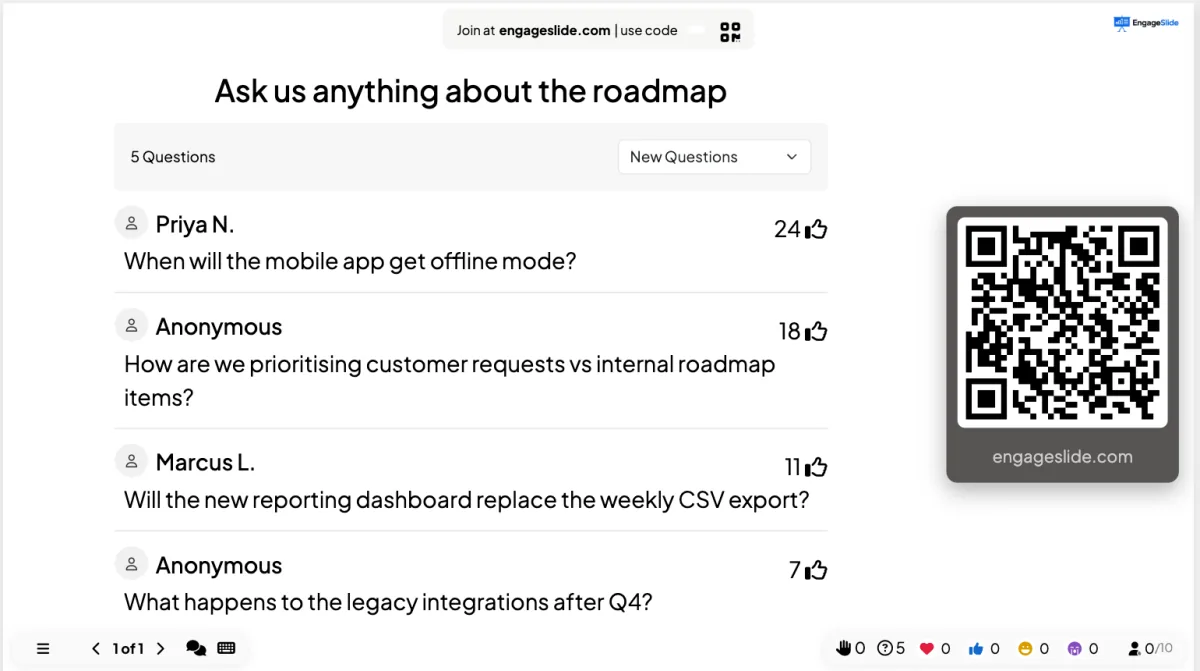
The presenter view above shows what you'll be working from: every incoming question, who asked it (or "Anonymous"), and its upvote count. That count is the part that does the facilitation work for you.
The settings that matter
- Anonymous submissions. Leave names optional. For town halls, restructures, pricing changes or anything political, anonymity is the difference between real questions and polite ones.
- Upvoting. On by default, and worth explaining out loud once: "if someone already asked your question, upvote it instead of retyping it."
- Moderation. For large public events, review questions before they hit the screen. For internal meetings, moderation usually costs you more trust than it saves you embarrassment.
- Profanity filter. Useful for open, unbadged audiences; unnecessary for a team of twelve.
The run of show
Treat the session as three phases with different jobs. Most of what goes wrong is a phase-one problem that only becomes visible in phase two.
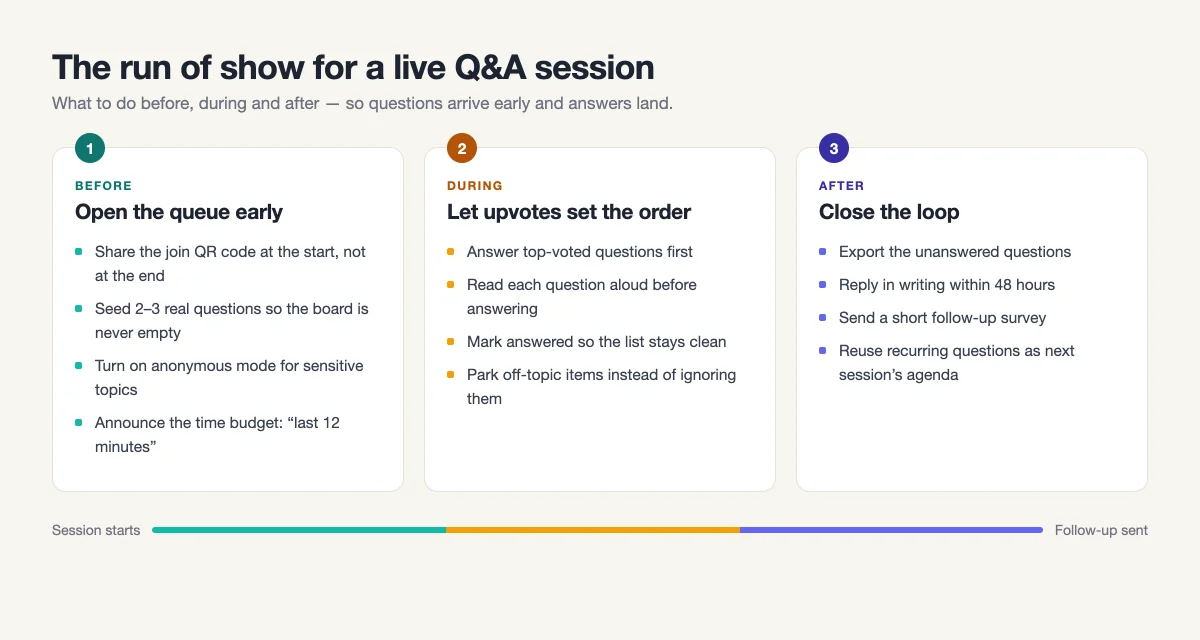
Before: fill the queue
An empty question board is contagious — nobody wants to be first. Seed it. Ask two colleagues in advance to submit a real question each, or add the two questions you already know are coming ("how does this affect my team?" is always one of them). Announce the budget explicitly: "we'll take questions for the last twelve minutes, and the board is open now."
During: let upvotes set the order
Answer the top-voted question first, every time. It signals that the ranking is real and that voting is worth doing. Read each question aloud before answering it — remote attendees may not see your screen, and reading it back proves you understood it. Mark each one answered as you go so the list shrinks visibly; a queue that never shortens makes an audience feel ignored.
Keep a hard rhythm: roughly ninety seconds per question. If an answer needs more, say so and park it. Three well-answered questions beat eight rushed ones.
After: close the loop
You will not get to everything, and that's fine — as long as the unanswered questions don't just evaporate. Export the list, answer the remainder in writing within 48 hours, and send it to everyone who attended. This is the step almost nobody does, and it's the one that makes people trust the format enough to ask something real next time.
Handling the four hard cases
- The hostile question. Answer the legitimate part, ignore the tone. "The real question underneath that is whether we're cutting the budget — we're not, and here's the plan." Never argue with the framing on stage.
- The question you can't answer. Say "I don't know" and commit to a date. Bluffing costs you the rest of the session; every subsequent answer gets discounted.
- The statement disguised as a question. Acknowledge the point in one sentence, then move on. "That's a fair concern, noted — next question." Don't reward it with five minutes.
- The one nobody asked. If a topic is clearly on everyone's mind and hasn't appeared on the board, raise it yourself: "nobody's asked about headcount, so I will." It's the fastest way to prove the session is genuinely open.
Q&A at scale: 30 people vs 300
Small groups need prompting; large groups need filtering. With a dozen people, the board may only collect three questions, so pair the Q&A with a quick live poll to warm the room up first. With hundreds of attendees, you'll get more questions than you can read, and upvoting stops being a nicety — it becomes the only workable triage. One of our users walked through exactly that scenario in managing live Q&A for 300 attendees.
For hybrid sessions, one rule matters more than the rest: everyone submits through the same board, in-person and remote alike. The moment you take questions from the room by voice and from remote attendees by chat, the remote half becomes second-class and stops participating within about ten minutes.
Don't save it all for the end
The strongest change you can make is structural: stop treating Q&A as an epilogue. Run it as a running board that's open from minute one, and pause twice mid-session to clear the top three questions. Attention decays long before your last slide — the reasons are covered in why your audience stops paying attention — and a two-minute question break resets it far better than a louder slide.
Because the Q&A slide lives in the same deck as your polls and quizzes in EngageSlide's interactive presentation tool, switching between them costs nothing: no app change, no second link for the audience, no re-joining. Ask a poll, present three slides, drop back to the question board, keep going.
A checklist you can steal
- Two days out. Add the Q&A slide, write the prompt, decide on anonymity and moderation.
- Ten minutes out. Display the join code. Ask two people to seed a question each.
- Minute one. Say the board is open and explain upvoting in one sentence.
- Mid-session. Pause twice, clear the top three, mark them answered.
- Last block. Answer by upvote order, ~90 seconds each, read each aloud.
- Within 48 hours. Export unanswered questions, reply in writing, send a short feedback survey.
Do that and you'll notice something in your second or third session: the questions get better. People start writing sharper ones because they've seen that questions actually get answered. That's the compounding return of running Q&A as a format instead of an afterthought — and it's the reason the last ten minutes of a meeting can end up being the most useful ten.
Cover photo by delegateconnectimages, via Flickr, licensed under CC BY 2.0. Further reading: The Surprising Power of Questions, Harvard Business Review.