
In today’s world of interactive presentations, engagement is no longer driven by content alone—it’s driven by experience. Visual clarity, branding, and real-time interaction all play a critical role.
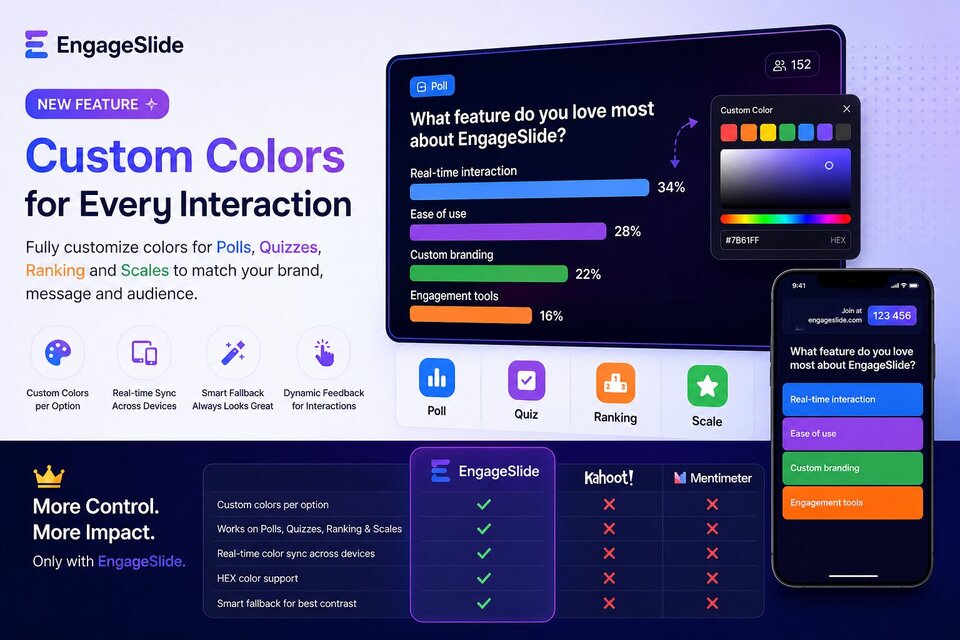
That’s why EngageSlide introduces Custom Colors — a powerful new feature that allows presenters to fully customize colors across Polls, Quizzes, Ranking, and Scale slides.
Unlike traditional tools, this is not just a visual tweak. It’s a functional upgrade that transforms how audiences perceive and interact with your presentation.
What is Custom Colors?
Custom Colors allows you to:
- Assign custom colors to each option in:
- Polls
- Quizzes
- Ranking questions
- Scale (rating) questions
- Use HEX color codes for precise branding
- Sync colors in real-time across all audience devices
This means every interactive element can now match your brand, message, or emotional tone perfectly.
Why Color Customization Matters in Interactive Presentations
Color is not decoration—it’s communication.
With proper color usage, you can:
- Increase information retention
- Reduce cognitive load
- Guide audience attention instantly
- Create emotional context (e.g. green = positive, red = negative)
Most platforms overlook this. They treat colors as static UI elements—not as part of the data itself.
What Makes EngageSlide Different?
Full Coverage Across All Interaction Types
Unlike many tools that limit customization to specific formats, EngageSlide applies Custom Colors to:
- Polls
- Quizzes
- Ranking
- Scales
👉 This creates visual consistency across your entire presentation
Option-Level Color Control
You can assign colors to individual answers, not just the slide.
Use cases:
- Highlight key answers
- Group categories visually
- Create gradients for scales (e.g. satisfaction levels)
Real-Time Color Synchronization
Colors are instantly reflected across:
- Presenter screen
- Audience mobile devices
No delay. No mismatch. Just a seamless experience.
Smart Fallback System
If no color is selected:
- The system automatically assigns optimized, high-contrast colors
👉 Your presentation still looks polished without extra effort
Dynamic Interaction Feedback
When users interact:
- Colors automatically adjust (lighten/darken)
- Creates a responsive, tactile experience
EngageSlide vs Kahoot vs Mentimeter
🎯 Flexibility & Customization
- Kahoot!:
Fixed color palette (typically 4 colors). No per-option customization. - Mentimeter:
Limited branding options. Colors are mostly theme-based, not data-driven. - EngageSlide:
✅ Full custom colors (HEX)
✅ Per-option control
✅ Works across all slide types
👉 This level of flexibility is currently not available in Kahoot or Mentimeter
🎯 Data Visualization Quality
- Kahoot: Focused on gamification, not data clarity
- Mentimeter: Clean visuals but limited control
- EngageSlide:
✅ Color as part of data structure
✅ Better visual hierarchy
✅ More intuitive interpretation
🎯 Brand Consistency
- Kahoot: Not designed for brand alignment
- Mentimeter: Partial brand kits (higher plans)
- EngageSlide:
✅ Precise HEX control
✅ Consistent across all interactions
✅ Ideal for corporate use
Real-World Use Cases
Corporate Presentations
- Match company brand colors exactly
- Use color-coded polls for decision-making
Education & Training
- Use color gradients for difficulty levels
- Make quizzes more intuitive and engaging
Events & Workshops
- Differentiate sessions by color
- Improve audience navigation and clarity
Key Benefits
- Higher audience engagement
- Faster understanding through visual cues
- Stronger brand identity
- More professional presentation experience
Conclusion
The Custom Colors feature on EngageSlide is not just a design enhancement—it’s a fundamental shift in how interactive presentations work.
By turning color into a functional part of your data and interaction layer, EngageSlide enables presenters to:
- Communicate more clearly
- Engage more effectively
- And deliver more memorable experiences
👉 If you’re currently using Kahoot! or Mentimeter, this is a capability you simply don’t have yet.