
Most customer service training is a list of rules: listen, apologise, don't argue, escalate when you must. Everyone nods, then the first real angry customer walks in and the list is forgotten. Customer service training scenarios fix this by letting your team practise the moment itself. They hear what the customer says, choose what to do, and see what happens next. This guide walks through a ready-made story step by step, gives you five more scenarios to build, and shows how to debrief each vote so the lesson sticks. Everything runs live in EngageSlide, with the whole team voting from their phones.
Why scenarios beat role-play and rule lists
Role-play works, but only two people practise while everyone else watches, and the quiet ones never volunteer. A rule list is efficient but abstract. A live branching scenario sits between the two:
- Everyone decides, every time. Each person votes privately on their phone, so new hires and veterans commit to an answer before hearing anyone else.
- Consequences are visible. A poor first move makes the next step harder, just like it would at the counter.
- The split is the lesson. If a third of your team would point to the returns policy first, you have found exactly what to coach.
There is also a business reason. Research on the service recovery paradox suggests that a problem handled really well can leave a customer more loyal than one who never had a problem. That only happens if staff make good calls under pressure, and that is what these scenarios practise.
Walkthrough: The Angry Customer template
Add a Scenario slide from the Games tab, open Start from a template and pick The Angry Customer. Its three meters set the stakes: Customer happiness starts low at 30, Team reputation at 60 and Budget at 70. Here is how the story plays out with a real team.
Step 1: A broken blender
Sam storms up to the counter: "I bought this two days ago and it's already dead. This is ridiculous!" The queue is growing. The team has three options:
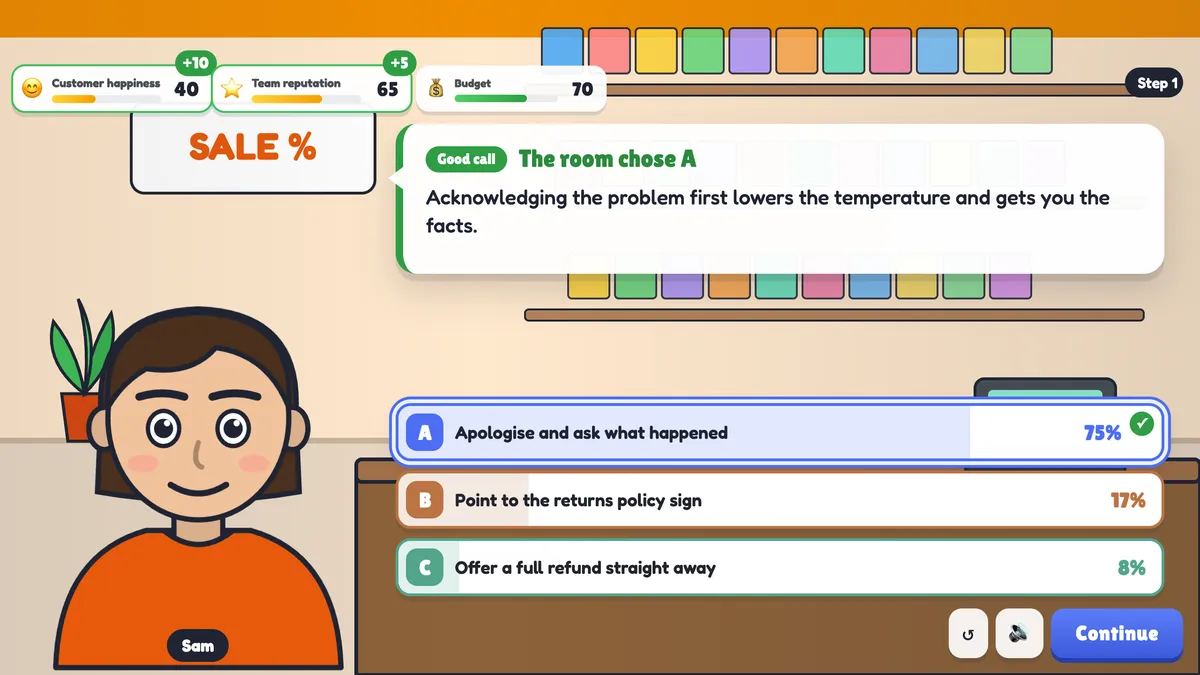
- Apologise and ask what happened. The best choice. Happiness goes up 10 and reputation up 5, because acknowledging the problem lowers the temperature and gets you the facts.
- Point to the returns policy sign. The tempting "by the book" answer. Happiness drops 15 and Sam demands a manager.
- Offer a full refund straight away. Fast, and it costs 15 from the budget, but nobody found out what Sam actually needs.
When the vote closes, the big screen highlights the room's choice with its share of votes. Sam reacts, a feedback line explains why, and the meters move.
Step 2: The real problem
Sam calms down: "I need it for my daughter's party tomorrow." The same model is in stock, but swaps usually need a manager's approval. Now the team must choose between swapping it now and getting approval afterwards (the best choice), asking Sam to wait while they find the manager, or offering a discount on a better model. This step is gold for discussion. It tests whether people feel trusted to make a sensible call, which says as much about your team culture as about their skills.
Step 3: The follow-up
Sam leaves happy. Later, Morgan the manager asks why the blender was swapped without approval. Explaining the situation and the outcome leads to the good ending, "A customer for life". Saying Sam was too angry to argue with costs 10 reputation and lands on the okay ending, because it sounds like giving in rather than making a good call.
The story also gives second chances. A team that pointed at the sign can apologise and start again. A team that refunded straight away can still mention the same model is in stock. Making Sam repeat everything to the manager, or pushing the upsell, ends with "A lost customer".
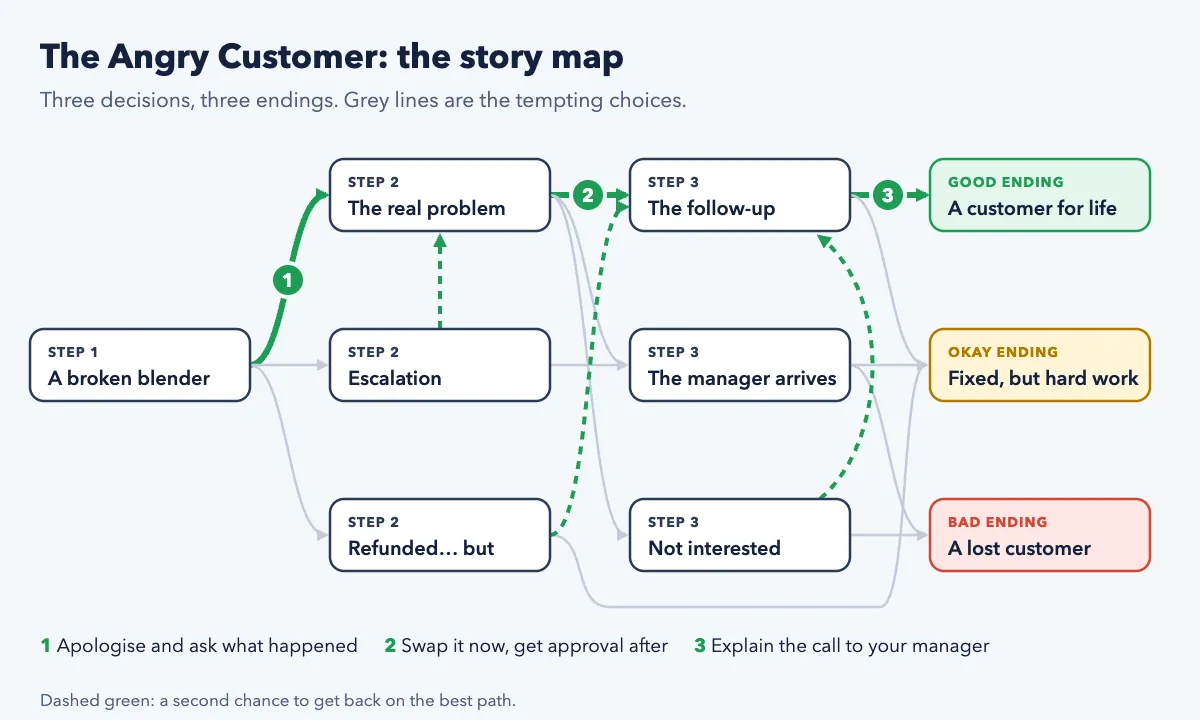
After the ending, press See the path. The recap shows the room's path next to the best path, with how many people agreed at each step. That one screen makes your debrief.
Five more customer service training scenarios to build
Once your team has played the template, write stories about your own customers. Use Blank story, keep each situation to two or three sentences, and tick one best choice per step. Here are five outlines to start from:
- The late delivery (phone call scene). A customer calls: the sofa was due Saturday, nobody came, and they took a day off work. Choices: read out the delivery terms, apologise and check the order live, or promise a new date you cannot confirm. Meters: Customer happiness, Trust, Cost. The lesson is that an honest "I'm checking now" beats a confident promise you can't keep.
- The refund that doesn't add up. A regular customer returns an item for the third time this month, clearly used. Choices: refuse flatly, refund without questions, or explain the policy calmly and offer an exchange. This tests fairness and consistency without accusing anyone.
- The VIP complaint. A key account manager forwards an angry email from a big client: "We're reviewing our contract." Choices: reply instantly with a discount, call to listen first, or pass it to legal. Add a Morgan-style manager character for the follow-up step.
- The public review. A one-star review goes viral on a Friday evening. Choices: reply defensively with the facts, post a short apology and move the conversation to private messages, or ignore it until Monday. The Team reputation meter will tell the story.
- The impossible request. A customer wants a product the business stopped selling. Choices: say "we don't do that", suggest the closest alternative and explain why, or promise to "see what we can do". This one practises saying no while keeping the customer.
For every choice, write one feedback sentence that explains rather than judges. "Promising a date you can't confirm buys five minutes and costs the next call" teaches far more than "Wrong". If you want more help with structure, our pillar guide to scenario-based training covers every field in the editor.
How to debrief each vote
The Scenario slide waits after every reveal until you press Continue. That pause is where the training happens. Use the same three questions every time so the team learns the routine:
- What did the customer hear? Ask someone to say the chosen response out loud, as the customer would hear it. "Point to the sign" sounds very different when you say it to a frustrated person.
- Why did the minority vote differently? Ask one person from the smaller group to explain their reasoning. Often they have a real concern, like being told off for skipping approval, and that is worth discussing openly.
- What would you say, word for word? Get one exact phrase from the room for the best choice. Write the best ones on a flipchart. They become the team's shared script.
The vote shows you what your team would do. The debrief turns it into what they will do. Spend more time on the pause than on the story.
Good debriefs also model active listening, the very skill the scenario teaches. Paraphrase what people say before you respond, and never mock a wrong vote. If people feel safe voting honestly, the results tell you where to coach.
Settings that work well for service teams
- Time to vote: 20–30 seconds. Long enough to read the situation, short enough to feel like a real conversation. Voting closes early once everyone has voted.
- Show votes while voting: off. People think for themselves instead of following the crowd.
- On a tie: Prefer the best choice for new hires, so the story stays on a useful path; pick at random for experienced teams who can handle a messier branch.
- Play again with a second group. Every game is saved under Past games and in your Report, so you can compare how the morning and evening shifts handled Sam.
Fitting scenarios into a training session
A scenario takes 10–15 minutes including debriefs. A simple 45-minute session works well: a short warm-up poll ("What's the hardest customer moment this week?"), the Angry Customer scenario, one custom scenario about your own products, then a quick quiz on the policies that came up. Team members join at engageslide.com with your code or the QR code. There is nothing to install, so it works just as well for a remote call centre team as for a shop floor briefing.
Ready to try it? See how the Scenario slide works, read the help article for every setting, or browse more training ideas on the EngageSlide blog.