
What Google Slides, PowerPoint, and Mentimeter Still Don’t Support
In modern online teaching, training, and product demos, presentations are no longer just static slides. Educators and presenters increasingly need the ability to embed live websites directly into their slides.
However, the reality is simple:
Google Slides, Microsoft PowerPoint, and Mentimeter do not support embedding live websites into slides.
That’s exactly where EngageSlide stands out.
The Limitations of Google Slides, PowerPoint, and Mentimeter
Despite being widely used, these tools share a critical limitation:
❌ No live website embedding
Google Slides only allows hyperlinks or static images
PowerPoint requires opening external browsers or using limited add-ins
Mentimeter focuses on polls and quizzes, not web content
In all cases:
Viewers must leave the presentation to open a website
Presentations lose flow and engagement
Live demos become clunky and inefficient
This is especially problematic for:
Software demos
Online training sessions
Product walkthroughs
Interactive workshops
EngageSlide: Embed Any Website Directly into Your Slides
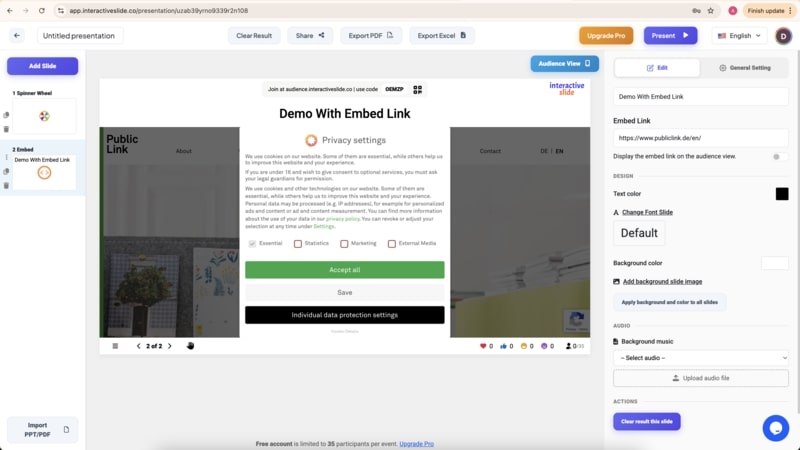
EngageSlide allows presenters to embed live websites directly inside a slide — something Google Slides, PowerPoint, and Mentimeter currently do not offer.
You can embed:
Any public website
Web apps or SaaS platforms
Dashboards and analytics tools
Learning platforms
Forms, quizzes, and interactive web tools
All content runs live, in real time, inside the slide — no new tabs, no interruptions.
Key Benefits of Embedding Websites in EngageSlide
1. Seamless presentation experience
Your audience stays focused — no switching tabs or breaking attention.
2. Real-time content
Embedded websites are fully interactive and always up to date.
3. Perfect for demos and training
Demonstrate products, platforms, and workflows directly inside your presentation.
4. Higher engagement
Combine web embeds with:
Live polls
Quizzes
Word clouds
Q&A
This transforms traditional slides into fully interactive presentations.
EngageSlide vs Other Presentation Tools
| Feature | Google Slides | PowerPoint | Mentimeter | EngageSlide |
|---|---|---|---|---|
| Add web links | ✅ | ✅ | ✅ | ✅ |
| Embed live websites | ❌ | ❌ | ❌ | ✅ |
| Real-time web interaction | ❌ | ❌ | ❌ | ✅ |
| EngageSlide | Limited | Limited | Strong | Very strong |
| Ideal for live demos | ❌ | ❌ | ❌ | ✅ |
Who Should Use EngageSlide?
Teachers and educators
Corporate trainers
Startup founders and sales teams
Marketers presenting landing pages
Webinar and workshop hosts
If you’ve ever felt frustrated opening multiple tabs during a presentation, EngageSlide is the solution.
Conclusion
While Google Slides, PowerPoint, and Mentimeter still do not support embedding live websites, EngageSlide enables presenters to place real, interactive web content directly inside slides.
It’s more than a presentation tool — it’s a platform for modern, interactive, and engaging presentations.
👉 Try EngageSlide and experience what next-generation presentations should look like.