
A conference hall full of 800 or 1,200 people feels electric until you start talking. Then something odd happens: the bigger the room, the quieter it gets. People who would happily speak up in a ten-person meeting sit silently in row 23, half-watching the slides and half-watching their inbox. Conference audience engagement is not a charisma problem. It is a scale problem, and it has practical fixes. This guide walks through how to plan, run and close a conference session so that hundreds of people take part instead of just attending, using live interaction tools that work from any phone.
Why large conference audiences go quiet
In a big room, every individual feels less responsible for responding. Psychologists call this diffusion of responsibility: when a speaker asks "Any questions?" to 1,000 people, each person assumes someone else will answer. Add social risk (nobody wants to be the one holding a microphone in front of their industry peers) and you get the familiar silence after every prompt.
Three other factors make conferences harder than a classroom or a team meeting:
- Distance. The back rows can barely see your face, let alone read small text on a slide.
- Fatigue. Your talk is probably the fourth or fifth of the day. Attention is already spent.
- No relationship. You are a stranger on a stage. People have no reason to trust you with their opinions yet.
The fix is to lower the cost of participating to almost zero. Instead of asking people to raise a hand or walk to a mic, you give them a way to respond from the phone already in their hand, often anonymously, and you show the whole room's answers on the big screen. That turns a one-way keynote into a conversation, even at a scale where real conversation seems impossible.
Before your talk: make joining effortless
Most interaction fails in the first 30 seconds, when people are asked to download an app, create an account or type a long URL. At a conference, every extra step loses a big share of the room.
Put the QR code on screen while people sit down
With EngageSlide, attendees join from a browser by scanning a QR code or entering a short join code. There is no app to install and no sign-up. Show the join slide while the room fills up, not when you start talking. People who arrive early scan it while they wait, and latecomers can still join because the join code stays visible on your slides. If you want more ideas for placing QR codes, read our guide on using QR codes to connect with your audience.
Open Q&A before you begin
Turn the Q&A on from the start. At conferences, questions often come up during the talk, and people forget them by the end. When the Q&A is open, attendees can type a question the moment they think of it, and you pick it up later.
Rehearse in the actual room
If you can, check the venue before your slot. Stand at the back and make sure the join code and results are readable. Plan to move around too: with EngageSlide's remote control you can advance slides and start interactions from your phone, so you are not stuck behind a lectern at the side of a huge stage.
The first three minutes: a warm-up that costs nothing
Your first interaction should be easy, fun and impossible to get wrong. It is there to teach the room that answering takes five seconds. Good options:
- A word cloud. "In one word, why are you at this conference?" Hundreds of answers build a live cloud on screen, and the most common words grow largest. It is visual, quick and shows the room its own mood.
- A where-are-you-from poll. Regions, industries or job roles. People enjoy seeing who else is in the room.
- A hot-take poll. A light, slightly provocative statement related to your topic. It gets opinions moving before your first real point.
Once people have answered something in the first two minutes, they are far more likely to answer again.
Keep the middle alive: one touchpoint every 7–10 minutes
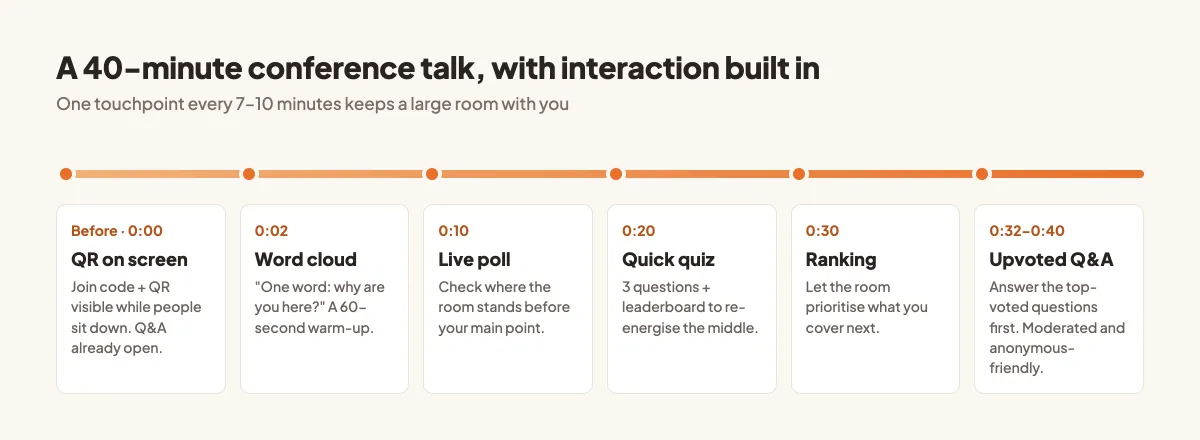
Attention drops fast in long sessions. A good rhythm for a 40-minute talk is one interaction every seven to ten minutes, each tied to what you are saying rather than bolted on.
Live polls to check where the room stands
Before your main argument, ask a poll: "How does your team handle this today?" The results tell you where the room is starting from, and you can adjust on the spot. If 70% already do what you are about to recommend, skip ahead and go deeper.
A short quiz with a leaderboard
Two or three quiz questions in the middle of a talk re-energise a tired room. EngageSlide can award more points for faster correct answers and shows a live leaderboard, so a quiet hall suddenly has 900 people competing for the top spot. Keep questions short and fair, and connect each answer back to your content.
Ranking and scale questions
Let the audience choose what you cover next. A ranking question such as "Which of these challenges hits your team hardest?" gives you a live agenda, and the audience feels ownership of the session. A scale question ("How confident are you about...?") works well before and after a key section, so the room can see its own shift.
A spinner wheel for a moment of surprise
Use a spinner wheel to pick a random topic, case study or giveaway winner. It is a small moment of suspense that works well just after lunch, when energy is lowest.
Q&A that works for hundreds of people
The traditional microphone Q&A breaks at conference scale. You get three questions, and one is a long speech from the same confident person. Live Q&A fixes this in three ways.
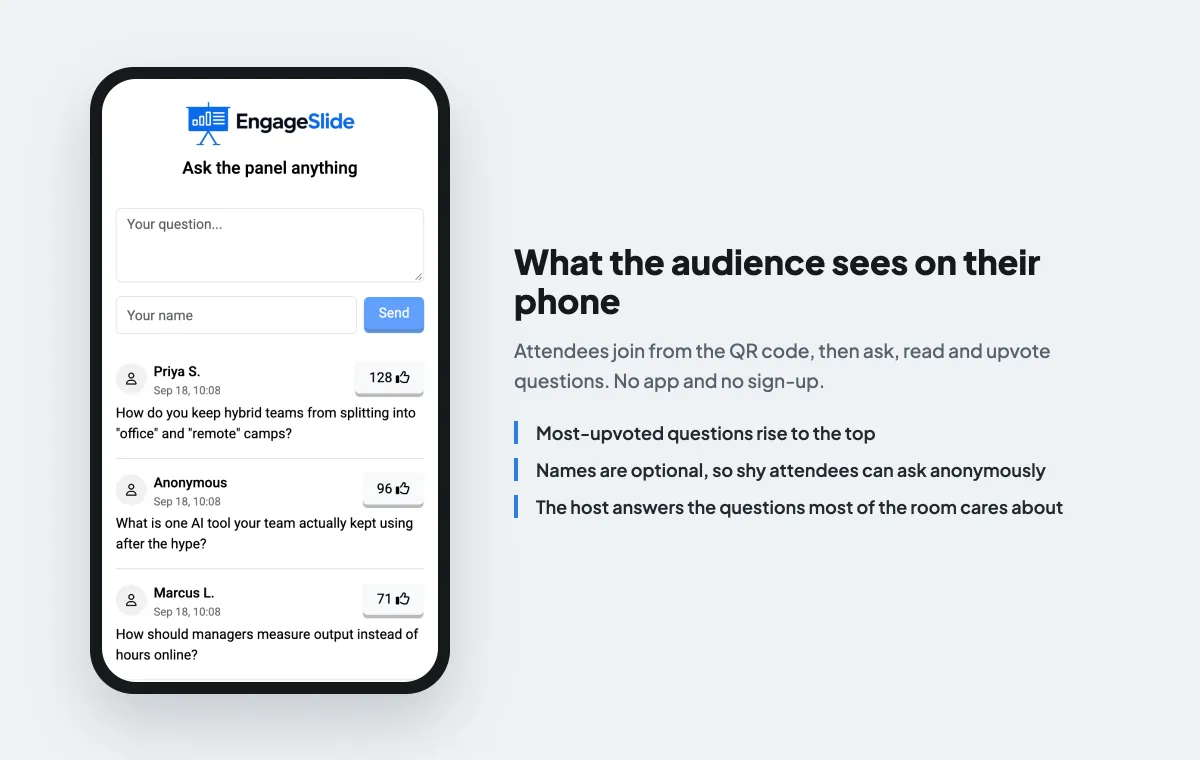
- Upvoting. Attendees read each other's questions and upvote the ones they care about. The most-upvoted questions rise to the top, so you answer what the room actually wants, not whoever was quickest to the mic.
- Anonymous questions. The name field is optional. Junior staff, non-native speakers and anyone nervous can ask the question they would never ask out loud. These are often the best questions in the room.
- Moderation. For high-profile sessions, turn on moderation so questions only appear on screen after you or a colleague approve them. You can also enable a profanity filter. That keeps off-topic or inappropriate submissions away from the big screen.
Not sure whether to moderate? Our comparison of moderated vs open Q&A explains when each works best. For a real example at scale, see how a trainer managed live Q&A for 300 attendees.
Design your interactions for the big screen
What works on a laptop can fail on a 10-metre screen. Keep these rules in mind:
- Short questions. One line, ideally under 12 words. People read them from far away.
- Few options. Three to five choices for a poll. More than that and the bars become unreadable.
- Show results, then comment. Pause on the results for a few seconds and say what you notice. "Interesting, almost half of you picked option C." This is the moment the room feels heard.
- Don't over-interact. Six or seven interactions in 40 minutes is plenty. Every poll should earn its place.
At a conference, engagement is not about getting a few people to speak up. It is about giving every person in the room a five-second, low-risk way to take part, and then showing the whole room what it said.
Common mistakes to avoid
- Asking for participation too late. If the first interaction comes 25 minutes in, the room has already settled into listening mode.
- Collecting answers you never use. If you run a poll, react to it. Ignoring the results tells people their input didn't matter.
- Relying on the venue Wi-Fi alone. Most attendees will use mobile data, but mention the join code slowly and leave it on screen long enough for everyone.
- Ending on a microphone Q&A. Keep the live, upvoted Q&A running to the end so the best questions get answered.
After the talk: keep the conversation going
A conference session doesn't have to end when you leave the stage. Every poll, quiz answer and question is saved with your presentation, so you can review what the room thought, answer the questions you didn't reach in a follow-up post, and use the results to improve your next talk. Many speakers also share a short summary of the results with the organisers, which is useful proof that the session landed.
Engaging a large audience at a conference comes down to three moves: make joining effortless, give people a reason to respond every few minutes, and show the room its own answers. If you want to try it on your next talk, you can build your session in EngageSlide's interactive presentation tool for free, with polls, word clouds, quizzes and live Q&A in one place.