
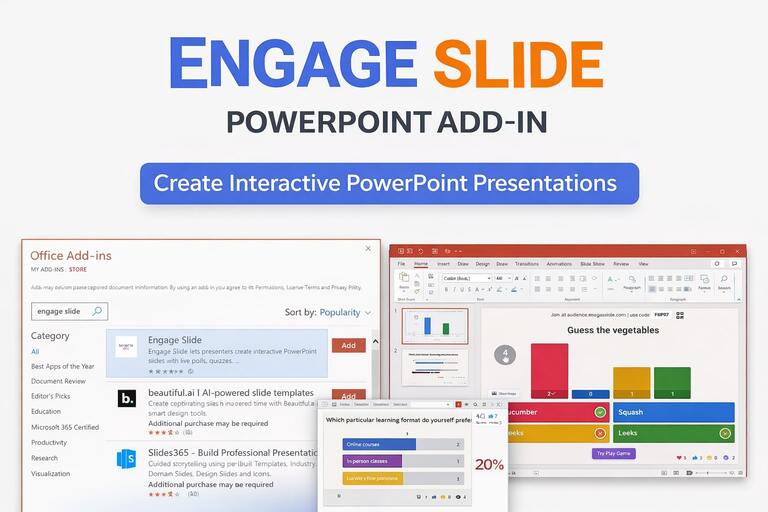
PowerPoint remains the most widely used presentation tool in the world. It is trusted, familiar, and deeply embedded in how people teach, train, and communicate ideas.
However, traditional PowerPoint presentations still struggle with one major limitation: they are mostly one-way.
Presenters speak. Slides advance.
Audience engagement is often assumed—but rarely visible.
Engage slide was built to change that.
With the EngageSlide PowerPoint Add-in, presenters can embed live interaction directly into their PowerPoint slides and turn passive presentations into real conversations—without changing their existing workflow.
What Is Engage Slide?
Engage slide is an interactive presentation platform designed to work natively inside PowerPoint.
Instead of running interactive content on a separate website, engage slide allows you to:
Add live polls, quizzes, word clouds, and Q&A directly into PowerPoint slides
Control interaction while staying in Slide Show mode
Let participants join instantly using a QR code or short PIN
Display real-time results on the presentation screen
Everything happens inside PowerPoint, keeping the presentation smooth and focused.
Why Use a PowerPoint Add-in for Interaction?
Many presenters attempt to increase engagement by switching between PowerPoint and external tools. This approach often causes problems:
Presentation flow is interrupted
Technical issues when switching windows or tabs
Audience confusion about where to look or what to do
Limited control over what is visible on the main screen
Engage slide solves this by being PowerPoint-first
With the engage slide add-in:
Interactive slides live inside your PowerPoint deck
No need to open a browser during the presentation
Presenter remains in full control at all times
The experience feels seamless for both presenter and audience
Key Features of Engage Slide PowerPoint Add-in
Native Slide Integration
Interactive slides created with engage slide behave like real PowerPoint slides. You can reorder them, duplicate them, and present them just like any other slide.
Real-Time Audience Interaction
Audience responses appear instantly on the slide, creating a shared, live experience during the presentation.
Live Polls in PowerPoint with Engage Slide
Live polls are one of the fastest ways to engage an audience during a presentation. With engage slide, polls are embedded directly into your PowerPoint slides and controlled by the presenter.
Typical use cases include:
Icebreaker questions
Quick opinion checks
Instant feedback during meetings or training
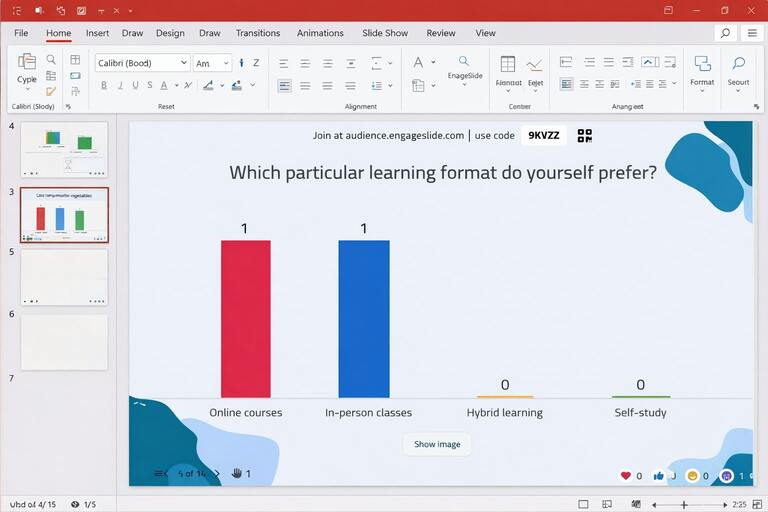
Poll results update in real time, allowing presenters to adapt their message instantly based on audience responses.
Word Clouds for Open Feedback and Ideas
Word clouds help capture open-ended feedback and visualize collective thinking. Engage slide allows presenters to collect text responses and display them dynamically on a PowerPoint slide.
Common scenarios:
Brainstorming sessions
Gathering expectations at the start of a workshop
Summarizing key takeaways
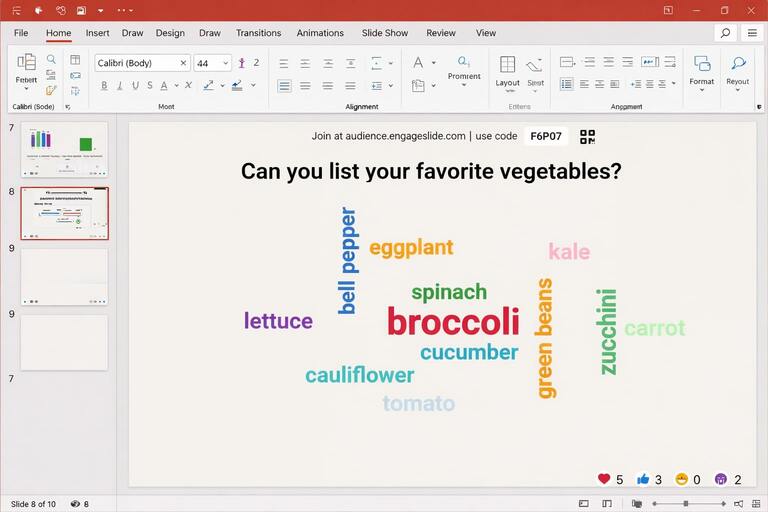
Larger words represent more frequent responses, making patterns immediately visible to the audience.
Interactive Quizzes Inside PowerPoint
Quizzes turn presentations into active learning experiences. Engage slide supports multiple quiz formats that can be used directly within PowerPoint.
Supported quiz types include:
Multiple-choice questions
True / false questions
Puzzle-style quizzes
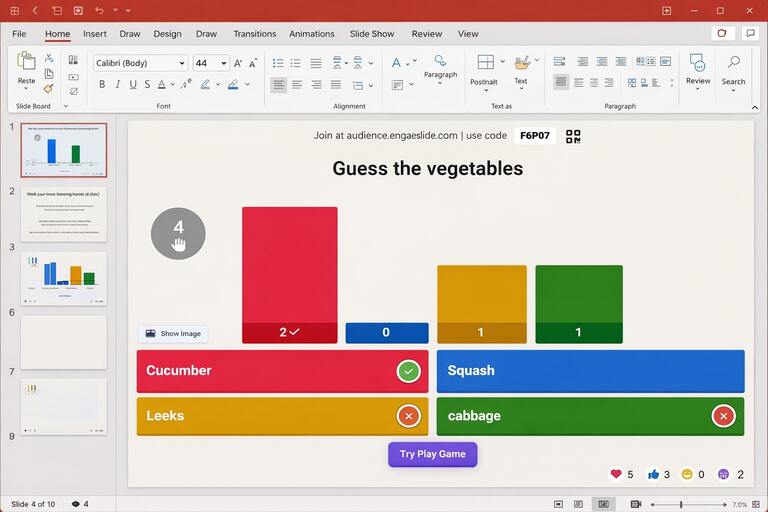
Quizzes are ideal for education, training, and knowledge checks, helping presenters measure understanding in real time.
How to Integrate Engage Slide Into PowerPoint (Step-by-Step)
Step 1: Install the Engage Slide PowerPoint Add-in
Open PowerPoint
Go to Insert → Add-ins
Search for engage slide
Add the add-in to PowerPoint
Step 2: Sign In to Your Engage Slide Account
Log in using your engage slide account
PowerPoint automatically connects to your workspace
Step 3: Create or Select an Interactive Slide
From the engage slide sidebar, you can:
Create new interactive slides
Select slides from your existing library
Each slide automatically generates:
A unique QR code
A short access PIN
Step 4: Embed the Interactive Slide Into Your Deck
With one click:
The interactive content is embedded into your PowerPoint slide
The slide behaves like a normal PowerPoint slide
Step 5: Present and Interact Live
Start Slide Show mode as usual
Audience joins on their own devices
Responses appear in real time
Who Is Engage Slide For?
Engage slide is ideal for:
Teachers and lecturers
Trainers and facilitators
HR and learning teams
Event organizers
Anyone who uses PowerPoint and wants real engagement
Conclusion
PowerPoint does not need to be replaced.
It needs to be enhanced.
The engage slide PowerPoint Add-in transforms static slides into interactive experiences while preserving the tools and workflows presenters already trust.