
Interactive presentations have become essential for educators, trainers, and business teams using Google Slides. Tools like Mentimeter helped popularize live polls and audience engagement—but when working directly inside Google Slides, presenters still face a common friction: switching between tabs and losing animation flow.
That’s where EngageSlide Google Slides add-on changes the experience.
In this article, we compare EngageSlide vs Mentimeter Google Slides integration to help you choose the best solution for seamless audience interaction without disrupting presentation flow.
Why interactive Google Slides matter today
Traditional slide decks are no longer enough for modern meetings and classrooms. Presenters now expect:
- live polls and quizzes
- Q&A participation
- real-time audience feedback
- interactive learning moments
- uninterrupted presentation flow
However, the biggest challenge isn’t adding interaction—it’s keeping interaction inside the presentation instead of outside it.
This is exactly where EngageSlide stands out.
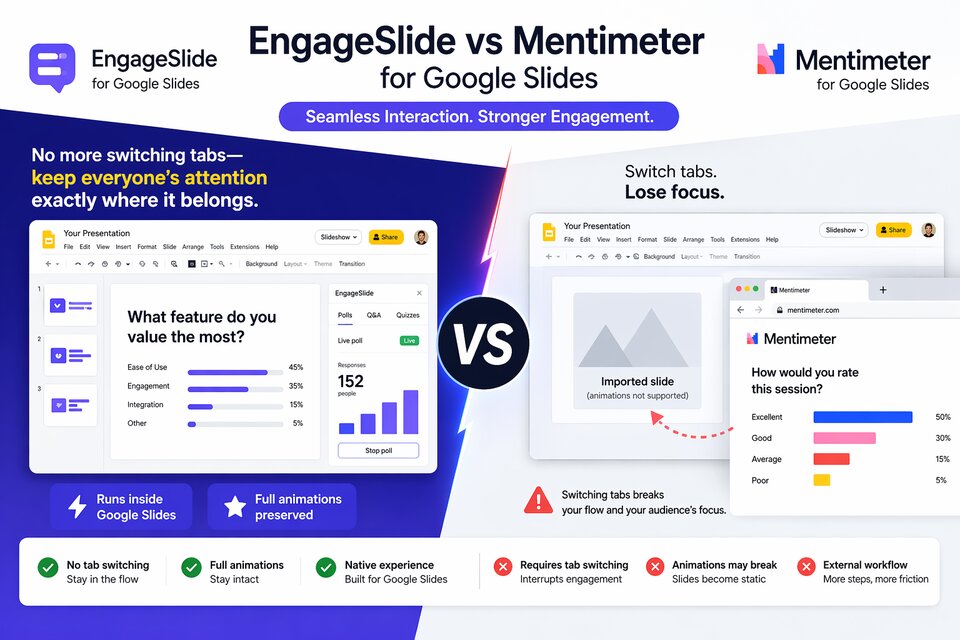
Quick comparison: EngageSlide vs Mentimeter Google Slides add-on
| Feature | EngageSlide | Mentimeter Google Slides workflow |
|---|---|---|
| Runs inside Google Slides presentation | ✅ Yes | ❌ Requires switching contexts |
| No tab switching during presenting | ✅ Yes | ❌ Often required |
| Keeps slide animations intact | ✅ Full animations | ❌ Can convert slides to static images |
| Native Google Slides experience | ✅ Fully integrated | ⚠ Partial |
| Polls, quizzes, Q&A inside slides | ✅ Yes | ✅ Yes |
| Setup complexity | Simple | Moderate |
| Best for live training & workshops | ⭐⭐⭐⭐⭐ | ⭐⭐⭐ |
Mentimeter is powerful—but its Google Slides workflow is not truly native.
The biggest limitation of Mentimeter in Google Slides
Mentimeter allows presenters to integrate interactive slides with Google Slides, but typically this involves either:
- embedding Google Slides into Mentimeter
- importing slides as static images
- switching between presentation environments
Imported slides may lose animation effects entirely because they become static images after import.
In many cases, presenters must switch contexts when running interactive content instead of staying inside Google Slides.
There is also no official native Google Slides add-on maintained by Mentimeter itself, according to university integration guidance.
This creates friction during live presentations.
EngageSlide advantage #1: No more switching tabs—keep everyone’s attention exactly where it belongs
One of the most common presenter mistakes is breaking flow.
Switching tabs during a presentation causes:
- attention loss
- slower transitions
- technical confusion
- reduced engagement
- weaker storytelling momentum
EngageSlide solves this problem completely.
Instead of launching external poll pages or jumping between tools, EngageSlide keeps interaction directly inside the slide deck.
That means:
- presenters stay focused
- audiences stay immersed
- transitions remain smooth
- engagement feels natural
This is especially valuable during:
- corporate training sessions
- workshops
- classrooms
- webinars
- conferences
When interaction happens exactly where content is delivered, engagement increases significantly.
EngageSlide advantage #2: Full animations stay intact
Animations are critical in professional presentations.
They help:
- reveal ideas progressively
- guide attention
- control pacing
- create storytelling flow
- emphasize key points
Many presentation engagement tools break animation support when importing slides.
Mentimeter, for example, may convert imported presentations into static images depending on workflow choice.
EngageSlide keeps animations working exactly as designed.
This creates a major advantage for presenters who rely on:
- build-in diagrams
- step-by-step explanations
- layered storytelling slides
- visual teaching sequences
- product demo walkthroughs
Instead of sacrificing slide quality for interaction, you get both.
A smoother presenting experience inside Google Slides
EngageSlide behaves like a natural extension of Google Slides rather than a separate presentation platform.
This enables presenters to:
- insert polls without leaving Slides
- launch quizzes instantly
- collect audience responses live
- run Q&A sessions inline
- maintain presentation rhythm
Mentimeter, by contrast, is strongest when used as its own presentation environment—not as a deeply embedded Google Slides interaction layer.
So if your workflow starts in Mentimeter, it works great.
But if your workflow starts in Google Slides, EngageSlide is the more seamless option.
Better audience focus = better learning outcomes
Engagement tools should support your message—not interrupt it.
Switching tools mid-presentation introduces cognitive friction for audiences:
They must mentally adjust to:
- new interface layouts
- new navigation flow
- new interaction screens
- different visual context
EngageSlide removes that friction entirely.
Participants interact exactly where they are already paying attention.
This dramatically improves:
- response rate
- retention
- participation confidence
- session energy
Especially in training environments, this difference becomes noticeable immediately.
Faster setup for presenters
Another key difference between EngageSlide and Mentimeter workflows is setup time.
With EngageSlide:
- create slide
- insert interaction
- present normally
With Mentimeter integration:
- prepare Mentimeter slides
- connect presentation sources
- embed or import content
- manage transitions between environments
While still powerful, that workflow adds complexity.
EngageSlide keeps everything simple and slide-native.
Designed for teams already using Google Slides
Many organizations standardize on Google Workspace.
That means presenters prefer tools that:
- work inside Slides
- match existing workflows
- avoid switching presentation platforms
- reduce training time
- minimize technical friction
EngageSlide fits naturally into these environments.
Mentimeter works best when teams are ready to adopt a separate presentation ecosystem.
When Mentimeter may still be the right choice
Mentimeter remains a strong platform for:
- standalone interactive presentations
- large-scale audience polling
- structured training environments
- LMS integrations
- Zoom / Teams embedded sessions
It’s especially effective when the presentation itself is built inside Mentimeter from the start.
However, for Google Slides-first presenters, the experience is less seamless.
Why EngageSlide is the better Google Slides add-on overall
If your workflow starts in Google Slides—and most teams today do—EngageSlide offers a more natural interaction model.
Key advantages include:
✔ No switching tabs during presenting
✔ Full animation support
✔ Native Google Slides experience
✔ Faster setup
✔ Smooth presentation flow
✔ Higher audience attention retention
Instead of adapting your slides to match your interaction tool, EngageSlide adapts interaction to match your slides.
Final verdict: EngageSlide vs Mentimeter for Google Slides users
Mentimeter is an excellent engagement platform.
But when presenting directly inside Google Slides, EngageSlide delivers a more seamless and professional experience.
The ability to run interactions without switching tabs and keep full slide animations intact makes a measurable difference in audience focus, presenter confidence, and session quality.
If your presentations live in Google Slides, EngageSlide is the smarter choice for interactive delivery.