
Breakout sessions are supposed to be the most active part of a workshop or meeting. Small groups, real conversation, everyone gets a voice. In practice, many of them go quiet: people land in a room, nobody is sure what the task is, one person talks, and ten minutes later the facilitator pulls everyone back for a report-back that turns into five rambling summaries nobody remembers. Breakout session engagement is rarely lost inside the room. It is lost in the minute before the room opens and in the ten minutes after it closes. This guide shows how to design both ends so small groups stay focused and their ideas actually land with the whole group.
Why breakout sessions lose energy
Small groups should be easier to engage than a big audience, so when they stall, the cause is usually structural rather than personal. The four most common failure points are:
- A vague prompt. "Discuss onboarding" gives a group nothing to finish. Groups need a question and a clear deliverable.
- No visible clock. Without a time limit, groups either rush or drift, and the facilitator ends up interrupting mid-sentence.
- Uneven airtime. In groups larger than five or six, a few voices dominate and the rest relax into listening. Psychologists call the effort drop social loafing, and it grows with group size.
- A report-back that repeats everything. If each group summarises its whole discussion out loud, the last group speaks to a tired room and the best ideas get buried.
The fix is not more energy from the facilitator. It is a tighter design: a crisp brief, a fixed output, and a report-back where every group's answer appears side by side.
Before the rooms open: brief with one card per group
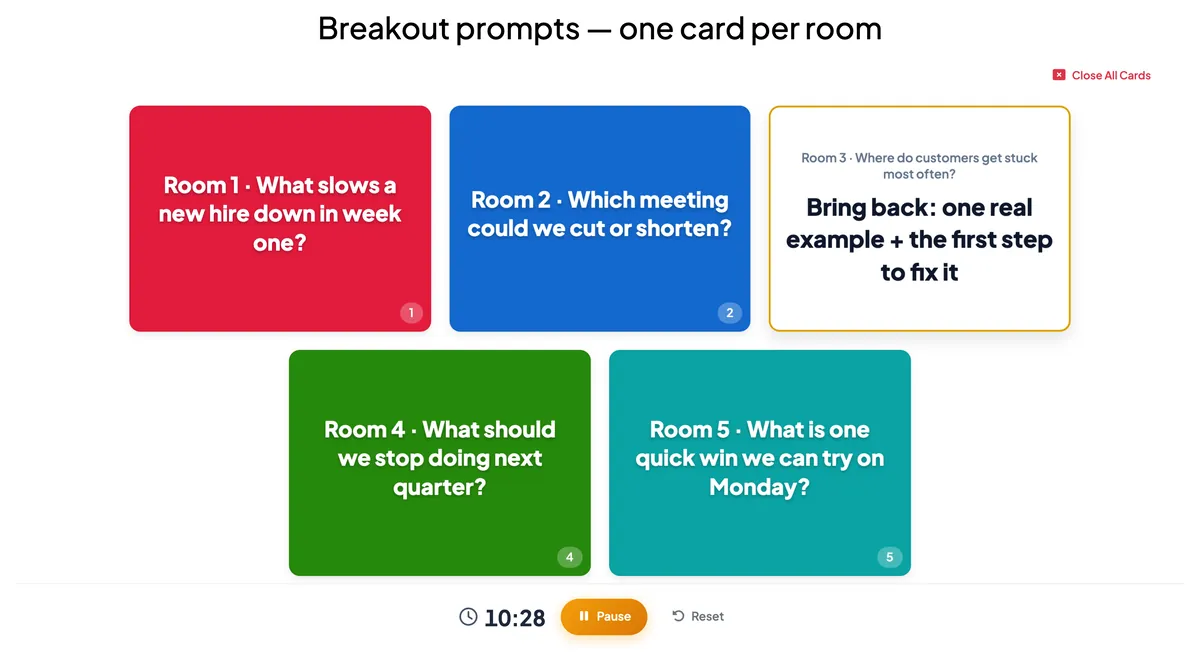
The single biggest improvement you can make is to give each group a question and the exact thing it should bring back. "Where do customers get stuck?" becomes "Where do customers get stuck? Bring back one real example and the first step to fix it." A defined output gives the group a finish line and makes the report-back short by design.
In EngageSlide, a Flip Cards slide in the Question & answer card style works well for this. Each coloured card shows one room's question; click it and it flips to reveal what that room should bring back. You can add up to nine cards, and the optional count-down timer starts when you open a card, so the brief and the time limit arrive together. Participants who have joined also see the open card up close on their phone, which helps when someone lands in their room and asks, "What was our question again?"
A few briefing habits make the cards work even harder:
- Name a role in each group. Ask for a timekeeper and a reporter before anyone leaves. The reporter is the one who submits the answer later.
- Keep groups to three to five people. It is the simplest way to stop one or two voices taking over, and it is the same logic behind think-pair-share: think alone first, then share in a small group.
- Paste the prompt into the chat too. If you run rooms in Zoom or Microsoft Teams, a copy in the chat means nobody depends on memory.
While the groups work: the rooms are yours, the output is EngageSlide's
A quick point of honesty about tools: EngageSlide does not create video breakout rooms. The rooms themselves happen in Zoom, Microsoft Teams, Google Meet, or physically at tables around a training room. What EngageSlide gives you is everything around them: the brief, the timer, and the shared place where each group's output lands. Because participants join on their own phone or laptop with a code or QR code, that connection stays open while they are in their room.
Give every group a timer it can actually see
Once people leave the main call, they can no longer see your shared screen. That matters for timing. A Countdown slide is perfect for in-room table work and breaks, but it only appears on the presenter's screen. For remote breakouts, put the clock on the phones instead: an Open Ended slide with a Time limit shows a countdown bar on every participant's phone, and when it reaches zero, submissions stop automatically. Groups always know how much time is left, wherever they are.
Ask for the output while the room is still open
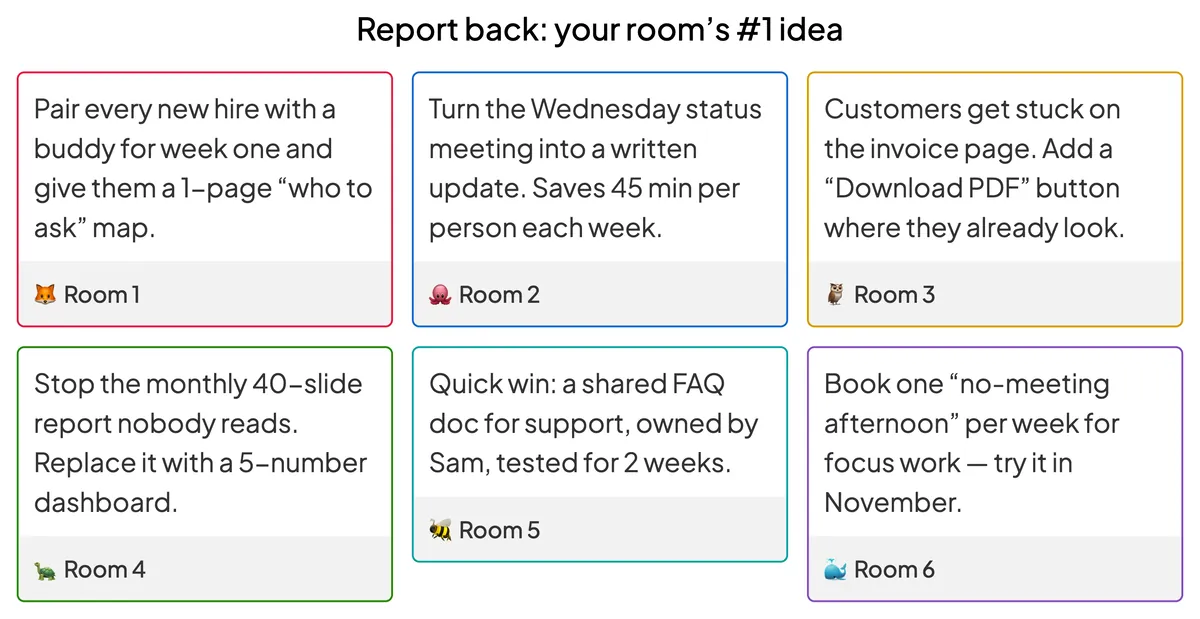
Instead of waiting for groups to return and talk, ask each reporter to submit the group's answer from inside the room. Turn on Allow the audience to enter their name on the Open Ended slide and tell reporters to type their room name ("Room 3") as their name. Each answer then appears on a card labelled with its group. Two settings matter:
- Hide result. Keeps the wall empty while groups write, so early answers don't influence late ones. You reveal everything at once with Show result when the room is back.
- Multiple Submissions. Leave it on if groups may send more than one idea; turn it off for one answer per person when only reporters should submit.
The report-back: from five monologues to one shared wall
This is where most breakout sessions lose the room, and where a shared screen helps most. When everyone returns, reveal the Open Ended wall. Every group's output is on screen at the same time, as a colour-bordered card with the room name, and you can click a card to open it large while that group adds thirty seconds of context.
The order of a strong report-back looks like this:
- Reveal the wall. Give everyone 60 seconds to read every answer silently. Reading beats listening to five summaries.
- Spotlight, don't recite. Ask one or two groups to expand on their card instead of having every group read its answer out loud.
- Let the room prioritise. Add the shortlisted ideas as options on a 100 Points slide (each person spreads 100 points across them) or a Ranking slide, so the session ends with a clear top choice rather than "great discussion, everyone."
- Collect the leftover questions. Open a Q&A slide where people can ask other groups questions anonymously and upvote the ones they most want answered.
A breakout session is only as good as its report-back. Give every group a question with a defined output, collect that output in one shared place, and let the whole room see and rank it together.
Breakout formats that keep small groups engaged
Mix the format to match the goal of the session. These four combinations use real EngageSlide slide types and work for both in-person tables and video-call rooms.
1. The problem-solving sprint
Flip Cards brief (one challenge per room) → 10 minutes in rooms → Open Ended report-back with a time limit → 100 Points vote on which fix to try first. Ideal for strategy days and team offsites.
2. The one-word pulse
After a short discussion, each person submits one word on a Word Cloud describing their group's conclusion or mood. Repeated words grow larger, so patterns across rooms show up in seconds. For more prompt ideas, see our guide on how to brainstorm with a live word cloud.
3. The team challenge
Send groups away to prepare, then bring them back for a quiz in Team quiz mode. Players pick their team when they join, every correct answer counts for the team, and the Leaderboard switches to a team ranking. Choose Average points scoring if groups are different sizes. Our comparison of team quizzes versus individual quizzes explains when each format works best.
4. The retrospective breakout
For agile teams, small groups can discuss one sprint theme each, then everyone adds notes to a Remote Retro slide, votes, and agrees on action items with owners. The phases are guided from the big screen, so the whole team stays on the same step.
A quick checklist for your next breakout session
- Prompt: one question per group, plus "bring back…" with a concrete deliverable.
- Size: three to five people per group, with a named timekeeper and reporter.
- Time: a visible clock: Countdown for in-room tables, an Open Ended time limit on phones for remote rooms.
- Output: reporters submit from inside the room, labelled with their room name.
- Report-back: reveal all answers at once, spotlight one or two, then let the room rank them.
- Close: end with a decision, an owner, or a question queue, not just applause.
If you run your sessions over video calls, our walkthrough on how to add a live quiz to Zoom meetings covers screen sharing and joining by link in more detail. Breakout sessions don't need a new platform to work better. They need a clear brief, a visible clock, and a report-back everyone can see. Build all three in one deck with the EngageSlide interactive presentation tool and your next small-group activity will end with ideas the whole room remembers.