

Most quiz questions split a room in two: the people who knew it and the people who didn't. Estimation questions don't. Ask "How tall is the Eiffel Tower?" and nobody types a perfect 330 m, but almost everybody gets close enough to feel smart. Even the wild 900 m guess gets a laugh when it lands far out on the number line. That is why estimation questions are the friendliest question format you can put in a live quiz, and why they make one of the best openers in any session.
This guide explains what estimation questions are, how the Estimate quiz works in EngageSlide (the slider on every phone, the scoring, and the number-line reveal), how to set one up in a couple of minutes, and how to write estimation questions that start a real conversation.
What estimation questions are
An estimation question asks for a number nobody is expected to know exactly: a height, a distance, a year, a price, a count. Instead of picking from four options, players give their best guess, and the scoring rewards how close they got rather than whether they matched one right answer.
That small change does a lot of work:
- Everyone can answer. There is no "I have no idea" option, so quieter players and newcomers answer as confidently as the experts.
- Being wrong is not losing. A guess that is off by a little still earns most of the points, so people stay in the game.
- The reveal is a story. You don't just learn the answer. You see where the whole room stood, who was closest and how far the crowd drifted.
- It starts discussion. "Why did half of you guess under 200?" is a much better question than "Who got it right?"
How an Estimate question plays in EngageSlide
In EngageSlide, estimation questions are a quiz type called Estimate. You add it from the Quiz tab of the slide picker, just like a multiple-choice question, and it lives inside any interactive presentation next to your polls, word clouds and other quiz slides. Players join by QR code or join code on their phones, and the points go straight into the normal quiz leaderboard.
On the phones: a slider with no starting value
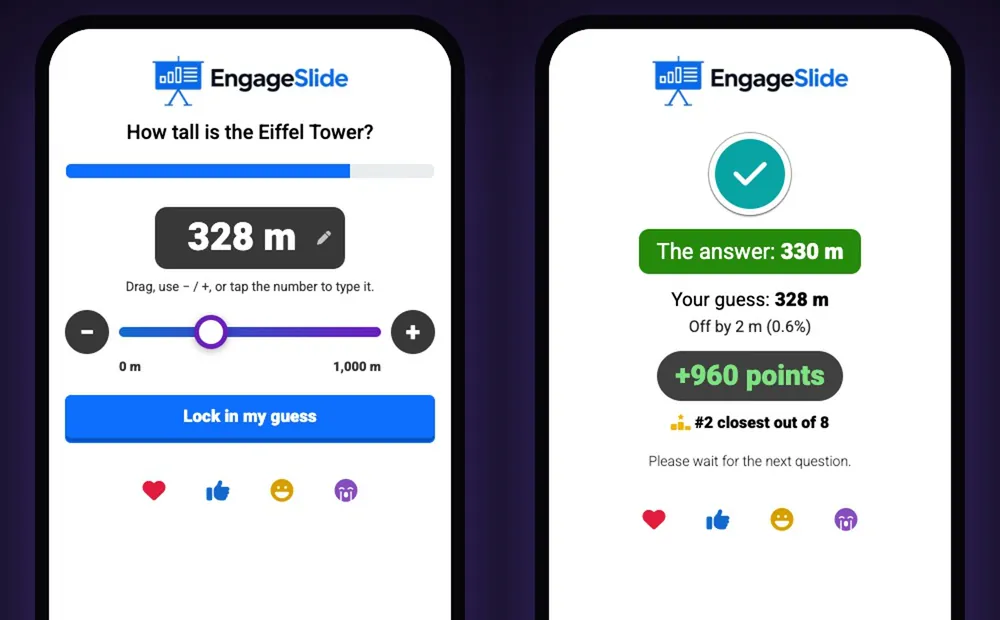
Each player sees the question and a slider between your minimum and maximum. They can drag it, nudge it with the − and + buttons, or tap the number and type it in. Then they press Lock in my guess. The slider starts with no value on purpose: if it started at the midpoint, many people would settle near that number without really thinking, which is the classic anchoring effect.
When the answer is revealed, every phone shows a personal result: the correct answer, their guess, how far off they were (in units and in percent), the points they earned and their rank, such as "#2 closest out of 8".
On the big screen: every guess on a number line

While people are guessing, the big screen shows the question, your picture or video (or a large "?") and an empty axis, so nobody can copy the crowd. When time is up, the reveal plays in steps. Every guess drops onto the number line as a player avatar. Then the crowd median appears. Then the real answer slides in from the median with a count-up, a green band marks the scoring zone, and gold, silver and bronze rings mark the three closest guesses. Finally, stat cards sum it up: the answer, the crowd average and median, how many players scored, and the closest guesses by name.
This is the moment rooms remember: players hunt for their own avatar and cheer the person who landed 2 m away.
How to set up an estimation question
Setup takes a couple of minutes. A new Estimate slide even comes with a sample question (the Eiffel Tower, 0–1,000 m) so you can see how it works before you change anything.
1. Write a question with one real number
Type your question and enter the correct answer. Add a unit such as m, km, people, years or $. Units can go after the number (330 m) or before it, which reads better for currencies ($1,200).
2. Choose the slider range
Set the minimum, maximum and step. If the answer sits right in the middle, people guess the middle and get lucky. Pick a range that is believable at both ends and puts the answer somewhere off-centre. For the Eiffel Tower, 0–1,000 m works well. 300–350 m would give the answer away.
3. Pick linear or logarithmic
Linear is right for most questions. Choose logarithmic when the range is huge, such as 1 to 1,000,000. On a log slider, small numbers get as much room as big ones, so a player who thinks "about 2,000" can aim as precisely as one who thinks "about 800,000".
4. Decide who scores points
The Who scores points setting controls how forgiving the question is. Choose Exact (only the exact answer scores), ±2%, ±5%, ±10% or Everyone. The percentage is a share of the slider range, so ±5% on a 0–1,000 m slider means guesses within 50 m of the answer score. A spot-on guess earns full points, and the points fall smoothly to zero at the edge of the band. The editor spells the rule out, for example "Full points at 330 m, falling to 0 at 280 m – 380 m".
As a rule of thumb, use ±10% or Everyone for openers and mixed groups, ±5% for a normal quiz round, and ±2% or Exact for experts who like a challenge.
5. Add a picture or video (optional)
Estimation questions shine with a visual: a photo of a crowd ("How many people are in this picture?"), a jar of sweets, a map or a product. Use Add Question Image for a picture, or paste a YouTube or .mp4 link into Video (optional) to play a clip on the big screen while players guess. Set the timer and points like any other quiz question. New Estimate slides start with the speed bonus off and a 30-second timer, because a good estimate needs a moment of thought.
Why estimation questions work as an opener
The first question of a session sets the mood. A tricky multiple-choice question can leave half the room feeling stupid before you've even started. An estimation question does the opposite.
- It is safe. Nobody is completely wrong, so even the most nervous participant answers.
- It gets every phone connected. One easy question at the start checks that everyone has joined before the content that matters.
- It shows the room to itself. The number line shows at a glance whether people are optimistic, cautious or all over the place.
- It shows off the wisdom of the crowd. In 1906, Francis Galton found that the median guess of nearly 800 fairgoers for the weight of an ox was within 1% of the true weight, an idea now called the wisdom of the crowd. Your crowd median often lands surprisingly close too, and pointing it out is a great talking point.
A good estimation question is not about who knows the answer. It is about how close the whole room can get, and that turns a test into a shared game.
Tips for writing good estimation questions
- Make the answer surprising. The best questions have an answer people underestimate or overestimate together, such as how many steps it takes to climb the Eiffel Tower or how many emails the average office worker gets a day.
- Tie it to your topic. In a sales kick-off, ask for last quarter's number of new customers. In a science class, ask for the speed of sound. The reveal then leads straight into your content.
- Use a reliable source. Check the answer before the session and be ready to say where it comes from. Someone will ask.
- Keep the range honest. Match the scoring band to how hard the question is; wide ranges with Exact scoring frustrate people.
- Talk about the spread. After the reveal, ask the closest player how they reasoned, and ask the room why the guesses clustered where they did.
- Mix it into a quiz. One or two Estimate questions between multiple-choice rounds change the rhythm and give everyone a fresh chance to climb the leaderboard.
Put it into your next session
Start with one estimation question as your opener, then build the rest of the quiz around it. If you want help with the bigger picture, read our guide on how to create a live quiz your audience will actually enjoy, or pick a format from these live quiz ideas for meetings and classes. For step-by-step help with every setting, see the Estimate quiz guide in the Help Center, and browse the EngageSlide blog for more ideas.
Cover photo: "Jelly Beans" by Sir Mildred Pierce via Wikimedia Commons, licensed CC BY 2.0.
.jpg)