
Two teams finish the quiz on the same score. Three projects get exactly the same number of votes. Two volunteers both want to present first. Ties happen in every session, and the way you settle them matters more than it seems: a tie-breaker that looks improvised or rigged can sour the mood faster than losing would. A good one is quick, visible to everyone and agreed before anybody knows who it helps. Here are six tie-breaker ideas you can run live on the big screen, when each one feels fair, and exactly how to set them up in EngageSlide.
What makes a tie-breaker feel fair
People rarely argue with the outcome of a tie-breaker. They argue with the process. Research on procedural justice shows that people accept a result much more easily when they believe the way it was reached was neutral and transparent. For a room decision, that comes down to four things:
- Agreed in advance. Announce the tie-breaker before the tie exists, ideally when you explain the rules. A method chosen after you know who is tied always looks like favouritism.
- Visible to everyone. If only the host sees the coin or the slip of paper, half the room will wonder. Put the moment on the big screen.
- Nobody knows the outcome early. Not the players, not the host. Randomness has to happen in the open, at the last moment.
- Matched to the stakes. Pure luck is fine for who presents first. For a prize won on knowledge, a skill-based decider often feels fairer.
6 tie-breaker ideas you can run live
1. Rock Paper Scissors: a duel the whole room can watch
The playground classic is still the best-known way to settle a tie, and the Rock Paper Scissors slide turns it into something the whole room can follow. Players pick rock, paper or scissors on their phones, the big screen chants “Rock… paper… scissors…” and throws its own hand, chosen at random at the moment picking closes. Beat the screen or tie it and you stay in; lose, or forget to pick, and you are out.
For a tie-breaker, the setting that matters is Final duel (on by default). When two players are left from a game that started with three or more, they stop playing the screen and play each other: a win scores a point, a tie scores nothing, and the first to 2 points wins. Both picks are locked in on the phones and revealed together, so nobody can claim the other saw their hand first.

If only the two tied people join, there is no duel: they both keep playing the screen until one of them loses. That is still fair, because the screen is a neutral opponent, and if both lose on the same throw nobody goes out and the room throws again. For a tie between two teams, let everyone on both teams play; the last one standing wins it for their side. Our guide to Rock Paper Scissors for the whole room covers the full game.
2. Heads or Tails: a coin call with nothing hidden
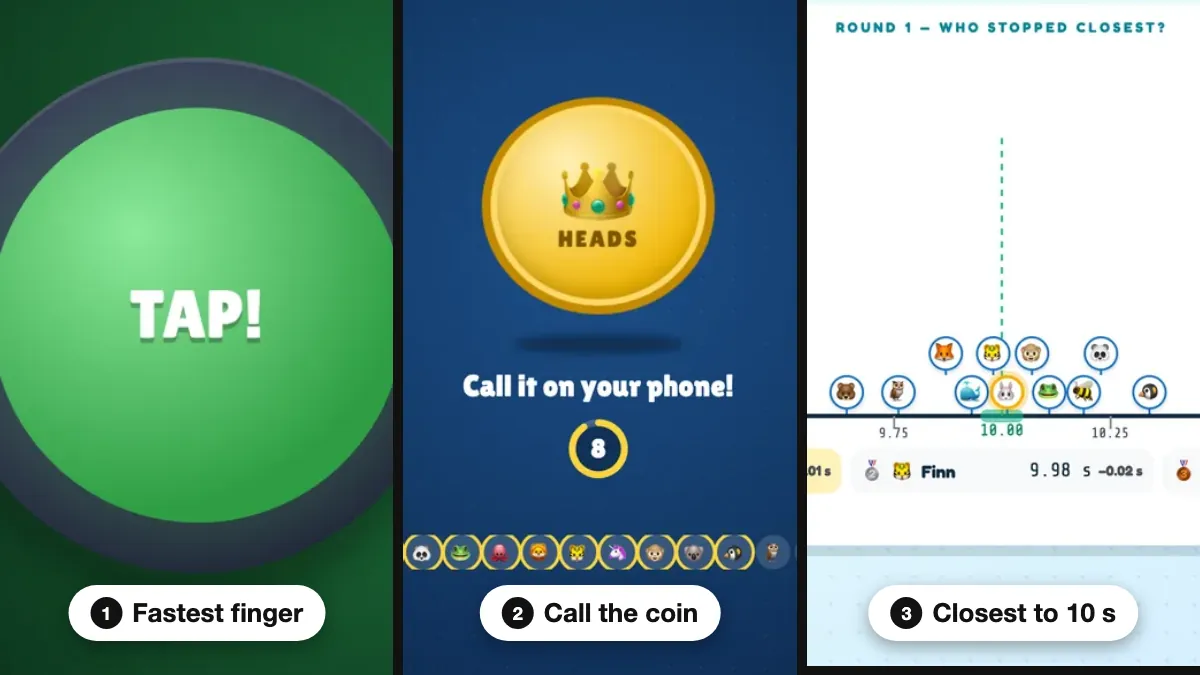
A coin toss is the classic fair decider, but a real coin flipped by the host is easy to doubt. The Heads or Tails slide puts a big gold coin on the screen instead. Everyone still in calls heads or tails on their phone while side panels count the calls live, then the coin spins and lands. The side is picked at random when calling closes, and wrong calls (or no call) are out.
Use Play until to decide how many winners you need: 1, 2, 3, 5 or 10. That suits several people tied for a few spots, such as five people tied for three prizes. If everyone still in calls it wrong, nobody goes out and the coin flips again, so the game never ends with no winner. The Heads or Tails game guide shows every screen.
3. Spinner Wheel: when the tie is between options, not people
Sometimes the tie is between topics or teams wanting the first slot. The Spinner Wheel is the simplest answer: type the tied options in the box next to the wheel, one per line, and press SPIN. The wheel turns for about six seconds while the box flicks through the entries, then a Congratulations! card shows the winner. Every entry has the same chance on every spin.
Two details keep it fair. Winners are not removed automatically, so if you are drawing an order, delete the winning line before the next spin. And for a tie between specific people, type just their names: Allow the audience to participate adds everyone who joins with a name, which suits a room-wide draw rather than a tie.
4. Stop the Clock: closest to 10 seconds
When a tie comes out of a knowledge quiz, some players will grumble if the decider is pure luck. Stop the Clock adds a little skill. A clock starts on every phone, disappears after a few seconds, and players tap STOP when they think it reads exactly the target. The closest stop wins.
For a tie-breaker, set Rounds to 1 and keep the default 10-second target. The time is measured on each player's own phone, so a slow connection does not hurt anyone, and the reveal shows every stop on a number line around 10.00 for the whole room to see. Over several rounds the winner has the smallest average miss, and a tie on that goes to the best single stop.
5. Quick Draw: fastest reaction wins
Quick Draw makes the game-show fastest-finger decider honest. Every phone and the big screen turn red, then green after a random wait; players tap as fast as they can and their reaction time appears in milliseconds. The phone measures the time between its own green screen and the tap, so network delay does not decide the result.
Tapping on red, or faster than 100 ms (a guess, not a reaction), counts as a false start. Choose 3 rounds for a tie-breaker; the lowest average wins and a tie goes to the faster single reaction. Turn on Fake-outs if your finalists are the competitive type.
6. A quick poll: let the room break the tie
If two ideas or team names are level, the fairest answer may be a second, simpler vote. Add a Poll with only the tied options, turn on Hide result so early votes do not sway late voters, and set a short Time limit. When time is up, press Show result. A runoff between two options almost always produces a clear winner, and nobody can say the room did not choose.
Which tie-breaker fits which tie
The right method depends on who is tied and what is at stake:
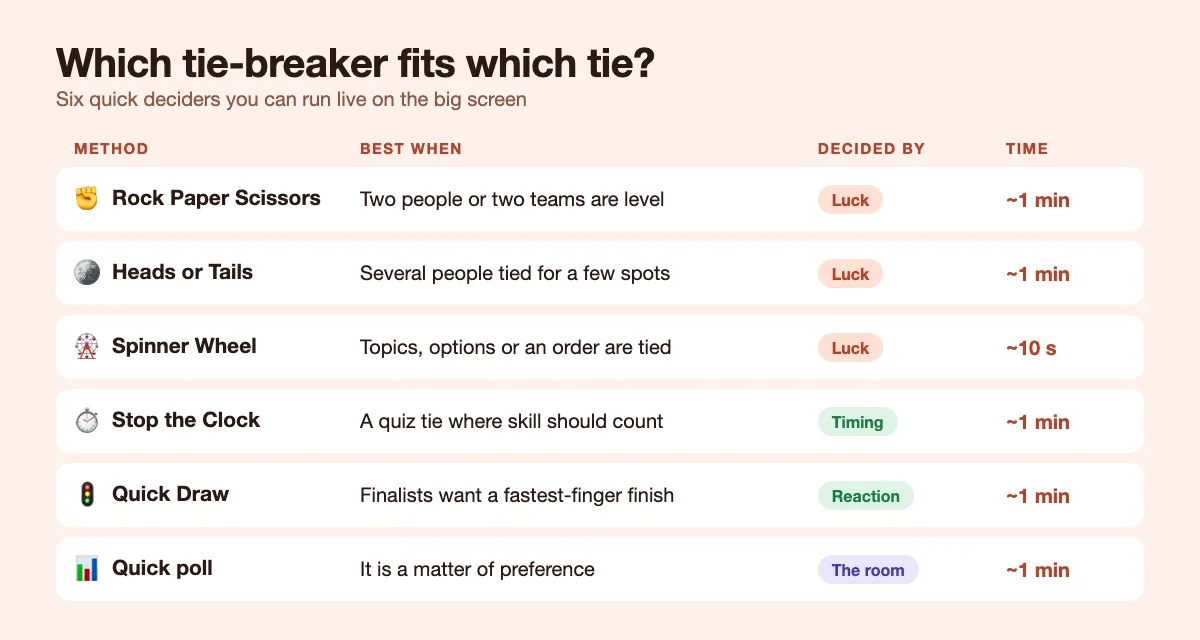
- Two people or two teams, low stakes: Rock Paper Scissors or Heads or Tails.
- Several people tied for a few spots: Heads or Tails with Play until set to the number of spots.
- Options, topics or an order: Spinner Wheel.
- A tie that came out of a quiz: Stop the Clock or Quick Draw, so skill still counts.
- A question of preference: a runoff poll.
How to run a tie-breaker live without losing the room
- Add it before you need it. Put the tie-breaker slide right after your leaderboard or vote slide. If there is no tie, simply skip it.
- Say the rule out loud at the start. "If we have a tie, it goes to a Rock Paper Scissors duel." One sentence removes every later argument.
- Bring everyone into the moment. Only the tied players play, but everyone watches. Read the screen out and let the room react.
- Keep it under two minutes. A tie-breaker that drags turns a fun moment into a delay.
- Accept the first result. No "best of five" once someone has lost. The rule you announced is the rule you play.
A fair tie-breaker is not about the method. It is about agreeing on it before the tie, showing it to everyone, and letting nobody, including the host, know the result in advance.
These games sit in the Games tab of the slide picker and keep their own results screen, so a tie-breaker never changes the quiz scores you are deciding between.
Common tie-breaker mistakes to avoid
- Hiding the randomness. A name pulled from a bag behind the laptop is fair in theory and suspicious in practice.
- Letting the losers redo it. One re-run invites another, and the room loses patience.
- Using luck for high stakes. For a prize earned on knowledge, give players a skill-based decider or a sudden-death tiebreaker question.
Ties are a gift if you are ready for them: a minute of suspense the whole room shares. For more ideas, browse the EngageSlide blog.