
Somewhere around the twentieth slide, most audiences quietly check out. Gamification is the fastest, most reliable way to pull them back — not with gimmicks, but by giving people a reason to lean in, answer, and compete. When you add points, streaks, and a live leaderboard to a presentation, passive watching turns into active playing. This guide explains why those simple mechanics work so well, which ones actually move the needle, and exactly how to add them to any talk using EngageSlide's interactive presentation tool — plus the traps that make gamification backfire.
What "gamification" really means in a presentation
Gamification is the use of game design elements — points, levels, challenges, rewards, competition — in non-game settings. In a presentation it doesn't mean turning your quarterly review into Mario Kart. It means borrowing the small feedback loops that make games hard to put down: a clear goal, an instant score, a visible ranking, and a reason to try the next question. Done right, it makes learning stickier and meetings livelier without changing your actual content.
The mechanics are deliberately simple. A question appears, everyone answers from their phone, the correct answer is revealed, points are awarded, and a leaderboard shifts in real time. That single loop — ask, answer, reveal, score — is the engine behind almost every engaging quiz you've ever played.
Why points and leaderboards actually work
Games hook us because they satisfy real psychological needs. Self-determination theory, one of the most cited frameworks in motivation research, argues that people are driven by three things: competence, autonomy, and relatedness. Good gamification hits all three — you feel yourself getting better (competence), you choose how to answer (autonomy), and you're doing it alongside everyone else in the room (relatedness).
The specific mechanics tap specific drivers:
- Points give instant feedback. A number appears the moment you answer, so effort has a visible, immediate payoff — the same dopamine loop that keeps people tapping in mobile games.
- Leaderboards create healthy competition. Seeing your name climb (or slip) makes the next question suddenly matter. Even people who "don't care about winning" answer faster when a ranking is on screen.
- Streaks and speed bonuses reward focus. Getting three in a row, or scoring more for a fast correct answer, encourages people to stay locked in rather than half-listening.
- Reveals trigger curiosity. The short gap between "everyone has answered" and "here's the right answer" is a tiny suspense moment — an open loop the brain wants closed.
The goal of gamification isn't to make people compete — it's to make them participate. Competition is just the most convenient excuse to get everyone answering at once.
If you want to go deeper on what makes people raise their hands in the first place, our breakdown of the psychology of audience engagement pairs well with this piece.
The core game mechanics you can add in EngageSlide
You don't need a developer or a separate app. Everything below is built into EngageSlide and runs live while you present, with the audience joining instantly by scanning a QR code or entering a join code.
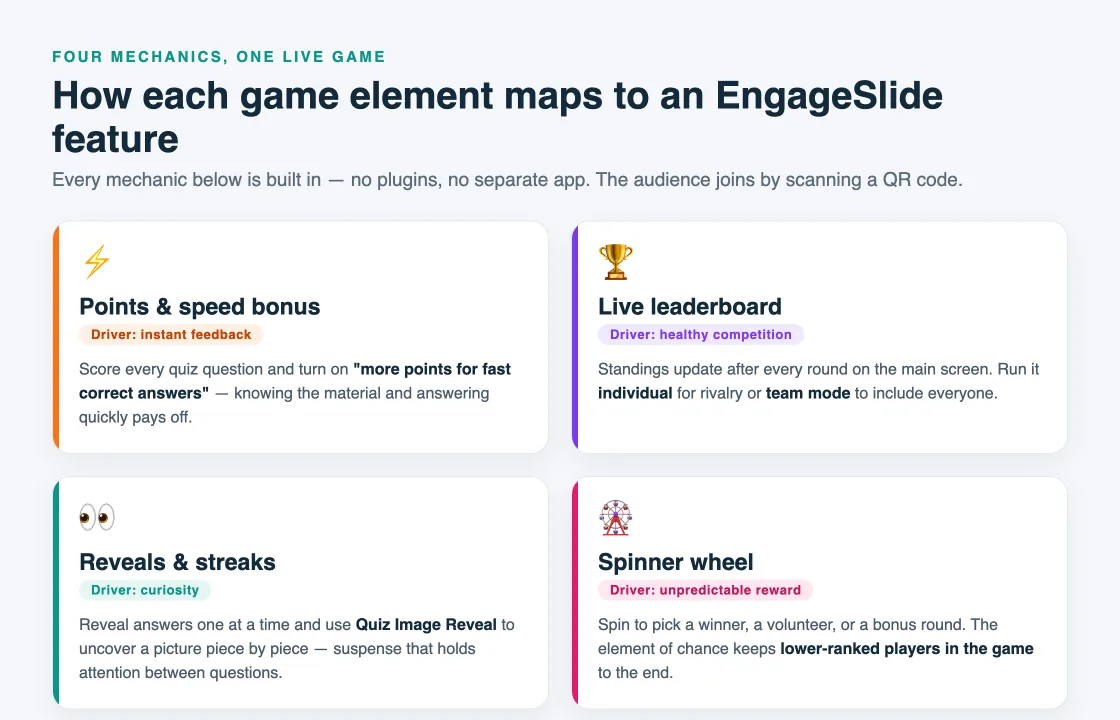
Points and speed bonuses
Turn any question into a scored quiz. In the quiz slide settings you can enable "More points for fast correct answers," so responders who know the material and answer quickly earn more than those who wait. That single toggle transforms a flat multiple-choice question into a race, and it rewards genuine recall rather than guessing after the crowd.
Live leaderboards — individual and team
The leaderboard is the heart of any gamified session. After each question, EngageSlide updates the standings on the main screen so everyone sees who's ahead. You can run it as an individual ranking for a competitive edge, or switch to team mode so tables, departments, or breakout groups compete together — which lowers the pressure on shy participants while keeping the energy high. For a step-by-step setup, see our guide on how to add a leaderboard to your quiz.
Streaks, reveals, and curiosity gaps
Pacing is a mechanic too. Reveal answers one at a time, let the correct-answer bar light up before you explain it, and use a Quiz Image Reveal slide — where a hidden picture uncovers piece by piece — to build anticipation. These small suspense moments keep attention between questions, not just during them. For inspiration, our list of live quiz ideas shows a dozen formats you can drop in.
Random rewards: the spinner wheel
Predictable rewards lose their spark; unpredictable ones don't. Drop in a spinner wheel to randomly pick a winner, a volunteer, or a bonus-point round. The element of chance adds a jolt of excitement and gives lower-ranked players a reason to stay engaged right to the end, because anyone can still get lucky.
Competition or collaboration? Choose the right frame
Not every audience should be pitted against each other. Individual leaderboards work brilliantly for training cohorts, sales kickoffs, and classrooms where a little rivalry is fun. But for cross-functional meetings, onboarding, or anxious groups, team mode is usually the better call — people who'd never fight for the top spot alone will happily play for their table. The mechanics are identical; only the framing changes. Read the room, and match the format to the stakes.

How to gamify your presentation in five steps
- Pick your moments. Don't gamify everything. Choose two or three points in your talk — after a key concept, before a break, at the finale — where a scored question will land hardest.
- Write questions with one clear answer. Points need a right answer. Use multiple choice, true/false, or type-answer questions, and keep them tied directly to what you just taught.
- Turn on scoring. Enable points and the speed bonus, and decide up front whether you're running individual or team play.
- Show the leaderboard between rounds. Let the standings breathe. A five-second pause on the leaderboard, with a bit of commentary, is where the energy actually spikes.
- End on a high. Save your best question for last, or run a spinner-wheel bonus round, so the session finishes on a laugh and a winner rather than trailing off.
When gamification backfires — and how to avoid it
Points can hurt as easily as they help if you overdo them. Watch for these common mistakes:
- Competition over content. If people are gaming the leaderboard instead of thinking, your questions are too easy or too frequent. Fewer, better questions beat a constant stream of trivia.
- The same people always win. A runaway leader kills motivation for everyone else. Mix in team rounds, a spinner-wheel wildcard, or a final double-points question so the standings stay open.
- Public embarrassment. Leaderboards should motivate, not shame. In sensitive groups, use team mode or anonymous nicknames so no individual is singled out for last place.
- Gamifying the wrong meeting. A points race during a somber or high-stakes discussion feels tone-deaf. Save the leaderboards for training, teaching, and celebration.
Putting it all together
Imagine a 45-minute training session. You open with a quick live poll to warm the room up, teach for ten minutes, then fire a three-question scored quiz with speed bonuses on. The leaderboard appears, teams jockey for position, and you reveal answers one at a time. Halfway through you spin the wheel to hand a bonus round to a random table. You close with a final double-points question that reshuffles the top three, then crown the winners. Same content you always deliver — but nobody checked their phone for anything except answering.
That's the real promise of gamification: it doesn't replace your message, it delivers it to an audience that's finally paying attention. Start small with a single scored quiz and a leaderboard, watch the room wake up, and add mechanics from there. When you're ready to build your first one, head to the EngageSlide blog for more playbooks, or jump straight into the interactive presentation tool and turn your next talk into something people actually want to play.