
Ask a team "Any concerns?" at the end of a meeting and you'll usually get silence, a couple of nods, and the same confident person saying everything's fine. Then the real feedback shows up later — in a private message, an exit interview, or a project that quietly slips. Silence in a meeting is rarely agreement. It's usually a sign that speaking up feels risky, pointless, or simply impossible to fit in. The good news: you can change that with a few deliberate changes to how you ask. This guide covers why teams hold back, a repeatable 15-minute feedback block you can drop into any regular team meeting, and how to run it with anonymous polls, scales and upvoted Q&A in EngageSlide.
Why teams don't give honest feedback in meetings
People aren't being difficult when they stay quiet. They're making a reasonable calculation about cost and benefit. Researchers call the missing ingredient psychological safety — the shared belief that it's safe to take interpersonal risks. In practice, four blockers show up again and again.
- Status. Nobody wants to contradict the manager, or the most senior engineer, in front of peers.
- Social proof. Once the first two people say "looks good", disagreeing means standing against the room.
- Air time. A few confident voices fill every pause, and quieter people never find a gap.
- Futility. "We raised this last quarter and nothing happened." If feedback disappears, people stop giving it.
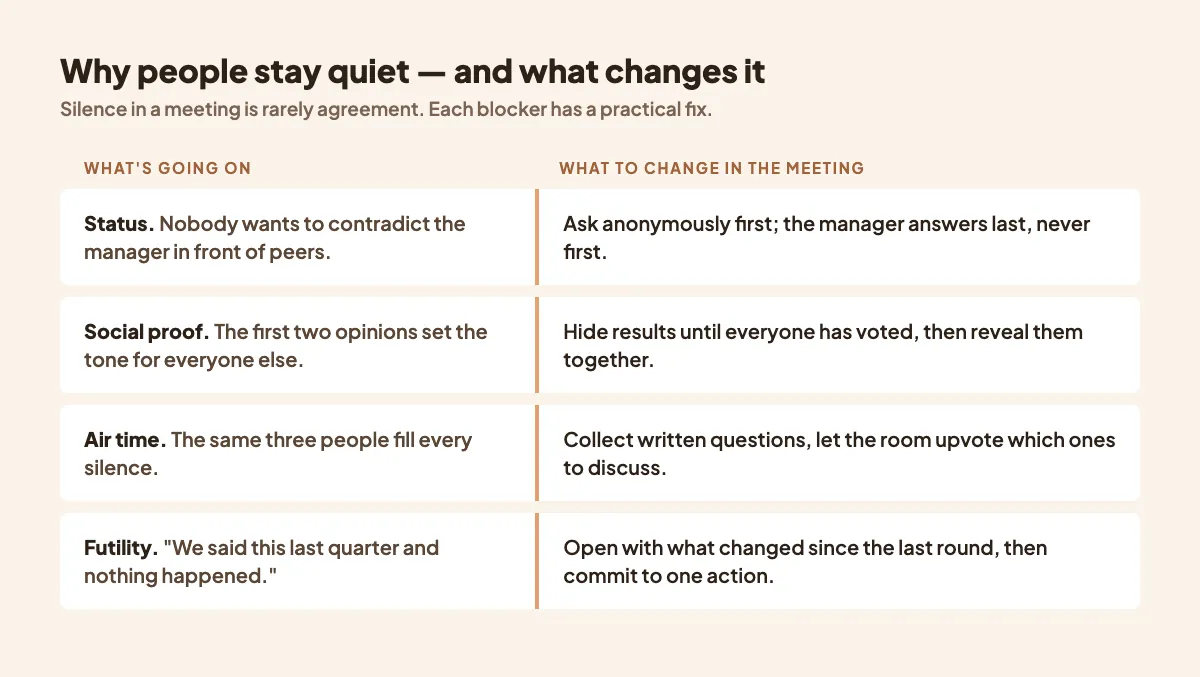
Each blocker has a practical fix, and none of them require a culture overhaul. They require changing the mechanics of the conversation.
Five principles for honest team feedback
1. Ask before anyone speaks
Collect answers individually first, then discuss. When everyone commits an answer before hearing others, you remove social proof and status in one move. This is the single biggest change you can make.
2. Make it anonymous when the stakes are personal
Questions about workload, trust, or how decisions are made deserve anonymity. Questions about which feature to build first usually don't. Our guide to anonymous polls: when and why goes deeper on where to draw the line.
3. The leader answers last
If you're the manager, keep your opinion to yourself until the results are on screen. Your first comment sets the frame for everyone else.
4. Ask specific questions
"How are things?" gets "fine". "What slowed you down most this sprint?" gets something you can act on. Our article on writing poll questions that get honest answers has examples of rewording vague questions.
5. Close the loop, visibly
The fastest way to kill honest feedback is to ignore it. Every feedback round should start with what changed because of the last one — even if the answer is "we looked into it and here's why we can't yet".
People don't stop giving honest feedback because they're afraid. They stop because nothing happened last time. Report back first, then ask again.
A 15-minute feedback block for your regular team meeting
You don't need a separate workshop. Reserve the last 15 minutes of a weekly or fortnightly team meeting every few weeks and run the same structure each time. Consistency matters: when the questions repeat, the trend tells you more than any single score.
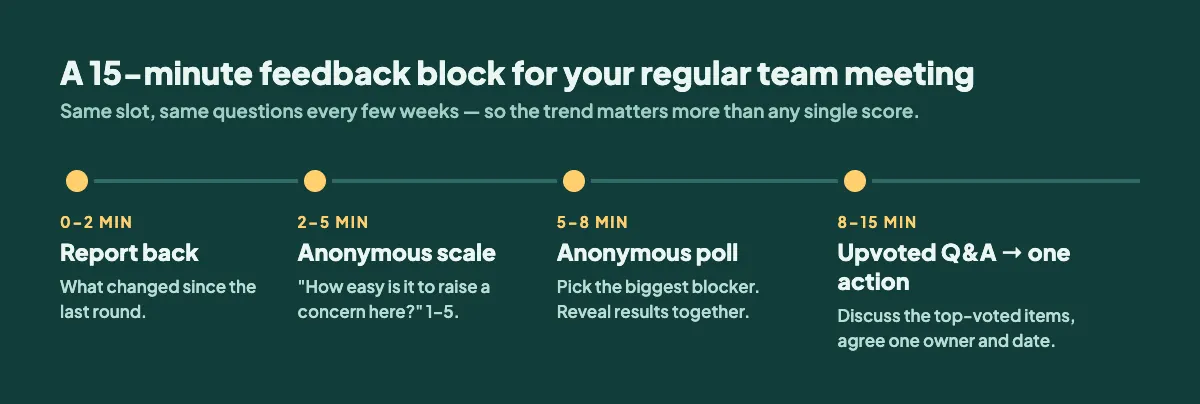
Minutes 0–2: Report back
One slide: "Last time you told us X. Here's what we did." Keep it short and concrete. This earns the honesty you're about to ask for.
Minutes 2–5: Anonymous scale question
Ask one or two questions on a 1–5 scale, with names turned off. Good options:
- "How easy is it to raise a concern in this team?"
- "How manageable was your workload in the last two weeks?"
- "How clear are our priorities right now?"
Keep the wording identical from round to round so you can compare averages over time.
Minutes 5–8: Anonymous poll on the biggest blocker
Give four or five concrete options plus "something else" — for example "The same few voices dominate", "Decisions feel already made", "Not enough time to think", "Nothing, I speak up freely". Hide the results while people vote, then reveal them all at once so nobody anchors on early answers.
Minutes 8–15: Upvoted Q&A, then one action
Open an anonymous Q&A and ask, "What should we talk about that we usually don't?" Let the team upvote the questions they want discussed. Take the top two or three, discuss them openly, and end by agreeing one action with a named owner and a date. One action that actually happens beats five that don't. For handling uncomfortable submissions, see anonymous Q&A for the questions people fear asking.
Running it in EngageSlide
Everything above fits in a single EngageSlide presentation you can reuse every round.
- Join in seconds. Teammates scan the QR code or enter the room code on their phones or laptops — no accounts, no installs. It works in the room and on video calls.
- Anonymous by setting. Turn off name collection on any poll or scale slide, and allow anonymous questions in Q&A, so responses can't be traced back to a person.
- Hide results until you're ready. Keep results hidden while voting is open, then reveal them together.
- Upvoting built in. Q&A sorts questions by votes, so the team decides what matters instead of the loudest voice.
- Present from where you already are. Use it on its own, or inside PowerPoint, Google Slides or Microsoft Teams, so the feedback block sits alongside your normal meeting slides.
Duplicate last round's presentation, update the report-back slide, and you're ready. The whole setup takes five minutes after the first time.
Between meetings: a short anonymous survey
Some feedback needs more time to think than a live poll allows. For those topics — a reorg, a new process, end-of-quarter reflections — send a short survey instead. EngageSlide's online survey maker lets you build one with scales, multiple choice and open paragraph answers, keep it anonymous, and review both a summary and individual responses. You can also link the survey to your meeting presentation so it appears on the last slide when the meeting ends.
A useful rhythm: live feedback block every few weeks, one longer anonymous survey each quarter, and a report-back slide at the start of every block.
Mistakes that undo the work
- Guessing who wrote what. Even jokingly. The moment someone thinks anonymity is fake, honest answers stop.
- Getting defensive on screen. Thank people for uncomfortable results. Explaining why they're wrong teaches the team not to answer next time.
- Asking and never acting. If you can't act on a topic, don't ask about it — or say upfront what's out of scope.
- Too many questions. Three well-chosen questions beat ten. Feedback fatigue is real.
- Only asking when things are bad. Run the block on a regular schedule, not just after a crisis, so it feels normal rather than alarming.
Start with your next meeting
You don't need to announce a new feedback programme. At your next team meeting, save the last 15 minutes, ask one anonymous scale question and one anonymous poll, open an upvoted Q&A, and commit to one action. Then open the following round by reporting what you did. After two or three cycles, you'll notice the answers getting more specific, more candid, and far more useful — which is exactly what honest feedback looks like.