
Running a workshop with a large audience is never easy.
Keeping everyone engaged is one challenge, but managing questions from hundreds of participants can be even harder. If you've ever hosted a seminar or training session with more than 100 people, you probably know the situation well: only a few people near the microphone get to ask questions, while the rest of the audience stays silent.
Last month, I attended a Digital Marketing Strategy workshop in Hanoi with more than 300 participants. What made the event interesting wasn’t just the content — it was the way the trainer handled the Q&A session.
Instead of using the traditional “raise your hand” method, the trainer used the Q&A slide feature from EngageSlide.
The result was one of the most interactive Q&A sessions I’ve seen in a large event.
The Problem With Traditional Q&A Sessions
Most workshops end with a Q&A session, but in reality, these sessions often don't work very well.
Common problems include:
Only a few people get the chance to ask questions
Many participants feel shy speaking in front of a crowd
Some questions take too long to explain
The audience at the back rarely gets a chance to participate
The trainer for the workshop, Minh Hoang, has been running corporate training sessions for more than 10 years. According to him, managing questions used to be one of the hardest parts of large events.
He explained:
“Usually I would only have time to answer five or six questions. But I knew many people still had things they wanted to ask.”
That’s why he started experimenting with interactive presentation tools, and eventually adopted EngageSlide's live Q&A feature.
How the EngageSlide Q&A Works
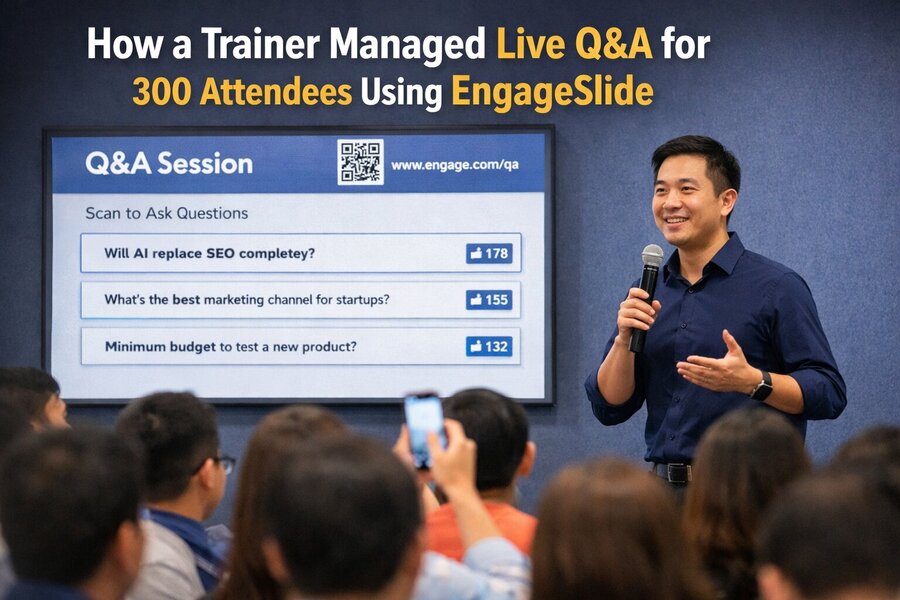
When the workshop reached the discussion section, the trainer switched to a Q&A slide.
A QR code appeared on the screen along with a short link.
Participants simply needed to:
Scan the QR code using their phone
Type their question
Submit it to the session
Within seconds, questions started appearing on the presentation screen.
What made it even more interesting was the voting system.
Everyone in the audience could vote for the questions they found most relevant. The questions with the highest votes automatically moved to the top of the list.
Instead of randomly picking questions, the trainer could immediately see what the audience cared about the most.
The Room Became Much More Interactive
Within the first few minutes, dozens of questions appeared on the screen.
Some of them included:
“Will AI completely replace SEO in the next few years?”
“Which marketing channel should small businesses start with?”
“What is the minimum budget needed to test a new product online?”
As the votes increased, the most popular questions quickly moved to the top.
The trainer simply answered the highest voted questions first.
One participant sitting near me said:
“Normally I never ask questions at events because I don’t like speaking into a microphone. But this makes it really easy.”
And that seemed to be the key difference.
Instead of only a few people speaking, hundreds of people were participating at the same time.
Trainers Can Moderate Questions Easily
Another useful aspect of EngageSlide is that the trainer has access to a moderation dashboard.
From there, the presenter can:
Highlight the question currently being answered
Hide inappropriate questions
Mark questions as answered
Sort questions by votes
This makes the entire Q&A session much easier to control.
There’s no need to pass microphones around the room, and the trainer doesn’t have to spend time deciding which question to pick.
Everything is already organized automatically.
High Engagement Even With 300 People
Large events often struggle with audience participation. The bigger the audience, the harder it becomes to keep people engaged.
But during this workshop, the engagement numbers were impressive.
By the end of the session:
More than 240 participants submitted questions
Nearly 1000 votes were recorded
Over 50 questions were discussed
Instead of a passive lecture, the workshop felt more like a group discussion.
The trainer mentioned afterward:
“What I like most is that I can immediately see what people are curious about.”
For trainers, that kind of feedback is extremely valuable.
Participants Feel More Comfortable Asking Questions
One of the biggest barriers in traditional Q&A sessions is confidence.
Many people hesitate to speak in front of a large audience, even if they have a good question.
With EngageSlide, asking questions becomes much easier because:
participants can submit questions anonymously
no microphone is required
everyone can participate at the same time
This removes the social pressure that often prevents people from speaking up.
As a result, the questions tend to be more honest and more diverse.
Q&A Becomes a Core Part of the Event
In many presentations, Q&A is just a small section at the end of the talk.
But when trainers use tools like EngageSlide, the Q&A session can become one of the most valuable parts of the entire event.
Some trainers even choose to:
keep Q&A open throughout the presentation
answer questions between sections
use audience votes to guide the discussion
This creates a much more interactive learning environment.
Instead of a one-way lecture, the session becomes a two-way conversation between the trainer and the audience.
Suitable for Many Types of Events
Although this workshop was focused on marketing training, the same approach can work for many other types of events.
For example:
university lectures
corporate training sessions
conferences
webinars
startup demo days
panel discussions
Any event where the audience might have questions can benefit from a structured live Q&A system.
All it takes is one interactive slide.
The Trainer’s Favorite Part
After the workshop, I asked Minh Hoang a simple question.
“If you had to go back to the traditional Q&A format, would you do it?”
He laughed.
“Honestly, probably not. Once you see hundreds of people asking questions at the same time, it’s hard to go back.”
And that perfectly explains why more trainers and event organizers are starting to use interactive presentation tools like EngageSlide.
Conclusion
Managing questions from a large audience has always been a challenge for trainers and event organizers.
But with tools like EngageSlide’s Q&A slides, presenters can:
collect questions from hundreds of participants
identify the most important topics through voting
moderate discussions easily
create a more engaging experience for the audience
Instead of a passive presentation, the session becomes a dynamic conversation.
And sometimes, the best insights during an event come not from the speaker — but from the audience themselves.