
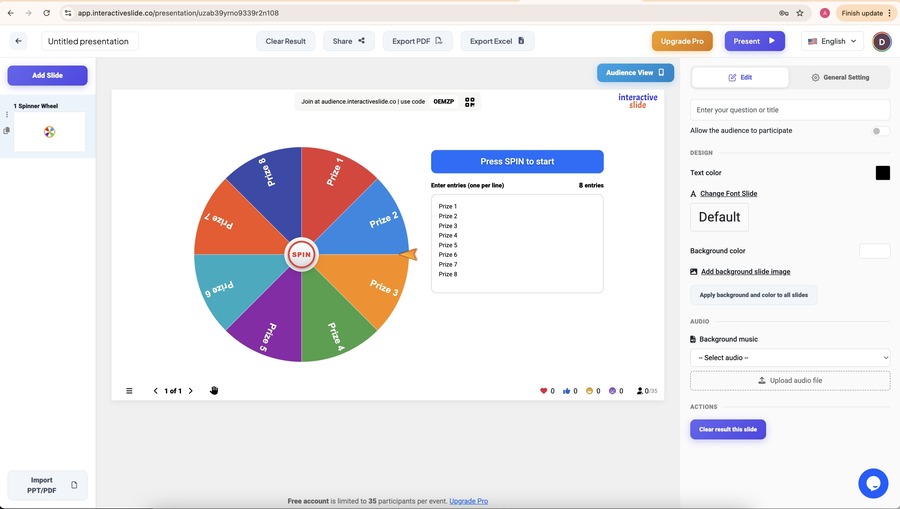
Spinner Wheel is one of the most engaging features on EngageSlide, designed to turn passive audiences into active participants. Whether you’re teaching a class, running a workshop, or hosting a live presentation, Spinner Wheel helps boost engagement in a fun and fair way.
This guide shows you how to use Spinner Wheel on EngageSlide step by step, with practical tips to get the best results.
What Is Spinner Wheel in EngageSlide?
Spinner Wheel is an EngageSlide that lets you:
Add participants, questions, or rewards
Spin the wheel to make a random selection
Create excitement and real-time interaction
It’s widely used in classrooms, training sessions, workshops, and live presentations to keep audiences focused and involved.
When Should You Use Spinner Wheel?
Spinner Wheel is ideal when you want to:
Randomly select a participant or student
Choose a question or topic fairly
Create an ice-breaker moment
Re-energize your audience during long presentations
Because the result is visual and unpredictable, it naturally increases attention and participation.
Step 1: Create or Open a Presentation
Log in to your account at EngageSlide and open an existing presentation or create a new one. Spinner Wheel can be added to any slide and works seamlessly with other EngageSlide types.
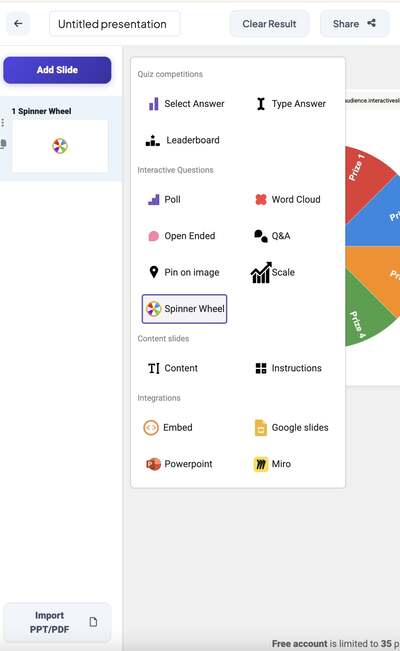
Step 2: Add and Customize the Spinner Wheel
Inside the slide editor:
Click Add Slide
Select Spinner Wheel
Add names, questions, or rewards
Edit the wheel title and items as needed
Keep the list readable and concise. For best engagement, 5–15 items usually works well.
Step 3: Spin the Wheel During Your Presentation
When presenting live:
Enter Present Mode
Click Spin to start the wheel
The selected result appears instantly for all participants
This moment creates suspense and encourages real-time interaction from your audience.

Best Practices for Using Spinner Wheel Effectively
To maximize impact:
Use Spinner Wheel at key moments, not too frequently
Clearly explain the rules before spinning
Combine it with Q&A or Quiz slides for higher engagement
Keep the experience fast and fun
Spinner Wheel works best as a highlight moment within your interactive presentation.
Why Use Spinner Wheel on InteractiveSlide.co?
With InteractiveSlide.co, Spinner Wheel offers:
Real-time interaction without setup complexity
Seamless integration with EngageSlide
A smooth experience for presenters and participants
Strong use cases in education, training, and business
It’s a simple tool that delivers powerful engagement.
Conclusion
Spinner Wheel is an easy yet effective way to make presentations more interactive, engaging, and memorable. With only a few steps, you can transform any session into a dynamic experience using EngageSlide.
👉 Try Spinner Wheel today and bring energy to your next presentation.