

Mentimeter is one of the best-known names in interactive presentations, and for good reason. It is polished, easy to learn and used by companies and universities around the world. But when the free plan runs out and a renewal invoice arrives, a fair question comes up: is Mentimeter worth it for the way you actually present? This guide answers that question with real numbers. It covers what the free plan includes, what the paid plans cost, who gets real value from paying, and when a free alternative with no feature limits is the smarter choice.
All plan details were checked on each vendor's own pricing page in October 2026. Plans change often, so confirm the current numbers before you buy.
What Mentimeter does well
Any honest answer starts with the strengths. Mentimeter offers a wide range of question types, clean results slides, AI help for building presentations, and audience Q&A. Its paid plans include unlimited participants, so you never have to worry about a big room going over a cap. For organisations that have already rolled it out to hundreds of presenters, the shared templates, workspace roles and admin controls on the higher plans are genuinely useful.
So the question is not whether Mentimeter is a good product. It is whether its price matches your situation.
What the free plan gives you
According to the plan comparison on Mentimeter's pricing page, the Free plan allows 50 participants per month, counted across every presentation you run that month. Several features are marked as paid-only, including:
- Importing presentations. You cannot bring in existing slides on Free.
- Exports. Image, PDF and Excel export of results are not included.
- Private presentations. Making a presentation private needs a paid plan.
- Branding and collaboration. Custom colours, themes, logos and editing with others sit on paid plans.
- Quick Forms, moderated Q&A and participant names. Also listed as paid features.
A monthly allowance of 50 sounds generous until you do the maths. A teacher with a class of 25 uses it up in two lessons. A manager running a weekly 15-person team meeting runs out in the fourth week. If you present regularly, the free plan is a trial rather than a long-term option.
What the paid plans cost
Mentimeter lists two self-serve paid plans, priced per presenter:
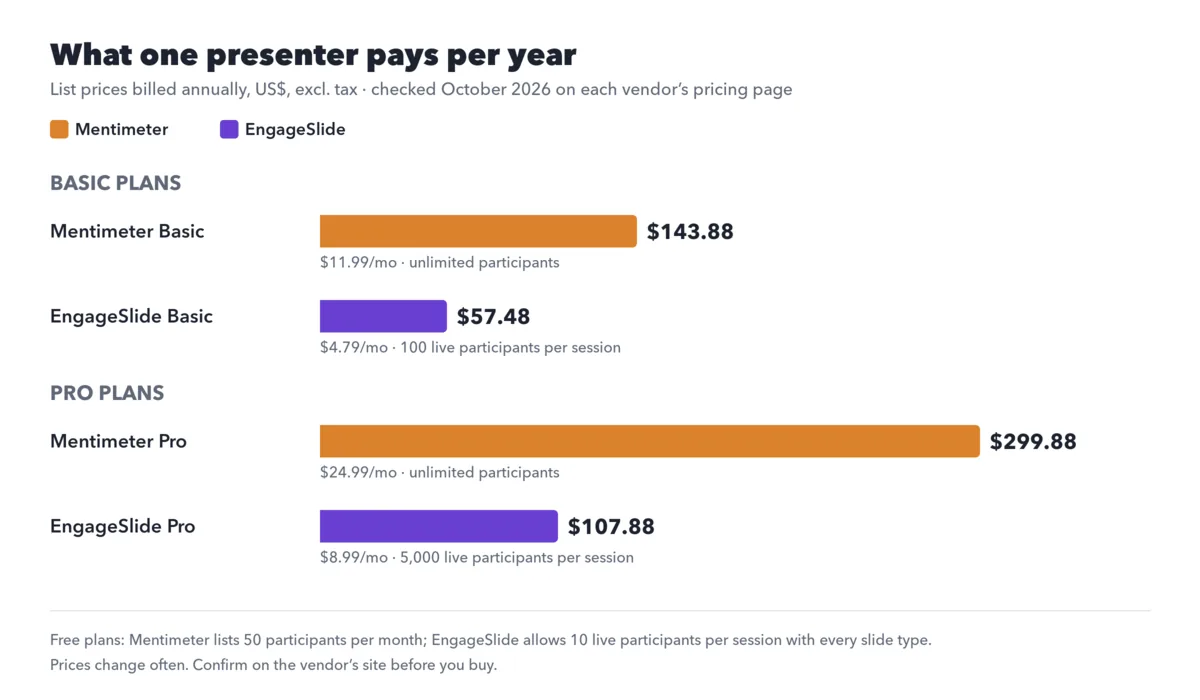
- Basic: $11.99 per presenter per month, billed yearly ($143.88 a year).
- Pro: $24.99 per presenter per month, billed yearly ($299.88 a year). Mentimeter's FAQ notes that Pro and Enterprise cannot be paid for one month at a time.
- Enterprise: custom pricing.
Both paid plans remove the participant limit. For a single presenter that is a reasonable price. For a team of ten presenters on Pro, it is close to $3,000 a year, and that is when people start comparing.
When Mentimeter is worth paying for
- Very large or unpredictable audiences. If you regularly present to thousands of people and cannot predict the size, unlimited participants removes a real risk.
- Your organisation already standardised on it. If colleagues share templates and IT manages licences centrally, switching has a cost of its own.
- You rely on enterprise features. SSO, SCIM, custom data retention and workspace roles matter in some regulated organisations.
When it probably is not
- Small groups, often. Weekly classes, team meetings and workshops of 10–100 people hit the free allowance quickly, but do not need unlimited participants either.
- You want more than polls. If your sessions are quiz-heavy or game-based, or you also need surveys and graded homework, you may end up paying for several tools.
- You pay out of your own pocket. Teachers, trainers and freelancers often buy their own licence. A yearly commitment matters more when it is your money.
- You present inside PowerPoint, Google Slides or Teams. Check how well each tool works where you already present before you pay.
A free alternative with no feature limits

EngageSlide takes a different approach to its free plan. Instead of locking question types, it includes every slide type on the free plan: live polls, word clouds, quizzes with a leaderboard, Q&A with upvotes, ranking, scales, open-ended questions, team games like Zombie Race and Tug of War, and classroom formats like Vote, Discuss, Revote. Importing PowerPoint and PDF files is available too. The free limit is room size: up to 10 live participants per session, and it resets every session rather than every month.
When you need a bigger room, the paid plans raise the participant limit and nothing else changes:
- Basic: $4.79 a month billed yearly, up to 100 live participants per session.
- Pro: $8.99 a month billed yearly, up to 5,000 live participants per session.
- Enterprise: flexible participant limits and custom features.
To be fair about the trade-off: Mentimeter's paid plans have no participant cap, while EngageSlide's Basic plan stops at 100 people per session. For most classrooms, meetings and workshops, 100 is plenty. For a 10,000-person keynote, you would need Pro or Enterprise.
EngageSlide also covers the work around a session, which matters if you are comparing total cost rather than one licence:
- Surveys with nine question types, email collection and CSV export, standalone or linked to a presentation.
- Graded assignments with auto-grading, a math editor and AI that turns an exam image or PDF into questions.
- Add-ins for PowerPoint, Google Slides and Microsoft Teams, so you can present where you already work.
- Remote control from your phone on the Pro plan, so you can move around the room.
You can see a full feature-by-feature comparison on the Mentimeter alternative page and every plan on the EngageSlide pricing page.
Mentimeter is worth it when you need unlimited participants or enterprise controls. If you present to small and mid-sized groups and want quizzes, games and surveys in one place, you are paying for headroom you do not use.
Six questions to answer before you pay
- How many people join a typical session? Look at your real attendance, not the biggest event of the year.
- How often do you present? A monthly allowance and a per-session limit behave very differently for weekly sessions.
- Which question types do you actually use? List the last five sessions. If they were mostly polls and quizzes, check that those are on the plan you are considering.
- Where do you present? PowerPoint, Google Slides, Teams or the browser. Test the integration you will use.
- What happens before and after? If you also send surveys or homework, count those tools in the total cost.
- Who pays, and how? Monthly or yearly, per presenter or per team. A yearly commitment for a tool you use twice a term rarely pays off.
The fairest test: build the same session twice
Pricing pages only tell half the story. Take your next real session, five or six slides with a poll, a word cloud, a quiz and a Q&A, and build it in both tools. Run it with a few colleagues on their phones. Note how long it took to build, how it looked on the big screen, and what your audience said. On EngageSlide's free plan you can do that with up to 10 people and every slide type, without entering a card.
For a broader look at the market, read the best Mentimeter alternatives or our roundup of the best free interactive presentation tools, which compares every free plan side by side. If you are new to the category, the idea behind all of these tools is the audience response system, the classroom clicker reinvented for smartphones.
Cover photo: "MSC 2014 Smartphone-Audience" by Marc Müller, Wikimedia Commons, CC BY 3.0 DE (cropped, phone screen blurred, text added).