
The best moment in any quiz show is the last question. In Final Jeopardy, players see only a category, decide how much of their score to risk, and then face one question that can flip the whole game. You can bring that same tension to a classroom review, a team trivia night or a training recap. This guide shows how to design and run a Jeopardy-style final wager round in EngageSlide: one blind bet, one question, and a leaderboard reveal that keeps everyone in the room until the very end.
New to betting questions? Start with Bet / Wager Quiz: Let Players Bet Points on What They Know, which explains the slide type itself. This post is about one specific use: the closing comeback round.
Why a final wager round works
Most quizzes are decided long before the end. Once a leader pulls ahead, the rest of the room quietly stops trying. A final wager round fixes that by changing the question from “who knows the most?” to “who knows what they know?”.
- Everyone still has a chance. A player in fifth place can climb with one confident, correct answer and a big bet.
- The leader has a real decision. Bet big to lock it in, or play safe and hope the chasers miss.
- It rewards self-knowledge. Players must judge how sure they are before they see the options, which is a useful habit in its own right. Research on loss aversion shows that people feel a loss more than an equal gain, so every bet becomes a small, memorable decision.
The format is borrowed from Jeopardy!, where the final round has turned many games around in the last minute. Your version just needs one slide.
How a wager question works in EngageSlide

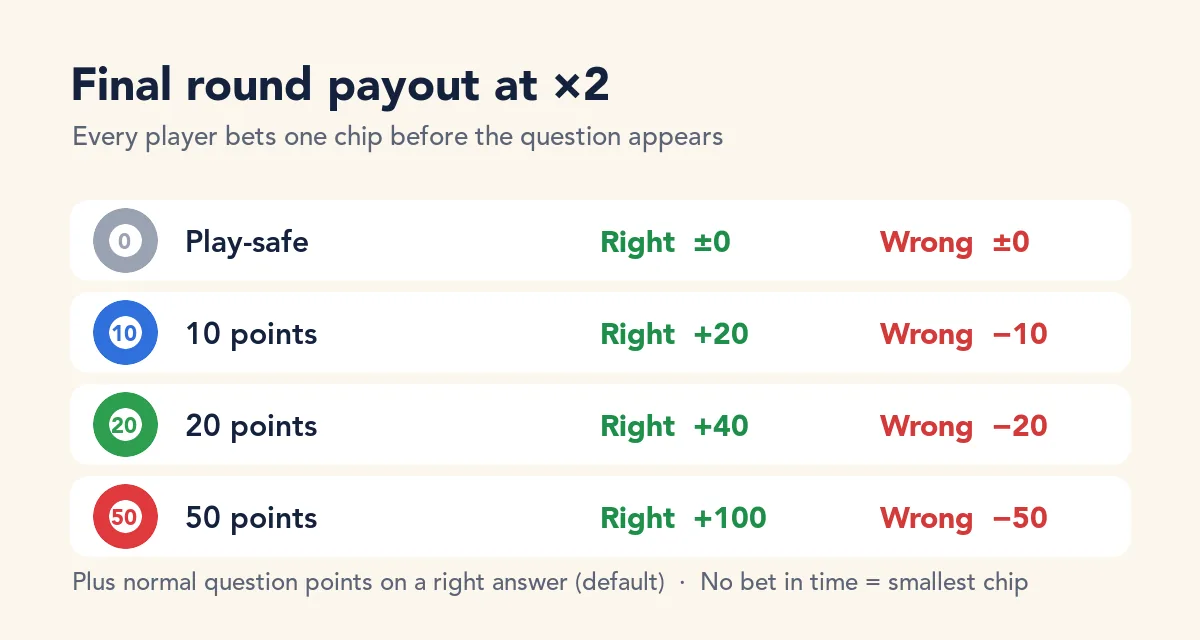
A Bet / Wager slide is a multiple-choice quiz question with a betting round in front of it. Before the options appear, every player picks one chip. A right answer wins the bet times the multiplier; a wrong answer, or no answer, loses the bet.
- Chips. Up to four bet amounts (the default is 10, 20 and 50). Every player bets exactly one of them.
- Payout. A correct answer pays ×1, ×1.5, ×2 (the default) or ×3 the bet.
- Betting time. 10, 15, 20 or 30 seconds. Anyone who doesn’t choose in time plays the smallest chip.
- Question points. By default a right answer also earns the normal question points on top of the bet winnings. You can switch this off to score the bet only.
While players bet, the big screen shows chip stacks growing for each amount and a counter such as “7 / 8 bets placed”. After the reveal, a Stakes panel shows the points won and lost and the biggest wins.
Setting up your final round, step by step
1. Make it a blind bet with a category hint
This is the setting that makes it feel like Final Jeopardy. Under While betting, players see, choose Hint only and type a short category such as Category: Space or Category: Our Q3 launch. Players bet on the topic, not the question; the question only appears once bets are locked.
Pick a category that is fair to everyone: broad enough that nobody is shut out, specific enough that people have a real sense of whether it is “their” topic.
2. Size the chips to your scoreboard
The default 10 / 20 / 50 chips are fine early in a quiz, but in a final round they are often too small to change anything. Before the event, run through your quiz once and look at the typical gap between first and fifth place. Then set your chips so the biggest one, at your chosen multiplier, can close that gap. Any chip can be edited up to 100,000 points, so you have room to make the final round matter.
A simple rule of thumb: the top chip should let a player in the chasing group overtake the leader only if they are right and the leader bets small. That keeps the leader’s choice meaningful.
3. Decide how harsh a wrong answer is
Two settings shape the risk:
- Scores never go below zero. Off by default, which means a lost bet can push a score negative. Switch it on for classes and casual groups, so a brave bet can only cost the points a player already has.
- Play-safe chip. Adds a 0-point chip for players who aren’t sure. They risk nothing and win no bet. It is kind to beginners, but in a true final round you may want to leave it off so everyone has to commit.
4. Choose the multiplier
×2 is the classic choice and easy to explain: “double or lose it”. Use ×3 when you want a dramatic swing and the question is genuinely hard. Use ×1 or ×1.5 when the group is competitive and you want the regular quiz to still count.
5. Write one great final question
The final question carries the whole round, so make it count:
- One clear right answer. Wager questions are all-or-nothing; if you tick several correct options, players must pick every one to win the bet.
- Hard, but fair. Aim for a question that roughly half the room can answer. Too easy and everyone wins; too hard and the bets are pure luck.
- Tied to the category. If the hint said “Space”, the question should feel like a space question to someone who knows the topic.
6. Put a Leaderboard right after it
Add a Leaderboard slide straight after the wager. It shows each player’s gain or loss (for example +100 or −50) next to their new score, which is where the room erupts. Don’t put anything between the reveal and the leaderboard.
Running the round live
The setup does half the work; your delivery does the rest. A simple script:
- Show the leaderboard first. Everyone needs to know where they stand before they bet.
- Announce the rules in one sentence. “Final round: you bet on the category, then answer one question. Right doubles your bet, wrong loses it.”
- Reveal the category and start betting. Read the hint out loud and watch the chip stacks build. Name the brave ones: “Three people just went all in.” If everyone has bet early, you can start the question straight away.
- Read the question slowly. Players can no longer change their bet once the options appear, so give them a moment to think.
- Pause before the reveal. A short silence before you show the answer adds more drama than any sound effect.
- Celebrate both outcomes. Call out the biggest win from the Stakes panel, and give a nod to whoever bet big and missed. Bold bets deserve applause either way.
A great final round isn’t about the hardest question. It is about one real decision, made by everyone at the same time, with the result shown on the leaderboard seconds later.
Where a final wager round fits
- Classroom reviews. End a unit quiz with a wager on the topic students found hardest. Their bets tell you how confident they feel, which is useful information before a test.
- Team trivia and socials. A blind bet on a fun category makes the last five minutes of a quiz night the best five minutes.
- Training recaps. Bet on the key policy or process point of the session. A confident wrong answer is a clear sign of what to clarify.
- Conference and event quizzes. A final wager keeps a large audience watching until the winner is announced.
If you want more than one comeback tool in a long quiz, keep the wager for the very end and use regular questions before it, so players have points to bet with. A wager placed after only one or two questions has little to play for.
Common mistakes to avoid
- Chips too small. If the final bet can’t change the order, nobody feels the tension.
- Showing the question during betting. It turns a blind bet into a regular quiz question with extra steps. Use Hint only.
- Skipping the leaderboard. The swings are the payoff; show them right away.
- Multiple wager rounds back to back. One final round is special. Three in a row feels like gambling.
Everything above runs in the EngageSlide interactive presentation tool: players join with a code on their phones, and the final round sits in the same deck as the rest of your quiz. For more quiz design ideas, browse the EngageSlide blog.