
Most training ends the same way. The session wraps up, people say it was useful, someone sends the slides round, and three weeks later almost nobody can remember the one procedure that mattered. That isn't a motivation problem. People forget quickly unless something makes them pull the material back out of memory. Training knowledge checks are the cheapest way to do that: short, low-stakes quizzes placed during and after the session so people have to recall what they learned instead of just re-reading it.
This guide covers why knowledge checks work, how to space them, how to write questions that test the job instead of trivia, and how to run the whole thing in EngageSlide, from a live quiz in the room to graded follow-up assignments that people complete on their phones.
Why knowledge checks make training stick
Two well-documented effects explain why a quick quiz beats another recap slide.
- The forgetting curve. Hermann Ebbinghaus showed that memory for new material drops steeply in the first hours and days, then levels off. The forgetting curve is why a one-off training day fades so fast when nothing follows it.
- The testing effect. Retrieving information strengthens memory more than reviewing it again. Researchers call this the testing effect (or retrieval practice), and it shows up again and again across subjects and age groups.
Put the two together and the approach is simple. Don't test once at the end. Make people retrieve the key points several times, spaced out, while the questions are still easy enough that they can succeed. Each check pulls knowledge back before it's gone, and after each one people forget more slowly.
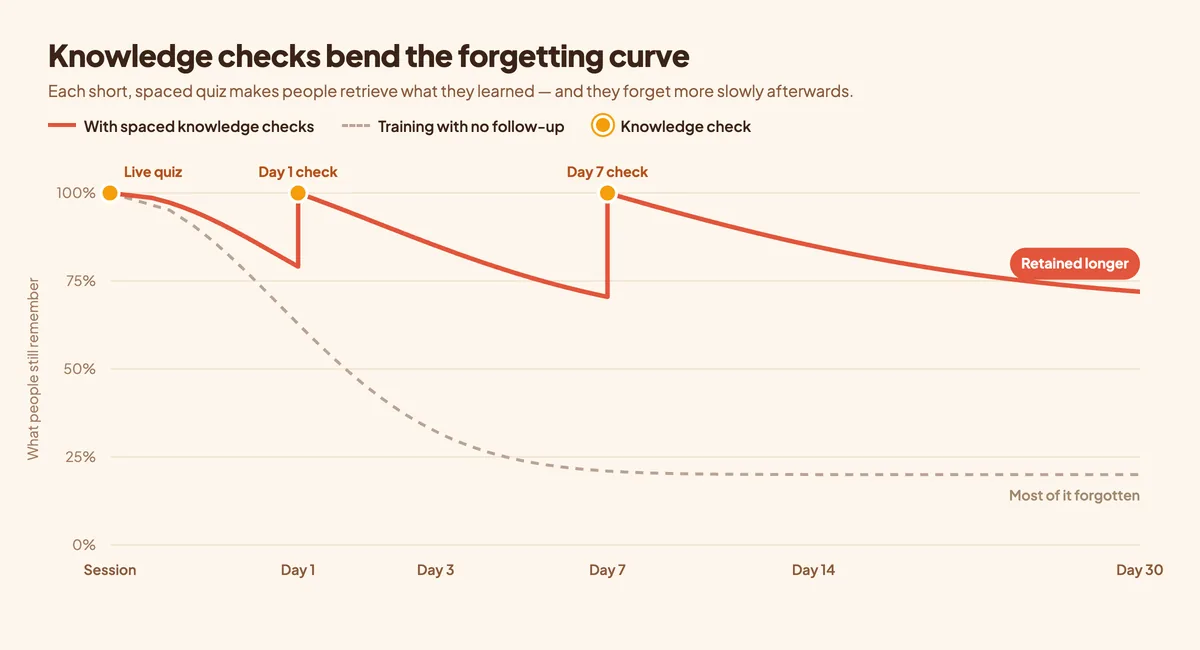
The diagram above is illustrative, not a measurement. Retention drops after every session, but each knowledge check brings it back up, and the next drop is gentler. Training with no follow-up just keeps sliding.
A knowledge check isn't an exam. Its job is to make people remember, not to catch them out. If the questions are too hard, you've built a test. If they're too easy, you've built a formality.
A simple spacing plan you can reuse
You don't need a learning management system or a complicated schedule. A four-touch rhythm covers most workplace training, from onboarding and compliance to product launches and software rollouts.
1. During the session: live quiz after each module
Every 10–15 minutes, stop and run two or three quiz questions on the module you just covered. It resets attention, shows you straight away which point didn't land, and gives people their first go at recalling it while the answer is still close.
2. Day 1: a short follow-up assignment
The next day, send five to eight questions on the most important points. This catches the steepest part of the forgetting curve. Keep it under ten minutes so people actually finish it.
3. Day 7: a scenario-based check
A week later, move from "what is the rule?" to "what would you do?". Scenario questions test whether people can apply the training, which is what the business actually needs.
4. Day 30: a refresher before it matters
Time the last check just before people will use the skill for real, such as the first audit, the first solo shift or the quarter-end process. Use the results to decide who needs a quick one-to-one rather than repeating the whole course.
Write questions that test the job, not the slides
The most common mistake is testing memory for wording ("Which slide listed the four data categories?") instead of the behaviour you're training. A few rules help:
- Start from the mistake you're trying to prevent. If the training exists because people approve fake invoices, ask about a realistic suspicious invoice, not the definition of phishing.
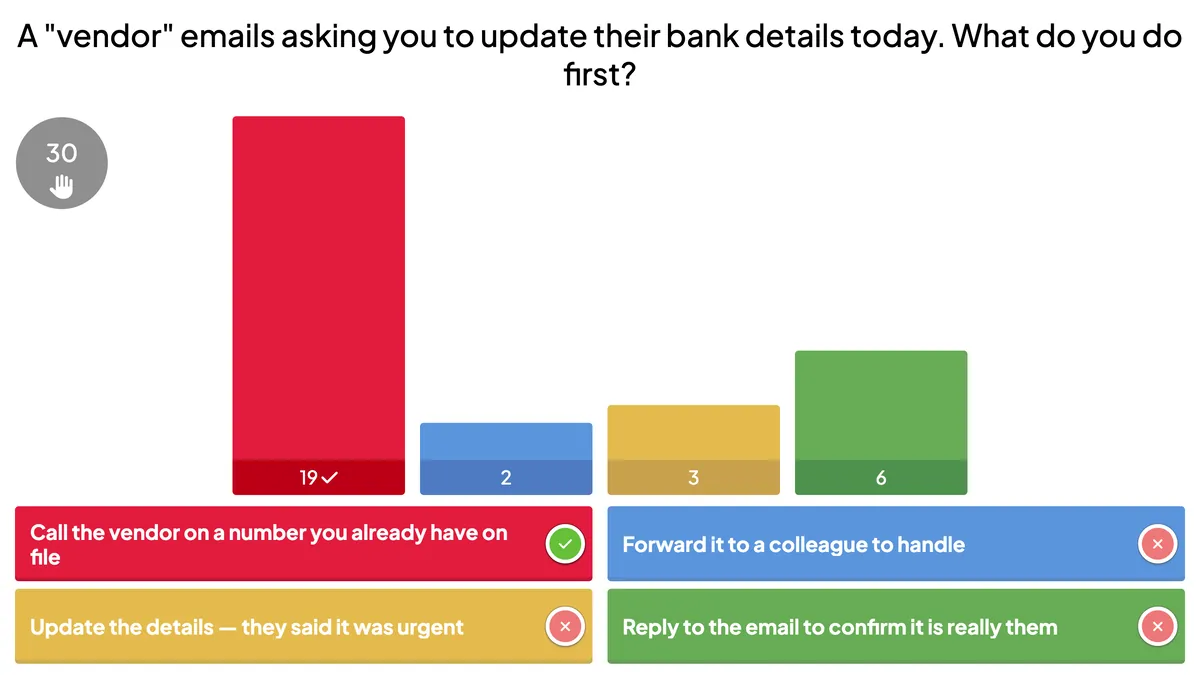
- Make wrong answers believable. Good distractors are the things people really do: "reply to the email to confirm", "forward it to a colleague". If a wrong option is obviously silly, the question teaches nothing.
- Test one idea per question. Long questions with several conditions measure reading stamina, not understanding.
- Explain every answer. Feedback is where most of the learning happens. A single sentence explaining why the right answer is right turns a score into a lesson.
- Mix the format. Recognising an answer is easier than producing one. Mix multiple choice with typed answers and ordering tasks so people have to recall, not just recognise.
For a deeper look at choosing formats, see our guide to quiz question types.
Running knowledge checks in EngageSlide
EngageSlide covers both halves of the plan: the live check in the room and the graded follow-up afterwards. It's all free to use, and participants join from their phones with a QR code or short link, with no app to install.
In the session: live quiz slides
Add quiz slides between your content slides so the check sits right where it belongs in the flow. You can mix several scored question types:
- Select Answer for classic multiple choice, with one or several correct options.
- Type Answer, where people type the answer, so they recall it instead of recognising it. It's good for terms, codes and names.
- Puzzle, where people put steps in the correct order. It's ideal for procedures such as an incident response or a month-end close.
- Match Pair for linking terms to definitions, or situations to the right policy.
When time is up, the results chart shows how the room split across the options and marks the correct one, like the example at the top of this article. That's your cue: if a third of the group picked a wrong answer, spend two minutes on it before moving on. Points and a leaderboard keep energy up during long sessions. Faster correct answers can earn more points, but keep the stakes low so the check still feels like practice.
For more on reading the results and reteaching on the spot, see how to use quizzes to check understanding in real time.
After the session: graded assignments
For the day 1, day 7 and day 30 checks, use the assignment maker. Each assignment is a link people open on any device, and it's graded automatically as soon as they submit.
- Question types for real-world answers: multiple choice, checkboxes, short text, numeric answers with an accepted tolerance, math expressions, and essays for open reflection.
- Automatic grading plus explanations. Add an explanation to each question and choose to show the correct answers after submission, so every check teaches as well as measures.
- Settings that fit spaced practice: a due date for each check, a time limit, a maximum number of attempts, shuffled question order, and a pass score for compliance-style sign-off.
- Collect email so you know who completed which check, and see results arrive in the gradebook as people submit.
- Link it to the live presentation. An assignment can be linked to your session and shown on the last slide, so people get the day 1 check before they even leave the room.
Build the questions faster with AI
Writing a month of knowledge checks by hand is where most plans stall. If you already have a training handout, an old exam or a policy document, upload the PDF, Word file or a photo and let EngageSlide's AI read it into draft questions. Then edit the distractors and add your explanations. The AI speeds up the drafting, but the trainer still decides what's worth testing.
Use the results to improve the training, not just grade people
Knowledge-check data is feedback on your course as much as on your learners. After each round, look for three things:
- Questions most people miss. That usually points to a confusing slide or an unclear explanation, not a bad group. Fix the material.
- Scores that fall between day 1 and day 7. That's a sign the point needs another retrieval moment or a job aid people can keep.
- Individuals who struggle on repeat. Offer a short one-to-one instead of making everyone sit the whole module again.
Finish with a two-minute survey asking what people still find unclear. Combined with the quiz data, it tells you exactly what to change before the next cohort. If you run training often, our guide for interactive training sessions covers the in-room side in more depth.
Start with one module
You don't have to rebuild your whole programme. Take the training that matters most, whether that's security awareness, a new tool or a safety procedure, and add three live quiz questions per module plus a day 1 and a day 7 assignment. Compare the day 7 scores with what you would have expected before, and adjust. Spaced knowledge checks are the easiest way to make sure training still counts weeks later, not just on the day.