

Every team has sat through the meeting that won't end. A decision is on the table, three people have opinions, everyone else has checked out, and forty minutes later you're exactly where you started — except now you're also behind schedule. Group decisions stall not because they're hard, but because the process is invisible: no one can see where the room actually stands, so the loudest voice fills the vacuum. A live poll fixes that in about thirty seconds. It makes everyone's position visible at once, turns a vague debate into a clear number, and gets you to a decision the whole group can see and support.
This is a different job from prioritising two variables on a grid — for that, our guide to the 2×2 prioritization matrix is the better tool. This article is about the fast, everyday decisions: which option, which order, which one first. Here's how to use live polls to make those decisions faster and cleaner.
Why group decisions stall — and how a poll unsticks them
Three forces quietly sabotage group decisions. The first is the loudest-voice problem: the most senior or most confident person speaks first, and everyone else anchors to them instead of thinking independently. The second is groupthink — the pull toward apparent consensus, where quiet doubts never get voiced. The third is simple analysis paralysis: too much discussion, no forcing function to actually choose.
A live poll counters all three at once. Everyone votes simultaneously, so no one anchors to the first speaker. Votes can be anonymous, so dissent shows up honestly. And a poll is a forcing function by design — it ends with a number, and a number is hard to argue with. You replace "what do we all think?" with "here's exactly what we think."
The four-step poll-to-decision loop
The mistake most people make is treating a poll as the decision. It's better used as a loop that surfaces disagreement and then resolves it. Four moves:
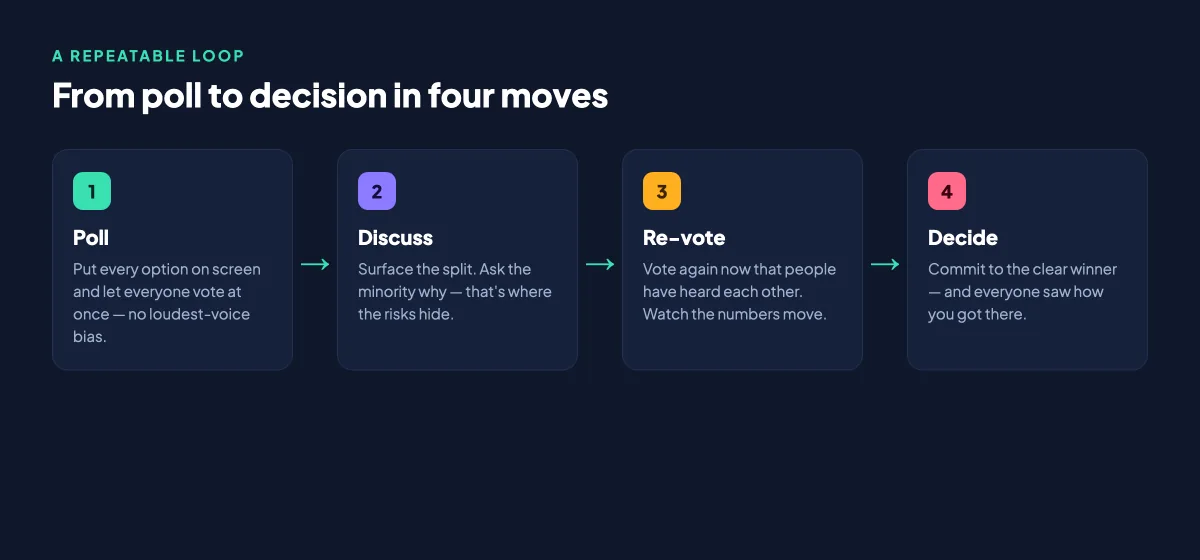
- Poll. Put every option on screen and let everyone vote at once. This is your honest starting picture — no loudest-voice bias.
- Discuss. Look at the split. If it's lopsided, you're nearly done. If it's divided, ask the minority why — that's usually where the real risks and overlooked ideas hide.
- Re-vote. Run the same poll again now that people have heard each other. Watching the numbers move is powerful: it shows the discussion changed minds, and it converts stragglers.
- Decide. Commit to the clear winner. Because everyone saw how you got there, they're far more likely to actually support it afterward.
The whole loop takes five minutes and replaces the forty-minute circular argument. It also creates buy-in, because people support decisions they helped shape far more than ones handed down.
Choose the voting method that fits the decision
Not every decision is a simple "pick one." Matching the poll format to the decision is what makes the result trustworthy:
- Multiple choice — for a quick, clean pick between a few options. Fastest to run, easiest to read.
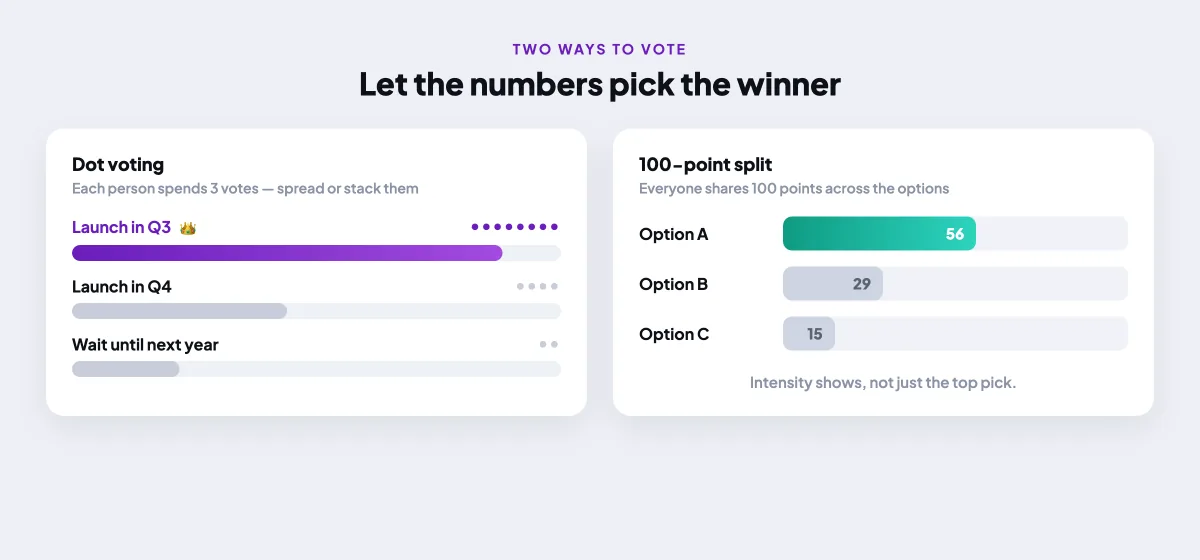
- Dot voting or a 100-point split — when priorities matter and people care about some options more than others. Each person distributes votes or points, so intensity shows, not just the top pick.
- Ranking — when you need an order, not a single winner: a roadmap sequence, an agenda, a shortlist.
- Linear scale — for measuring confidence or risk. "How confident are you in this plan, 1 to 5?" surfaces hesitation a yes/no never would.
- Anonymous polling — for anything sensitive, where honesty beats politeness.
Dot voting and 100-point splits deserve special mention because they capture nuance a single vote can't. Instead of a flat "which one," you learn how strongly the group feels — and a runaway favourite looks very different from a narrow lead.
The goal isn't to replace judgement with a vote. It's to make the group's real position visible, so the judgement that follows is grounded in fact rather than in whoever spoke loudest.
When to keep it anonymous
Anonymity is the difference between the answer people give and the answer they believe. For low-stakes choices — where to order lunch, which name sounds better — named voting is fine and even fun. But for anything where hierarchy or peer pressure is in play (Is this deadline realistic? Do we actually trust this plan?), turn anonymity on. People will tell you the truth when their name isn't attached, and the truth is exactly what a stalled decision needs. If you want to go deeper on wording these, our guide to writing poll questions that get honest answers is a useful companion.
How to run it in EngageSlide
Setting this up takes a couple of minutes in EngageSlide's interactive presentation tool. Add a poll slide, choose your question type — multiple choice, ranking, scale, or a points-based question — and list the options. Participants join by scanning a QR code or entering a short code; no app or login required, so even a room of first-timers is voting within seconds. Results appear live on the shared screen and update as votes land, which is what makes the re-vote step feel dynamic. To run the loop, you simply reset and re-open the same poll after the discussion.
Because you can present from your phone with remote control, you're free to walk the room and facilitate while the poll runs — no tether to the laptop. And for the meetings where a decision hinges on two competing factors at once, like impact versus effort, layer in the 2×2 grid for better decision-making alongside your polls.
Decisions live polls speed up
Almost any recurring team decision is a candidate: choosing the next quarter's roadmap priorities, picking a meeting time that works for everyone, shortlisting vendors, settling on a product name, deciding which of three designs ships, or agreeing on a team norm. The pattern is always the same — a decision with a handful of options and more opinions than time. Instead of talking in circles, you poll, discuss the split, re-vote, and move on.
Mistakes to avoid
Keep the option list short — more than five choices splinters the vote and muddies the winner. Don't skip the discussion step and treat the first poll as final; the disagreement it reveals is the whole point. Avoid leading option wording that nudges people toward your preferred answer. And don't poll decisions that aren't actually the group's to make — a vote you plan to overrule erodes trust fast. Used honestly, though, live polls turn your slowest meetings into your quickest, and hand every decision a mandate the whole room can see. Find more facilitation playbooks on the EngageSlide blog.