
Audience interaction plays a key role in successful presentations, webinars, and training sessions. However, many participants hesitate to raise their hands or interrupt the speaker to ask questions.
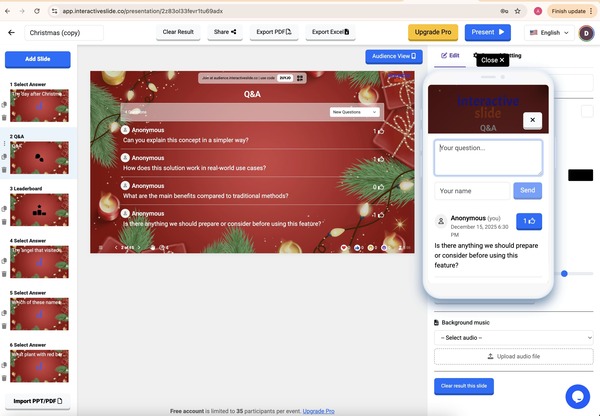
The Q&A feature on Interactive Slide allows audiences to submit questions in real time directly on the slide, creating a smooth and interactive experience without disrupting the presentation flow.
What Is the Q&A Feature in Interactive Slide?
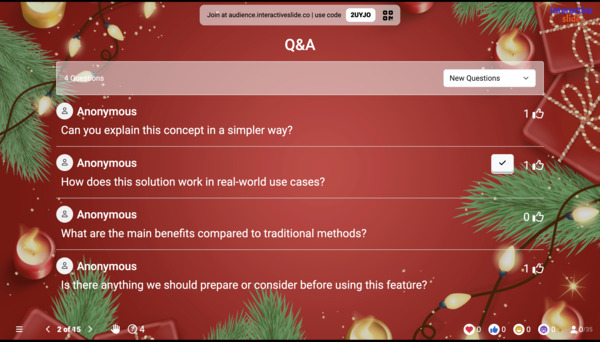
Q&A (Question & Answer) enables participants to send questions instantly while a presentation is in progress. Presenters can view incoming questions live, select which ones to address, and respond at the right moment.
✔ No app installation
✔ No audience sign-up required
✔ Works on any device with a browser
How Live Q&A Works
Using Q&A on EngageSlide is simple:
Add a Q&A slide to your presentation
Share the presentation link or QR code
Participants submit questions from their phones or laptops
Questions appear instantly on the presenter screen
All interactions happen in real time, keeping your session dynamic and engaging.
🖼 [Image 2: Audience submitting questions from mobile devices]
Key Benefits of EngageSlide Q&A
1. Real-Time Interaction Without Interruptions
Participants can ask questions at any time without interrupting the presenter or breaking the flow.
2. Simple Question Management
Presenters can:
View incoming questions live
Choose which questions to answer
Ignore duplicate or irrelevant questions
3. Ideal for Multiple Use Cases
🎤 Webinars and online events
🏫 Classrooms and training sessions
🏢 Team meetings and business presentations
4. Fully Integrated Into Your Slides
Q&A is built directly into the presentation experience, eliminating the need for external tools or platform switching.
Why Use EngageSlide Q&A?
| Feature | EngageSlide Q&A |
|---|---|
| Built directly into slides | ✅ |
| No audience registration | ✅ |
| Works on all devices | ✅ |
| Easy setup | ✅ |
| Presenter-friendly interface | ✅ |
By reducing friction, presenters can focus on delivering content, while audiences stay actively engaged.
Create More Engaging Presentations with Live Q&A
Effective presentations are not just about speaking — they are about listening and responding. With EngageSlide Q&A, you can:
Capture audience questions effortlessly
Increase participation
Deliver a more interactive and professional experience
👉 Try EngageSlide today:
https://EngageSlide.com