
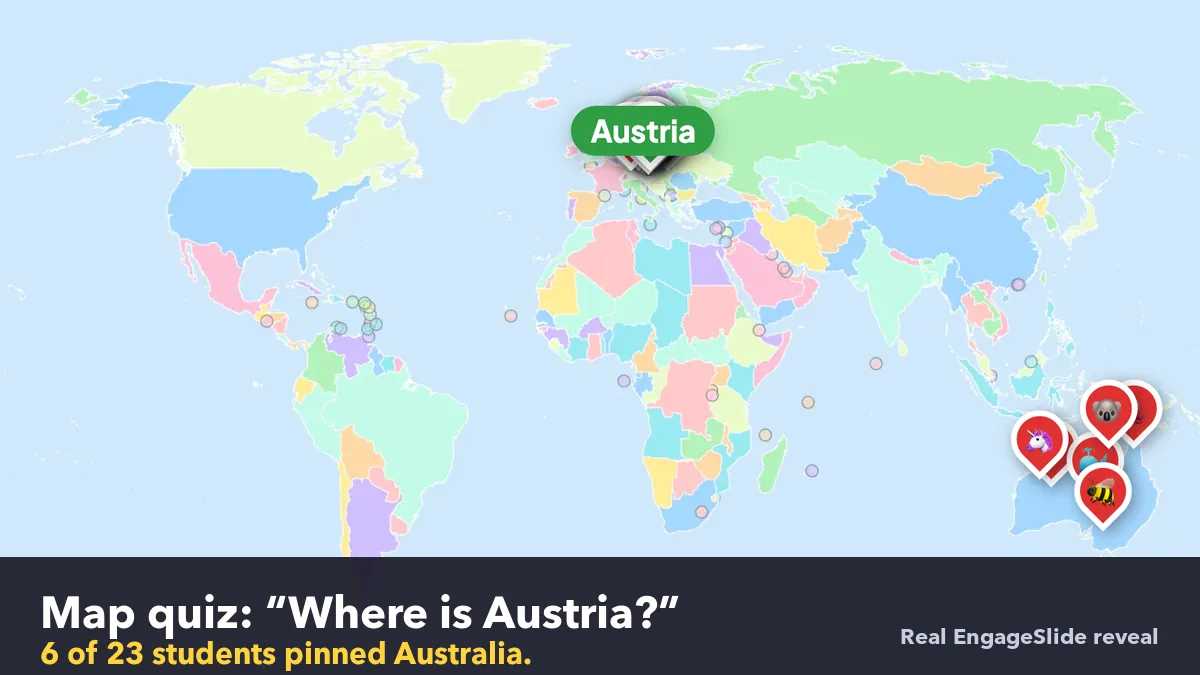
Ask a class "Which of these is Austria?" with four options and most students will get it right. Ask them to point at Austria on a blank world map and the room splits: half find central Europe, a few land in Germany or Hungary, and a confident group heads straight for Australia. That gap between recognising a name and finding a place is what a map quiz game is for. This guide shows geography teachers how to run one live in EngageSlide with the Pin Answer slide: every student drops a pin on their phone, the right pins score, and the reveal shows the whole class's thinking on one map.
Why map quizzes need pins, not multiple choice
Multiple-choice map questions test recognition. The options do half the work, and a student can pick Kenya from four names without knowing where East Africa is. A pin question tests recall. Students have to picture the map and commit to a spot, which is the kind of effortful remembering that makes knowledge last. Psychologists call this the testing effect: retrieving something from memory strengthens it far more than reading it again.
Pins also show you how students are wrong. A wrong letter in a multiple-choice question tells you little. A wrong pin tells you whether a student was one country off, on the wrong continent, or confusing two similar names. Each pin is a small window into the student's mental map.
Built-in maps: no uploading, no drawing
Pin Answer comes with ready-made boards that already know where every region is, so you never have to find an image or draw answer zones:
- World map with more than 200 countries, and Continents with all seven.
- Europe, Asia, Africa and The Americas for regional units.
- USA with all 50 states plus DC.
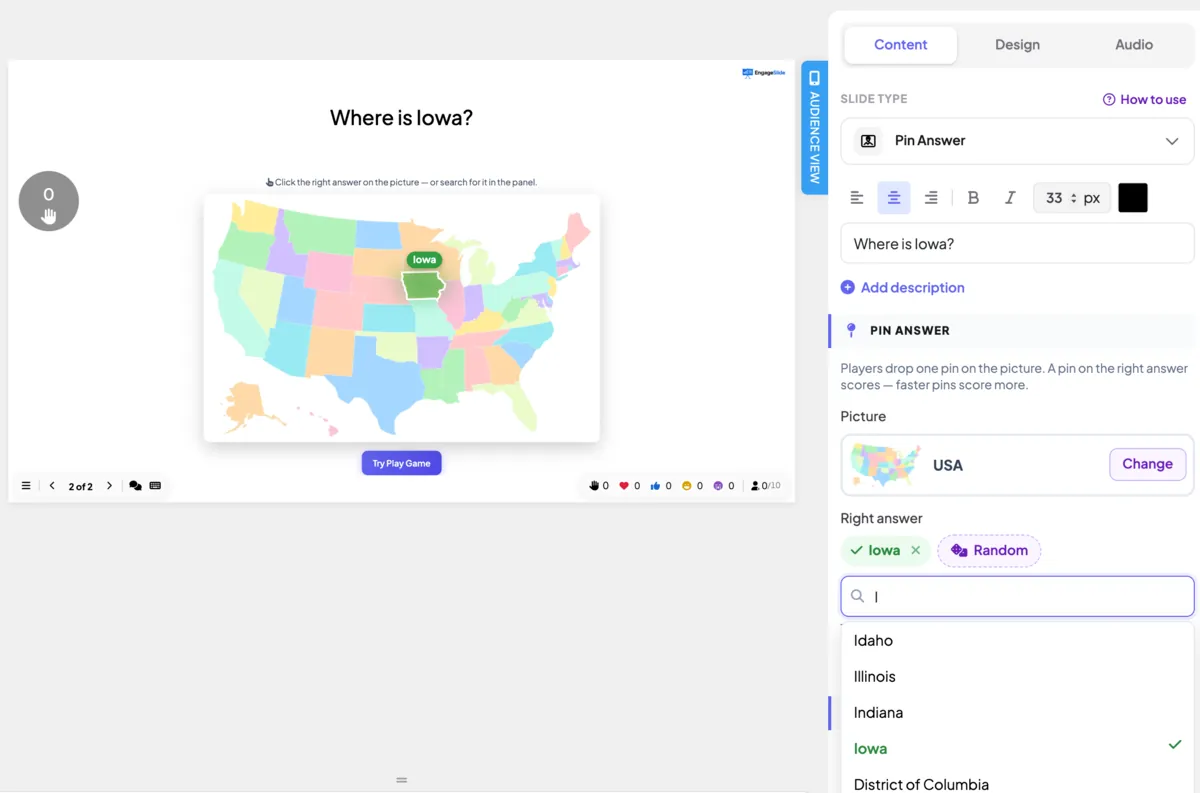
Add a Pin Answer slide from the Quiz tab, click Change under Picture and pick a board. EngageSlide picks a random answer and writes the question for you, such as "Where is Kenya?". To choose the answer yourself, type in the search box under Right answer or click the region on the slide. The whole shape of the country or state counts as correct, and very small places such as Malta get a finger-sized circle so they are still fair to hit on a phone.
Build a 10-question round in minutes
The fastest workflow uses two buttons: Random and duplicate.
- Make the first slide. Pick a board, choose the answer, and check the time limit. 20–30 seconds works well, because finding a place takes longer than tapping a button.
- Duplicate it. Use the duplicate icon next to the slide in the left panel.
- Change the answer on the copy. Search for the next country or press Random. The question title updates automatically as long as you have not typed your own.
- Repeat until you have a full round, then add a leaderboard slide at the end.
Need a question with more than one right answer, like "Tap a country that borders Brazil"? Click + Add another right answer (up to five), or Shift-click more regions on the map.
Countries, states and capitals
Countries and states are built in. Capitals need a small twist, because the boards are made of countries, not cities. Write a clue question instead: "Which country has Nairobi as its capital?" on the Africa board, with Kenya as the right answer. Type your own title and it stays as you wrote it. Clue questions are harder than "Where is Kenya?" because students must link two facts, so save them for the end of a round.
Plan the round from easy to hard
A good map round starts with a quick win, so everyone joins in, and finishes with a stretch that separates confident students from guessers. Aim for most of the class to get the first question right and around a third to get the last one.
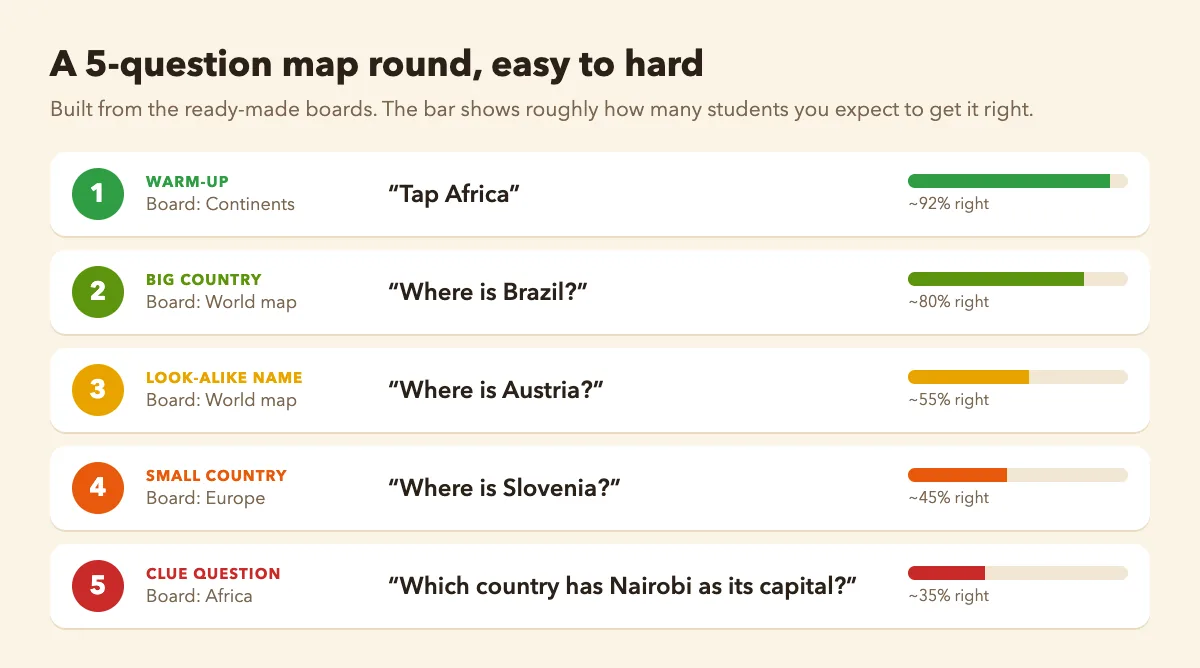
- Warm-up (Continents board). "Tap Africa." Nearly everyone succeeds, and students learn how pinning works.
- Big, familiar countries (World map). "Where is Brazil?" Large targets build confidence.
- Look-alike names. "Where is Austria?" on the world map, or "Where is Iowa?" on the USA board, where students often mix up Iowa, Idaho and Ohio. These questions catch confusions.
- Small countries (continent boards). "Where is Slovenia?" on the Europe board. Students can zoom in up to 3× on their phones to place a pin precisely.
- Clue questions. Capitals, rivers or "the country between Peru and Brazil". These are the stretch at the end.
Reading the pin spread for misconceptions
When time is up, or when you click End Quiz, every pin drops onto the big screen with the student's emoji. The right region lights up green, right pins turn green, wrong pins turn red and then fade, and a summary appears, for example "52% pinned the right spot · 12 of 23". Each student's phone shows their own pin and the points they earned, and the points go to the leaderboard.
Don't skip past the red pins. Where the wrong pins cluster tells you what to reteach, and it's often more useful than the percentage.
Learn to read three patterns:
- Near misses. Pins in the neighbouring country mean students know the region but not the borders. Show the outline and two landmarks, then move on.
- A distant cluster. A group of pins on another continent, like Austria pins in Australia, means students are matching the name, not the place. Name the confusion out loud. Students who made it will remember the correction.
- Scattered pins. Pins spread everywhere mean the class has no anchor yet. Go back to the continent level before asking about countries.
Then ask one student with a green pin how they found it: "I looked for Germany first, then went down and right." That strategy is worth more than the answer itself. If a question split the class badly, duplicate it and ask again at the end of the lesson. A second attempt after the correction is where the learning sticks.
Running the game in class
- Joining is quick. Students go to engageslide.com and enter your code or scan the QR code. No app, no accounts.
- Test it first. Use Try Play Game in the editor to check that your answers and timing feel right before class.
- Speed matters, but only a little. With "More points for fast correct answers" on, quicker right pins score closer to the maximum. Turn it off for a calmer review round where accuracy is all that counts.
- Mix formats. A map round sits well with other quiz types and shares the same leaderboard, so you can run a five-question geography warm-up and keep the scores going through the lesson.
Five ways to use map quiz games across the year
- Unit openers. Five pins at the start of a new region show what students already know.
- Current events. "Where did today's earthquake happen?" connects the news to the map in under a minute.
- History lessons. "Where is the Suez Canal?" or "Which country did Magellan's voyage start from?" puts events in their real place.
- Exam review. A 10-question world map round before a test, played twice, with the misses discussed in between.
- Friday fun. Let the class vote on the next country, then pin it.
For a full tour of every Pin Answer setting, including using your own diagrams and pictures, read our guide to hotspot quiz questions with Pin Answer, see the Pin Answer slide page, or check the help article. More classroom ideas are on the EngageSlide blog.