
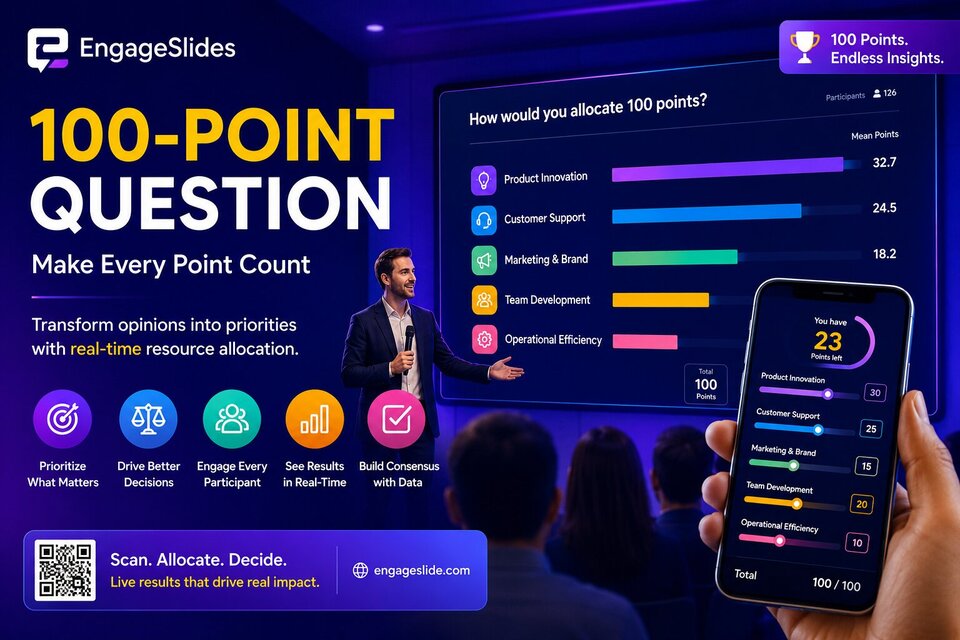
Have you ever found yourself in a meeting where every single idea seemed "equally important"? Whether it’s a product team debating new features or a family deciding on a vacation destination, consensus often stalls because everyone wants to protect their own preferences.
This is where the EngageSlides 100-Point Question feature steps in as a game-changer. Instead of simply choosing "Yes" or "No," your audience must make tough decisions: allocating a limited resource (100 points) to what they truly believe in.
In this article, we’ll explore why this feature is the ultimate tool for prioritization and five practical ways you can apply it today to transform your meetings into high-impact decision-making sessions.
1. What is a 100-Point Question?
At its core, a 100-point question is a "resource allocation" exercise. Participants are given a list of options and a fixed "budget" of 100 points. Their task is to distribute these points across the options.
Vibrant and dynamic real-time charts on EngageSlides.
The magic lies in the "zero-sum game" nature of the task. If you want to give Option A more points, you are forced to take points away from Option B. This forces participants to think deeply about the relative value of each choice, rather than just giving a 5-star rating to everything.
2. Why It Outperforms Standard Polls
In typical multiple-choice polls or rating scales, participants often lean towards "playing it safe" or liking everything. You end up with a bar chart where all columns are nearly identical—leaving you no closer to a decision than when you started.
With EngageSlides 100 Points, the difference is clear:
- Realistic Trade-offs: It accurately reflects how we manage time and money in the real world.
- Visual Precision: Our high-fidelity charts display mean values with sharp animations, making even slight differences in priority immediately obvious.
- Premium Experience: The intuitive slider system allows participants to feel the weight of their choices as they see their "Points Left" counter update in real-time.
3. 5 Practical Ways to Use 100 Points for Better Results
1. Prioritizing Your Product Roadmap
This is perhaps the most classic application. When your engineering team has limited capacity but the stakeholder wishlist is endless, use a 100-point slide. Ask stakeholders to allocate points based on business value. The items with the highest mean score aren't just "popular"—they are the vetted priorities.
2. Departmental Budget Allocation
Avoid heated debates over whether to spend more on Marketing or R&D. Let the data speak. Each executive can "distribute the wealth" on EngageSlides anonymously. The final result represents a consensus built on data, reducing personal friction and bias.
3. Market Research & Customer Insights
Stop asking, "How satisfied are you with our service?" Instead, try: "If you had 100 points of satisfaction to give, how would you distribute them across Price, Quality, and Support?" You’ll be surprised to find what your customers actually value most.
4. Identifying Training & Development Gaps
In a workshop or training session, trainers can ask participants to allocate points to the skills they feel they lack the most. The live chart on the big screen will immediately point out the collective "knowledge gaps," allowing the trainer to pivot the content to where it’s needed most.
5. Team Building: Uncovering Shared Values
Is your weekly meeting feeling a bit stale? Ask: "What makes an ideal work environment for you?" Options might include: Flexibility, Career Growth, Compensation, or Great Colleagues. The distribution of points will spark deep, meaningful conversations about company culture that rarely surface in casual chat.
4. How to Set Up 100 Points on EngageSlides
Setting up a 100-point slide on EngageSlides takes less than a minute, but the impact is immeasurable.
Audiences can easily adjust points with smooth, responsive sliders.
- Create a New Slide: Select the "100 Points" slide type from the EngageSlides dashboard.
- Enter Your Options: List the items you want your audience to prioritize.
- Customize the Look: Choose custom colors for each bar to match your brand's aesthetic.
- Present Live: Your audience scans a QR code and starts sliding. You’ll see the chart bars "dance" in real-time as submissions roll in.
5. Conclusion
Prioritization isn't about choosing one thing; it's about the courage to let go of others. The 100-Point feature on EngageSlides isn't just a polling tool—n it's a decision-making framework that helps teams face the reality of finite resources.
Whether you are a CEO planning a strategy or a teacher connecting with students, 100 points will help you find the most impactful path forward with transparency and fairness.
Ready to elevate your meetings? Experience the power of data-driven prioritization today at engageslide.com.