
Every facilitator knows the moment: the coffee has worn off, the slides have been going for forty minutes, and the room has gone quiet in the wrong way. You need something that wakes people up in seconds, needs no explanation and doesn’t put anyone on the spot. Quick Draw is exactly that — a reaction game where everyone’s phone turns red, then green after a random wait, and the fastest tap wins. One sentence of rules, about ten seconds per round, and a room that is suddenly leaning forward.
This guide explains how Quick Draw works in EngageSlide, why it is fair even on patchy Wi-Fi, how to set it up in under a minute and the best moments to use it in a class, a meeting or an event.
What is Quick Draw?
Quick Draw is a game slide in EngageSlide’s Games tab. Players join on their phones with your code or QR code — no app, no account — and each round goes like this:
- Get ready. The whole phone screen becomes one big button and shows Get ready….
- Red. The phones and the big screen turn red: Wait for it….
- Green. After a random 2.5 to 6 seconds, everything turns green and says TAP!. Players tap as fast as they can.
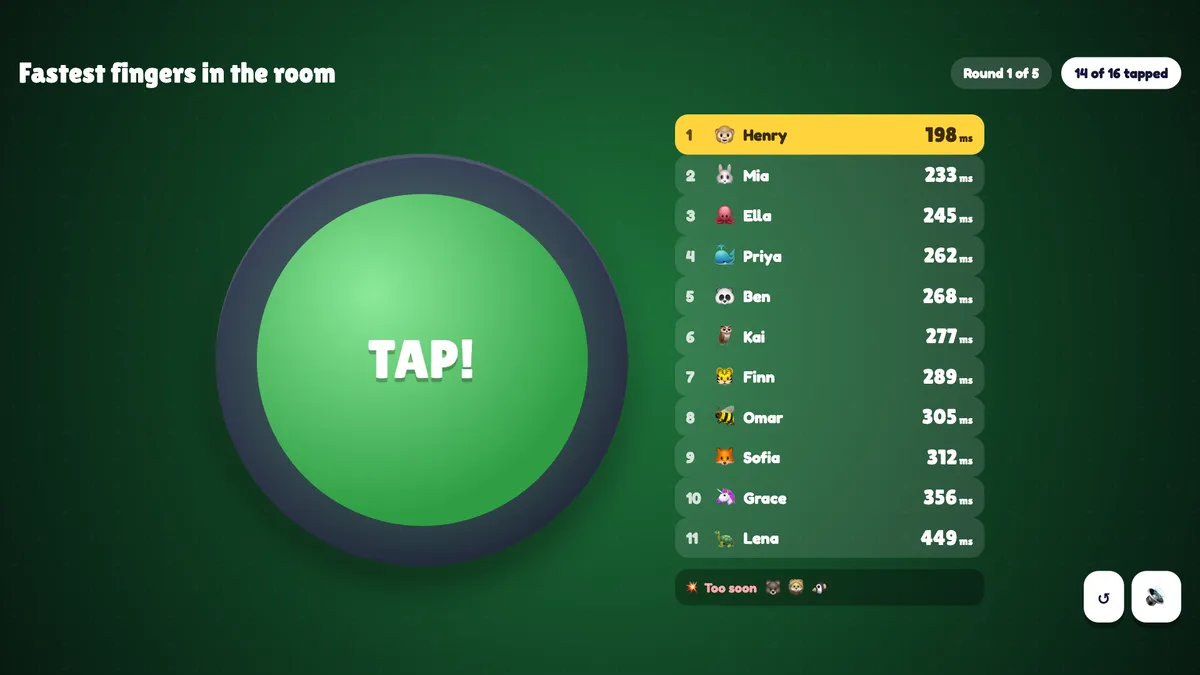
- Results. The big screen lists the taps as they arrive, fastest first, in milliseconds. Anyone who tapped too early is listed under Too soon.
After a few rounds (3, 5, 7 or 10 — you choose), the player with the best average reaction time wins a podium finish. Because the delay before green is random every round, nobody can count their way to a win — they have to genuinely react.
Why it is fair — even on slow Wi-Fi
The first question any tech-savvy audience asks is: “Won’t the person with the best connection win?” In Quick Draw, no. The reaction time is measured on each player’s own phone, from the moment their screen turned green to the moment they tapped. Network delay only changes when the green appears on a phone — it never gets added to the time that counts. In our own tests, a tap scheduled exactly 200 ms after green was recorded as 201–202 ms.
Two more rules keep it honest:
- False starts. Tapping while the screen is still red is a false start. So is a “reaction” faster than 100 ms — humans can’t react that fast, so it was a guess. A false start counts as 1000 ms for that round.
- Missed rounds. If a player doesn’t tap within 3 seconds of green, the round counts as 1000 ms too. The round closes as soon as everyone has tapped, so nobody waits for stragglers.
Typical human reaction times to a visual signal sit in the low-to-mid hundreds of milliseconds — the classic field of mental chronometry has measured this for over a century. That is why the scoreboard is fun to read: the differences between players are small, visible and very real.
Fake-outs: the optional twist
Once your group has the hang of it, switch on Fake-outs. In most rounds the screen then flashes yellow for a moment during the red. Tapping on yellow is a false start. It is the single best way to catch the eager players — and it reliably gets the biggest laugh of the session.
How to set up Quick Draw in EngageSlide
There are no questions to write and no answers to check. Setup takes less than a minute:
- Add the slide. In your presentation, click + New Slide, open the Games tab and choose Quick Draw.
- Give it a title. It is shown on the big screen — something like “Fastest fingers in the room”.
- Pick the rounds. Under Settings, choose 3, 5, 7 or 10 rounds. Five is a good default: long enough for a fair average, short enough to keep the energy up.
- Decide on fake-outs. Leave them off for a first game; turn them on for a rematch.
- Present. Share the join code or QR code, watch the avatars arrive, and press START (or Enter).
The full walkthrough with every setting is in the Quick Draw help article, and you can preview the slide on the Quick Draw slide page.
What players see on their phones
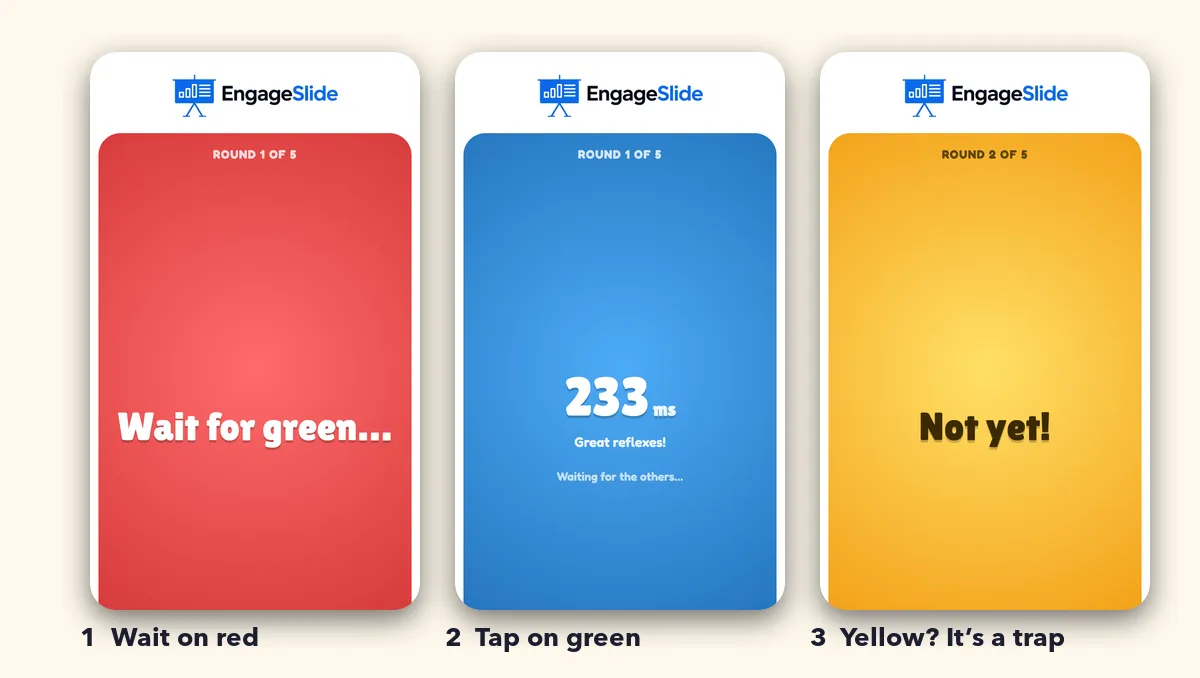
The phone experience is deliberately minimal. In the lobby, players see three coloured chips — Red: wait, Green: TAP! and, with fake-outs on, Yellow: trap!. During a round the entire screen is the button, so there is nothing to aim for. The moment they tap, their own time appears — “233 ms — Great reflexes!” — while everyone else is still reacting. After each round they see their place in that round (for example #2 of 11 this round) and their running average, and at the end their final place, average and best reaction.
On the big screen, each round ends with a bar chart of the fastest fingers and a count of false starts. The next round starts by itself after five seconds, so you can keep talking or just let it flow. After the last round, a podium shows the three best averages plus the single fastest reaction of the game.
Quick Draw works because it removes every barrier: no knowledge, no typing, no reading — just wait for green and tap. Everyone can win, and everyone wants another round.
When to use Quick Draw
As an energizer after a break
Post-lunch slumps are real. A three-round Quick Draw takes about a minute and resets the room’s attention before your next block. It pairs well with the advice in our guide to running meetings people don’t dread: short, purposeful interaction beats a long “any questions?” pause.
As a zero-pressure icebreaker
Many icebreakers ask people to share something personal, which not everyone enjoys first thing in the morning. Quick Draw asks for nothing but a thumb. Use it to open a workshop, then move into a conversation starter from our list of icebreaker questions for remote teams.
To pick who goes first
The fastest player presents first, chooses the next topic or picks a prize. It feels fairer than calling on someone, and it is far more fun than drawing names from a hat.
In the classroom
Teachers use Quick Draw as a quick reward between activities, or as a live science demonstration: run five rounds, compare the class average with the first round, and talk about practice, fatigue and anticipation (fake-outs make the last one very tangible).
At events and conferences
Because the rules need no explanation and the phone does all the timing, Quick Draw scales to a large audience. The big screen shows the top taps and a count of how many have tapped, so even a packed hall can follow the race.
Tips for a great round
- Announce the rule once: “Wait for green, then tap. Tap early and it’s a false start.” That is genuinely all people need.
- Play a practice round with fake-outs off, then a real game with them on.
- Read the leaderboard aloud. Saying “Henry, 198 milliseconds!” turns a quiet room into a cheering one.
- Celebrate the false starts as much as the winners — it keeps the mood light and the competitive players humble.
- Keep it short. Five rounds is plenty. If they ask for more, press Play again — the same players are kept.
Frequently asked questions
Do players need an app?
No. They join in the phone’s browser with your code or the QR code on screen.
Can people join late?
Yes. A late player can play from the round they join, and their average is calculated over the rounds they actually played.
Does Quick Draw change quiz scores?
No. It has its own results and podium, and it doesn’t touch the points on your quiz leaderboard — so you can drop it between quiz sections without affecting the standings.
Quick Draw is part of EngageSlide’s growing set of game slides, alongside quizzes, polls and Q&A in one interactive presentation tool. Add one to your next session and see how fast a room can wake up.