
Every memorable quiz has one thing in common: the questions fit the moment. A rapid-fire warm-up needs something different from an end-of-unit knowledge check, and a team-building trivia night calls for a different rhythm than a classroom review. Yet most people reach for the same format every single time — a four-option multiple choice — and wonder why engagement plateaus. The truth is that the type of question you ask shapes how people think, how hard they try, and how much they remember afterward. This guide breaks down the main quiz question types, what each one is genuinely good at, and how to build them in EngageSlide's interactive presentation tool.
Why the question type matters more than you think
Answering a question is a small act of retrieval, and retrieval is what makes learning stick. Decades of research on the testing effect show that people remember information far better after they've had to recall it than after simply re-reading it. But not all questions trigger the same mental effort. Recognising the right answer from a list is easier than producing it from memory; putting steps in order is different again from matching pairs. When you vary your question types, you exercise different kinds of thinking and keep your audience genuinely alert — because they can't fall into autopilot.
There's also a pacing benefit. A quiz built entirely from identical questions feels like a form. Rotate the format and every slide brings a small surprise, which is exactly the kind of variety that keeps a room leaning in. Let's look at the formats worth knowing.
The core scored quiz question types
These are the formats where answers are marked right or wrong, points are awarded, and a leaderboard keeps score. In EngageSlide you'll find them grouped under the quiz slide types when you add a new slide.
1. Multiple choice (Select Answer)
The workhorse. You pose a question, offer a handful of options, and mark one — or several — as correct. It's fast to answer, instantly scannable on screen, and works for almost any subject. Multiple-choice questions are popular for good reason: they're low-friction for participants and effortless to grade automatically. The art is in the distractors — the wrong answers should be plausible enough to make people actually think, not obvious throwaways.
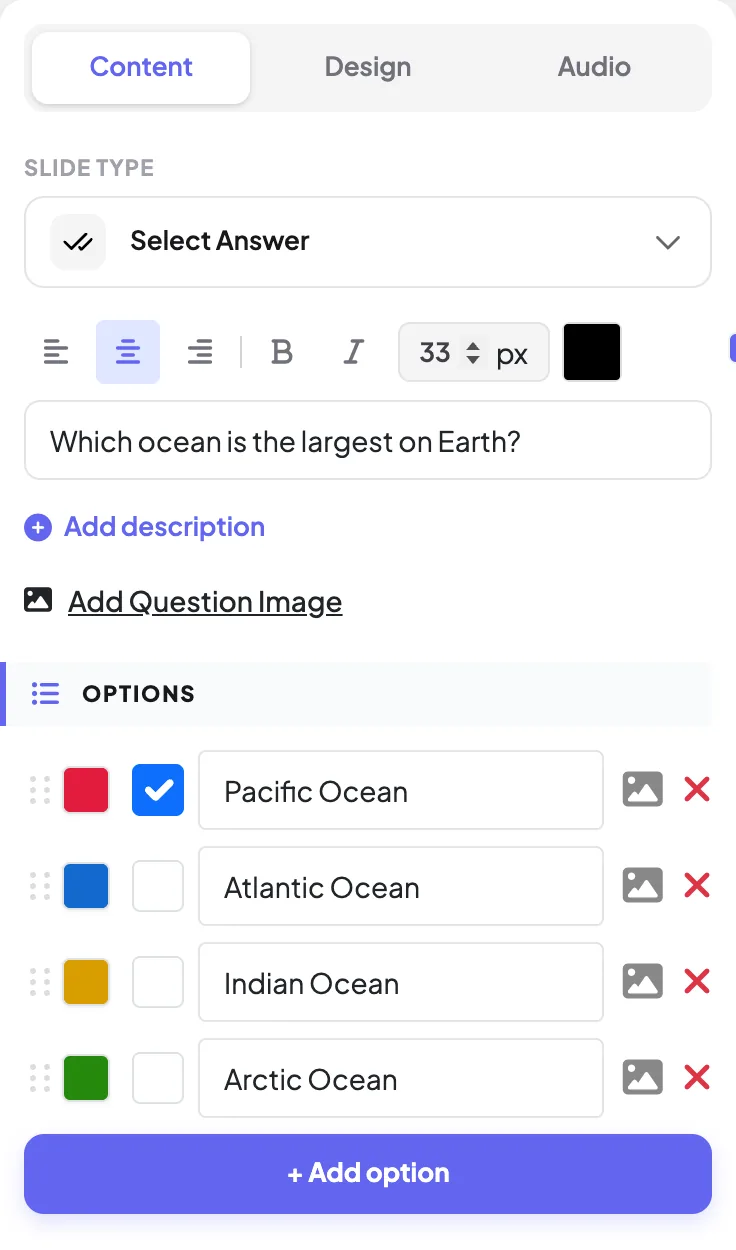
In EngageSlide you set this up as a Select Answer slide: type your question, add colour-coded options, tick the correct one, and decide whether faster answers earn more points. You can even attach an image to each option for visual questions.
2. True / False
Technically a two-option multiple choice, but it earns its own mention because of what it does to pacing. True/false questions are perfect for rapid-fire rounds, myth-busting segments, and quick confidence checks where you want a snap judgement rather than deliberation. Because there are only two choices, guessing gives a 50% baseline — so use these for reinforcing facts and sparking debate, not for high-stakes assessment. Build one by creating a Select Answer slide with just two options: True and False.
3. Type Answer
Here participants type a short response instead of picking from a list — so there's nowhere to hide and no lucky guessing. Type Answer questions test genuine recall: a capital city, a formula, a keyword, a year. EngageSlide automatically matches submissions against your accepted answers (and you can add alternate spellings), so grading stays instant even though people are producing the answer themselves. It's the closest a live quiz gets to a real exam question, which makes it ideal for vocabulary drills and terminology checks.
4. Match Pair
Match Pair asks players to connect items across two columns — terms to definitions, countries to capitals, dates to events, tools to jobs. It rewards understanding of relationships rather than isolated facts, which is why trainers and teachers love it for consolidating a topic. If you want to see it in context, our write-up on Match Pair use cases walks through real classroom and workshop examples.
5. Puzzle (ordering)
With a Puzzle question, participants arrange choices into the correct sequence to score. Think chronological order, process steps, ranked sizes, or the stages of a workflow. Ordering questions demand a different kind of reasoning — you have to understand how pieces relate, not just whether a single fact is true — so they're a great way to raise the difficulty near the end of a quiz.
Beyond right and wrong
Not every question needs a correct answer. Some of the most engaging moments in a session come from questions that simply surface what the room thinks. EngageSlide's interactive question types sit alongside the scored quiz formats and mix in beautifully:
- Polls. Gather opinions and show them live as bar or pie charts — perfect for opening a topic or gauging a decision.
- Scale & ranking. Ask how strongly people agree, or have them rank options in order of preference to prioritise as a group.
- 100 Points. Participants distribute a budget of 100 points across options, revealing not just what they value but how much.
- Word cloud & Q&A. Collect short text responses that form a live word cloud, or let the audience ask and upvote questions in real time.
These aren't scored, but they add texture — a poll to open, a quiz to test, a word cloud to reflect. Dropping one between quiz rounds also gives slower participants a breather without stalling the momentum.
How to choose the right question type
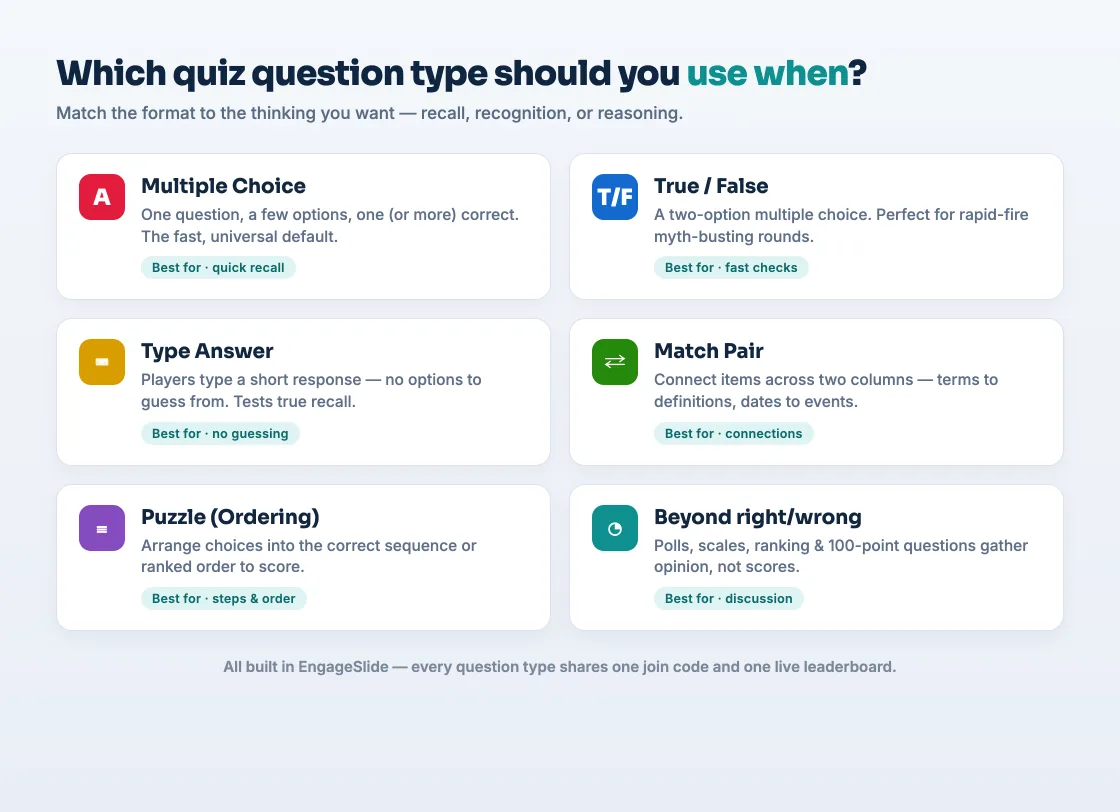
The simplest rule: match the format to the kind of thinking you want. Recognition (spotting the right answer) suits multiple choice and true/false. Recall (producing the answer) calls for Type Answer. Reasoning about relationships or sequence points you to Match Pair and Puzzle. And when you want opinion rather than a score, reach for polls, scales, or the 100-point question. Use the quick reference below to decide at a glance.
Mixing question types into one great quiz
The best quizzes rarely lean on a single format. A reliable structure looks like this: open with an easy multiple choice to build confidence, drop in a couple of true/false questions to pick up the pace, raise the stakes with a Type Answer or Match Pair that separates the field, and finish with a Puzzle worth extra points for a dramatic finale. Keep a running leaderboard so every question feels consequential, and consider awarding more points for faster correct answers to add friendly urgency.
Variety isn't decoration — it's what keeps a quiz feeling alive. Every time the format changes, your audience has to re-engage their brain, and that renewed attention is exactly what you're after.
If you're still shaping the overall experience — pacing, reveals, and scoring — our guide on how to create a live quiz your audience will enjoy pairs perfectly with this one, and 10 live quiz ideas gives you ready-made prompts for each format.
Building your first quiz in EngageSlide
Getting started takes minutes. Create a presentation, add a slide, and choose a quiz type from the picker — Select Answer, Type Answer, Match Pair, or Puzzle. Fill in your question and options, mark the correct answer, set a time limit if you want one, and repeat for each round. When you present, participants join with a QR code or short join link, answer on their phones, and watch the leaderboard update instantly. For a full step-by-step walkthrough, see our complete quiz setup guide, or browse more ideas on the EngageSlide blog. The tools are free with no feature limits — so the only real question left is which type to try first.