

You've all seen it. The presenter finishes, asks "Any questions?", and the room goes silent. A few people look at their phones. Someone eventually asks something safe, the presenter answers, and the session limps to a close. It's not that nobody had questions — it's that the format made asking them feel risky, slow, or pointless. A flat Q&A is a facilitation problem, not an audience problem, and it's very fixable. Here's how to run a Q&A that actually crackles, using the live tools built into EngageSlide.
Why Q&A sessions fall flat
Three things quietly kill most Q&A sessions. The first is fear: asking a question out loud in front of colleagues or strangers feels exposing, especially if it might sound basic. This is a matter of psychological safety — when people don't feel safe to look uninformed, they simply stay quiet. The second is friction: raising a hand, waiting for a roving microphone, and phrasing a question on the spot is a lot to ask. The third is the dominator: one confident person asks a long, rambling question that eats the clock and signals to everyone else that Q&A is not really for them.
Fix those three — safety, friction, and fairness — and the questions flow.
Collect questions live, not by shouting out
The single biggest upgrade is to let people submit questions from their phones instead of raising a hand. In EngageSlide you add a Q&A slide to your presentation; when you present it, the audience joins with a QR code or short code and types their questions in. No accounts, no app to install. Questions appear on your screen as they come in, so you're never staring at a silent room hoping someone speaks.
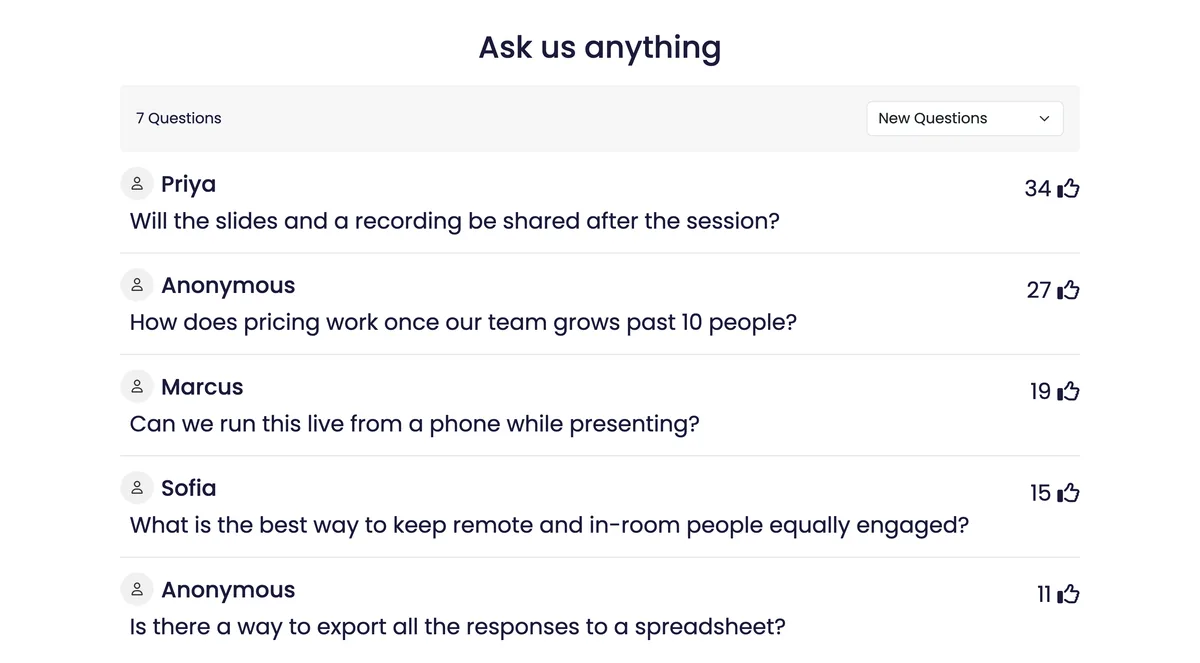
This is a standard part of the interactive presentation tool, and it works identically whether you're on stage, on Zoom, or running a hybrid session. Here's the live view a presenter sees, with questions already sorted by how many people have upvoted them:
Let the audience upvote
Notice the thumbs-up counts in that screenshot. Upvoting is what turns a pile of questions into a priority list. Instead of you guessing which question matters, or the loudest person deciding for the room, the audience surfaces the questions the most people actually want answered. It solves the flat-Q&A problem at its root: there's never an awkward silence, because you always have a ranked queue to work through, starting with the question 34 people cared about.
Upvoting also defuses the dominator. A single long-winded question no longer commands the floor by volume — if the room doesn't upvote it, it stays near the bottom, and the questions with broad interest rise to the top on their own.
Make it safe: allow anonymous questions
The questions people most want answered are often the ones they're least willing to attach their name to — about layoffs, pricing, a shaky roadmap, or something they feel they "should" already know. Let people ask anonymously and those questions finally surface. You'll get more honest, more useful Q&A, and the audience learns that no question will be held against them. If you're running an all-hands or a sensitive session, anonymity isn't a nice-to-have — it's the difference between real questions and polite ones.
Anonymity pairs naturally with light moderation. If you're worried about the occasional off-topic or inappropriate submission, you can review questions before they hit the main screen, so you get the candor of anonymous asking without handing the room over. In practice most audiences self-moderate the moment they can upvote — genuinely useful questions rise, noise sinks — but having the option lets you relax and let people speak freely.
Run it well: five facilitation moves
1. Seed the first question
Silence is contagious, and so is momentum. Before the session, plant one or two questions yourself (or ask a colleague to). The moment there's a question on screen with an answer, others feel safe adding theirs.
2. Open the queue early
Don't save Q&A for the last two minutes. Put the join code up at the start and invite questions throughout — people think of their best questions mid-talk, not after it. By the end you'll have a full, upvoted queue instead of a cold start.
3. Batch by theme
Scan the incoming questions and group the similar ones. Answering three related questions together is faster and feels more prepared than ping-ponging between unrelated topics.
4. Mark questions as answered
As you handle each one, mark it done so it clears from your view. It keeps you organized on stage and makes sure no upvoted question quietly gets skipped — the fastest way to lose an audience's trust is to ignore the thing they most wanted addressed.
5. Protect the time
A lively Q&A can run long. Tell the room how many questions you'll take, work top-down through the upvoted list, and promise to follow up in writing on the rest. People are happy to be cut off when they can see their question is #4 in the queue and will get a reply.
A great Q&A isn't about being ready for any question — it's about making it easy and safe for people to ask the real ones. Remove the fear, remove the friction, and let the room vote on what matters.
Keep the energy after the questions stop
Q&A doesn't have to be the last thing that happens. Because EngageSlide runs polls, quizzes, word clouds, and surveys in the same deck, you can turn the end of a session into a two-way close instead of a fade-out:
- Poll the unresolved debate. If a question exposed a genuine split in the room, drop it into a live poll and let everyone weigh in.
- Capture follow-ups with a survey. Add a quick feedback survey on the final slide to collect the questions people didn't get to — and their email if they'd like a reply.
- Check what landed. A one-question quiz or word cloud ("what's your main takeaway?") tells you whether the message actually stuck.
If you want the full setup walkthrough, our complete guide to running a live Q&A session covers moderation and settings in depth, and you can browse the EngageSlide blog for more ways to make presentations interactive. Get the format right and "Any questions?" stops being the moment your session dies — and becomes the moment it comes alive.