
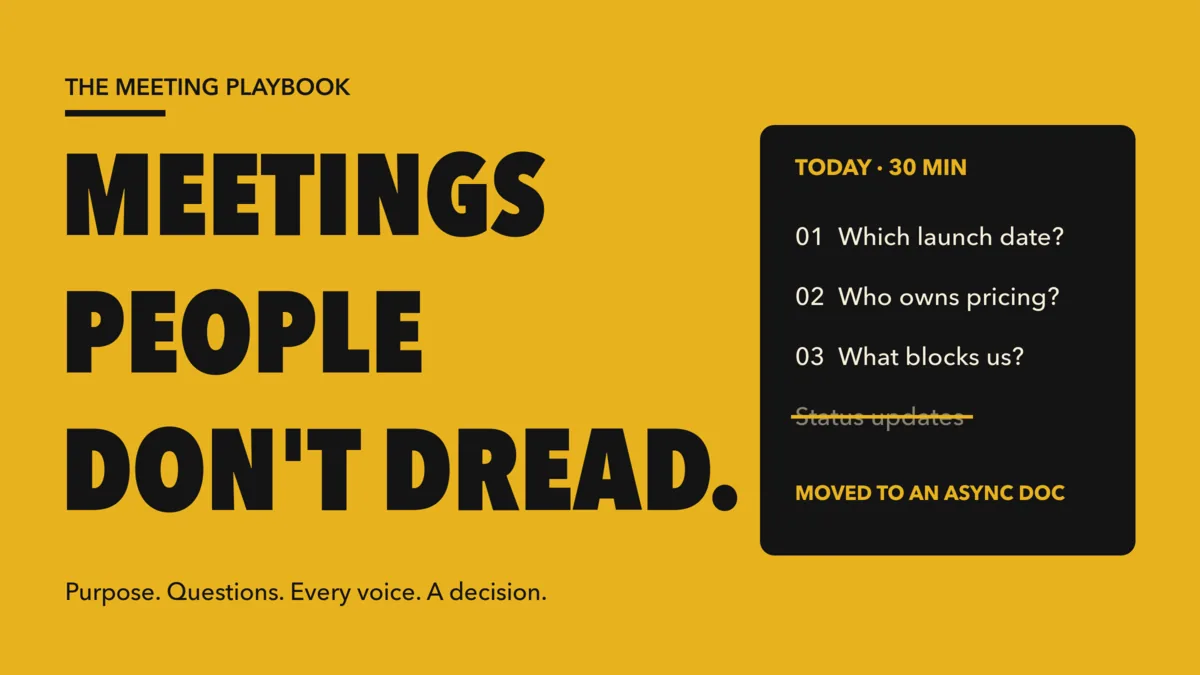
Most people do not hate meetings. They hate meetings that waste their time: the weekly sync where nothing is decided, the call where three people talk and everyone else checks email, the "quick catch-up" that runs twenty minutes over and ends with "let's take this offline." The good news is that engaging meetings are not a matter of charisma. They come from a handful of design choices you can make before anyone joins the call. This guide walks through why meetings become dreaded, the fixes that work, and how to use live interaction in EngageSlide to make every person in the room count.
Why people dread meetings
A meeting is supposed to be the place where a group does something it cannot do alone: decide, align, or solve a problem together. Dread sets in when a meeting stops doing that job. In practice, the same five patterns show up again and again:
- No clear purpose. The invite says "Weekly sync" and nothing else. Nobody knows what the meeting is for, so nobody knows when it is done.
- The wrong people. Twelve people are invited "to stay in the loop" when four could make the call. The other eight sit through discussions that do not need them.
- Status updates read aloud. Each person reports what they did last week. Information that takes two minutes to read takes thirty minutes to hear.
- A few voices dominate. The most senior or most confident people speak first and longest. Quieter people, remote attendees and newer team members stay silent, and their ideas never reach the table.
- No decision, no owner. The meeting ends with a vague sense of agreement but no decision written down and no name next to the next step. A week later, the same topic is back on the agenda.
Fix 1: Pass the purpose test before you send the invite
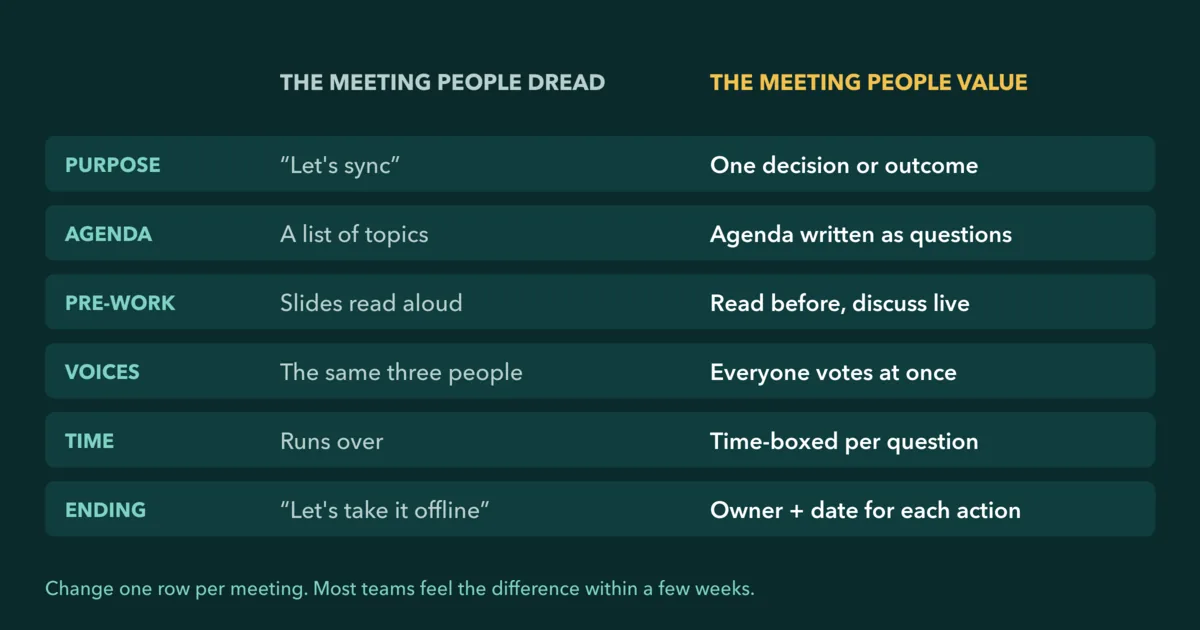
Before scheduling, finish this sentence: "By the end of this meeting, we will have ___." Good answers are concrete: "picked a launch date," "agreed the top three risks," "chosen which candidate gets an offer." If you can only write "discussed the project" or "shared updates," the meeting probably should not happen in that form.
The purpose test also tells you who to invite. Include the people needed to make the decision and the people whose input changes it. Everyone else can read the outcome afterwards.
Fix 2: Write the agenda as questions, not topics
"Q4 launch" is a topic. "Do we launch on 14 November or 28 November?" is a question. Topics invite open-ended conversation that expands to fill the available time. Questions have an answer, so the group knows when it is finished and can move on.
Rewrite every agenda item as a question and put a time box next to it. Three questions in a 30-minute meeting is plenty. If an item cannot be phrased as a question, it is probably information, and information belongs in pre-work.
Fix 3: Move status updates out of the room
Status updates are the biggest single cause of dreaded meetings, and the easiest to remove. Ask everyone to post their update in a shared doc or channel before the meeting. Then use the meeting for the things that genuinely need people together: questions, disagreements and decisions.
A simple rule works well: "If it doesn't need a reaction, write it. If it needs a decision, bring it."
Fix 4: Give every person a voice at the same time
The traditional way to get input is to go around the table or ask "any thoughts?" Both favour the people who speak first. Once two senior people have shared an opinion, the rest of the room tends to agree with them. This is why so many meetings reach a fast consensus that falls apart later.
Live interaction solves this by letting everyone answer at once, before anyone sees what others think. In EngageSlide, attendees join from their phone or laptop with a code or QR code and respond to the question on screen. A few formats work especially well in meetings:
- Poll. Ask "Which decision do we need to make first today?" and let the group set the order of the agenda in 30 seconds.
- Ranking. Have people drag options into order of priority. The combined ranking shows where the team actually agrees and disagrees.
- Scale. Ask "How confident are you that we hit the deadline?" on a 1–5 scale. A wide spread of answers is a signal to dig in, even when the room seems to agree.
- Q&A with upvotes. Collect questions throughout the meeting, anonymously if needed, and let people upvote the ones that matter most so you answer the important ones first.
- Open Ended. Ask "What's the biggest blocker this week?" and read the answers together instead of waiting for someone to volunteer.
Because results appear live on the shared screen, the discussion starts from what the whole group thinks, not from what the loudest person said first.
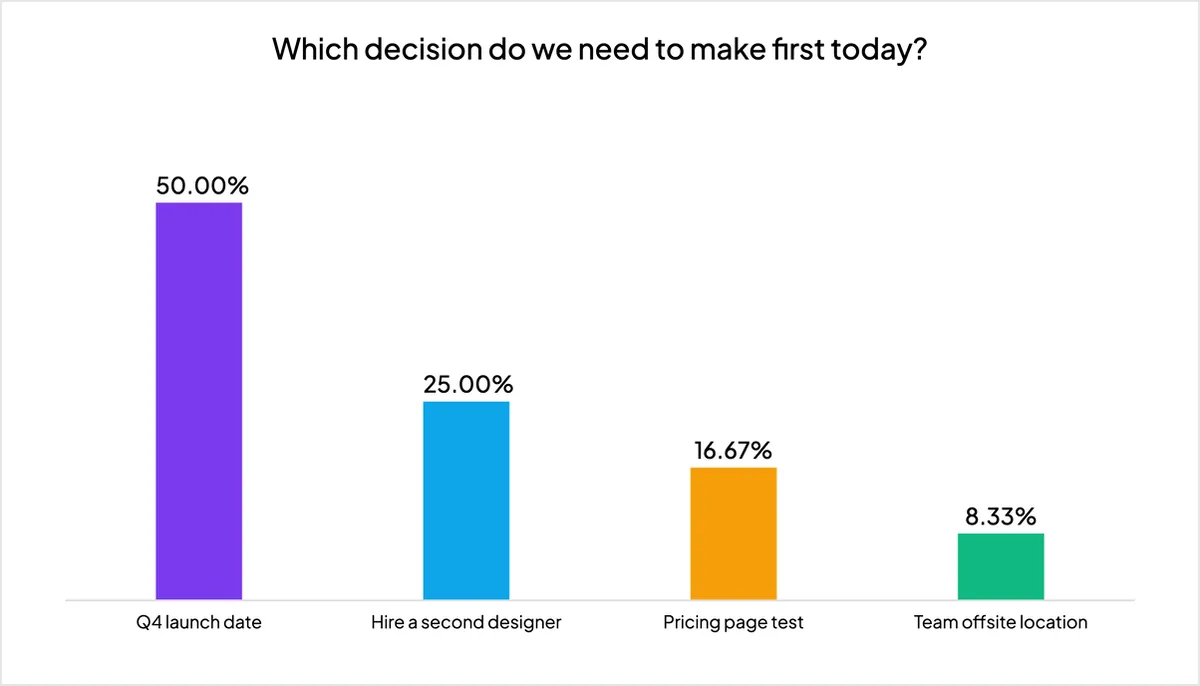
In the example above, half the team voted to settle the Q4 launch date first. The facilitator now knows where to spend the first ten minutes, and nobody had to argue for the order.
Fix 5: Time-box every question
Parkinson's law says work expands to fill the time available, and meeting discussions are no exception. Give each agenda question a fixed slot and say it out loud: "We have eight minutes for this one." When time is up, the group either decides, agrees a next step to get the missing information, or explicitly parks the item.
A visible timer helps. So does ending meetings early when the questions are answered. A 30-minute meeting that ends after 22 minutes is a gift people remember.
Fix 6: Decide and assign before anyone leaves
A meeting without a written decision is just a conversation. Reserve the last five minutes for three things:
- Read back the decisions. State each one in a single sentence so everyone hears the same version.
- Name an owner and a date for every action. "Someone should look into it" means no one will. "Priya sends the revised timeline by Thursday" gets done.
- Write it down where everyone can see it. Post the decisions and actions in the team channel within the hour.
When the group is split, a final poll can confirm the decision in seconds. If one option wins clearly, you are done. If the vote is close, you have learned that the decision needs more work, which is far better than discovering that a week later.
Fix 7: Close with a one-question meeting rating
You cannot improve meetings you never measure. End each recurring meeting with a single anonymous Scale question: "How useful was this meeting?" from 1 to 5. It takes ten seconds, and the trend over a few weeks tells you whether your changes are working.
If you want deeper, more candid input, go further than a single rating. Our guide on how to gather honest feedback in meetings shows how to build a short, regular feedback block into your team's routine.
A meeting people don't dread has one purpose, an agenda of questions, every voice heard at the same time, and a written decision with an owner before anyone leaves.
A 30-minute meeting template you can copy
Here is a simple structure that puts all seven fixes together:
- Before (async). Purpose sentence in the invite, agenda written as two or three questions, status updates posted in a shared doc.
- 0:00–0:03 — Set the order. A quick poll: which question should we tackle first?
- 0:03–0:23 — Work the questions. For each one, start with a Ranking, Scale or Open Ended slide, discuss the results, then decide. Keep the Q&A open in the background.
- 0:23–0:28 — Decide and assign. Read back decisions, name owners and dates.
- 0:28–0:30 — Rate the meeting. One anonymous Scale question.
Build the slides once in EngageSlide and reuse the same deck every week. You only need to update the question titles, and the team quickly learns the rhythm.
Common mistakes to avoid
- Adding interaction for its own sake. Every poll should change what happens next in the meeting. If the result will not affect the discussion, skip it.
- Revealing results too early. Let everyone vote before showing the chart, so people answer honestly rather than following the crowd.
- Letting the facilitator decide alone. If the group voted, respect the result or explain clearly why you are going a different way.
Start with your next meeting
You do not need a company-wide initiative to fix meetings. Take your next recurring meeting, write the purpose sentence, turn the agenda into questions, and add one live poll at the start. For more ideas on bringing interaction into team calls, read how to make your team meetings truly interactive, or browse more practical guides on the EngageSlide blog.