
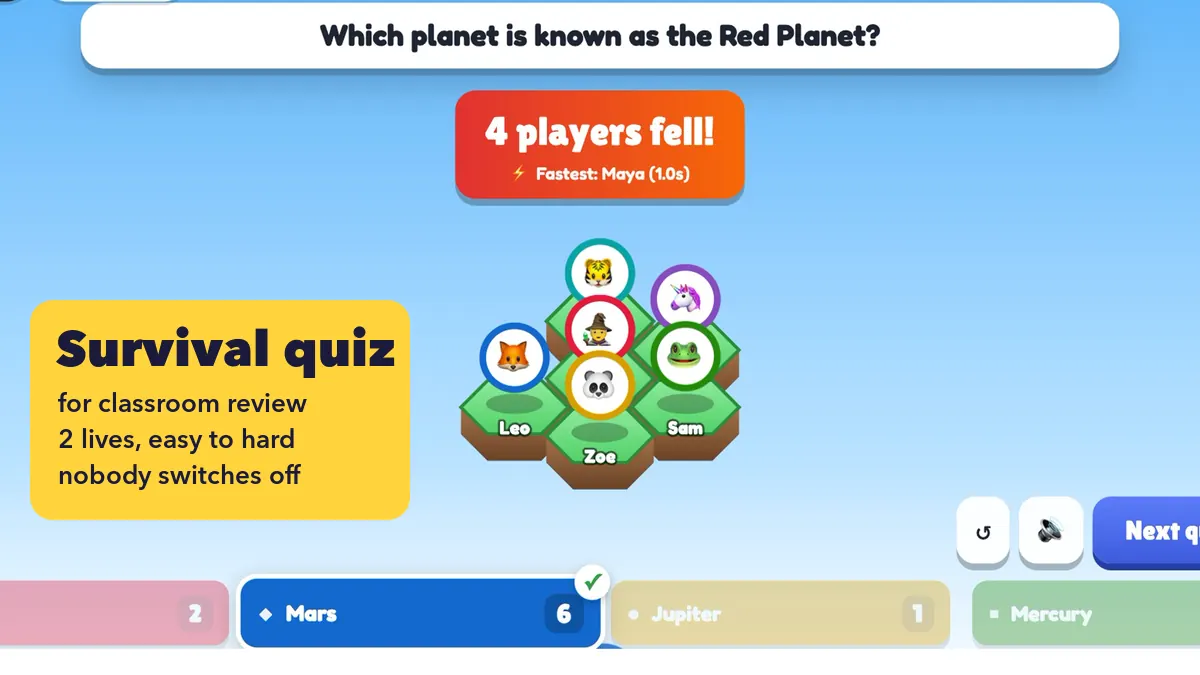
End-of-unit review has a familiar problem: the strong students answer everything, the rest wait for the bell. A survival quiz flips that. Every student starts on the board, every question matters, and the whole class watches the floor empty until one player is left. Done badly, though, an elimination game can push the students who need review most out of the game after question two. This guide shows how to run a survival quiz as a classroom review game that keeps everyone thinking, using the Last One Standing slide in EngageSlide.
If you are new to the game itself, read Last One Standing: An Elimination Quiz Where Wrong Answers Drop Your Tile first. Here we focus on the teacher’s side: question order, lives, what fallen students do, and how to reteach from the results.
Why a survival quiz works for review
Review sticks when students have to pull answers from memory instead of re-reading notes. That is the testing effect, one of the best-supported findings in learning research. A survival quiz adds two things a worksheet lacks: stakes and an audience. Each student sees their own tile on the big screen, so a right answer feels like a small win in front of the class, and a close call is something they remember.
It is also a quick formative assessment. By the end you know which question knocked out the most students, which is exactly the topic to teach again.
Set it up in five minutes
Add a Last One Standing slide to your lesson deck. It comes with 12 sample questions, so delete those and add your own. If your review questions already live in a document, click Paste list and paste one question per line:
- Format: Question | *Correct answer | Wrong | Wrong
- Example: What gas do plants absorb from the air? | *Carbon dioxide | Oxygen | Nitrogen
Each question has two to four answers. Then choose the settings: time per question (10, 15, 20 or 30 seconds), 1 or 2 lives, the final showdown on or off, and a theme (Sky islands, Lava pit or Ice floes). Students join on their phones or laptops with the code on the screen.
Order your questions easy → hard
The question list controls the pace of the game more than any setting. If question one is the hardest, half the class falls before they have warmed up. If every question is easy, nobody falls and the game drags. Plan a curve instead:
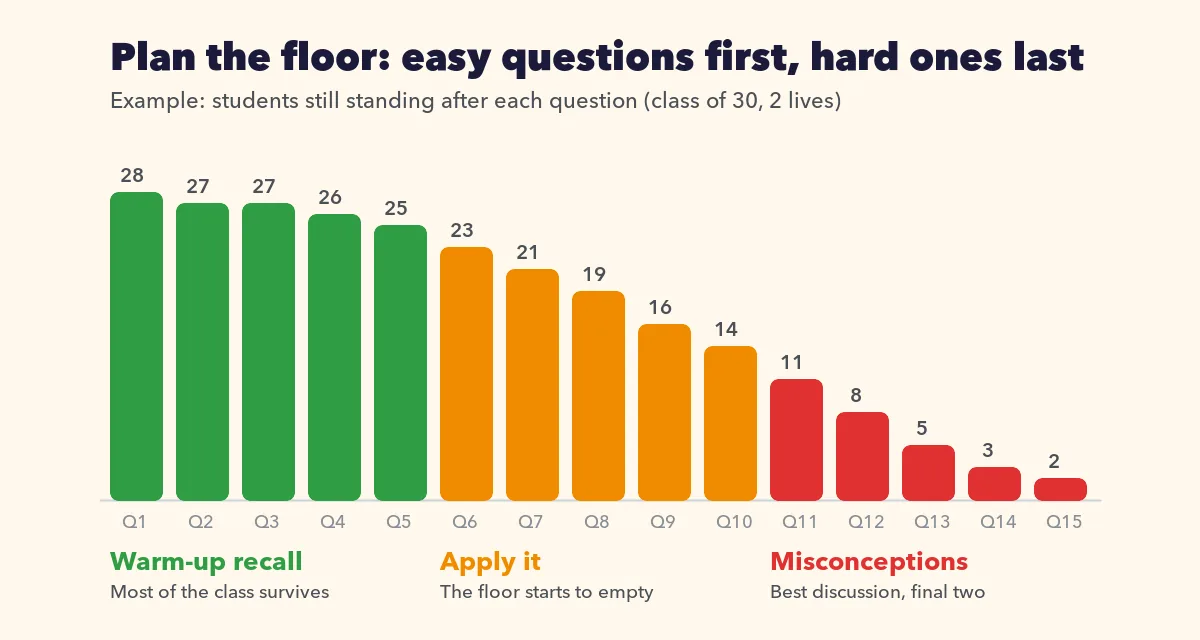
- Questions 1–5: warm-up recall. Key words, definitions, facts from the first lessons of the unit. Most of the class should survive these.
- Questions 6–10: apply it. Short problems, “which example shows…” questions, reading a value from a familiar diagram.
- Questions 11–15: the misconceptions. Write wrong answers that match real mistakes your students make. These empty the floor and create the best discussion.
Write more questions than you think you need: 12 to 15 for a class of 25 to 30 usually ends with a single winner. If the questions run out, everyone still standing shares first place, which is fine for a review but less exciting.
Keep answers short (two to five words), because students read them against the clock. For younger classes or questions with a calculation, choose 20 or 30 seconds instead of the default 15.
Use 2 lives so one slip doesn’t end the game
With 1 life, a single wrong tap and the tile drops. That is thrilling at a staff party and harsh in a classroom, especially for a student who misread one question. With 2 lives, the first wrong answer cracks the tile (“Your tile cracked!”) and only the second one drops it. Students who know the material survive a careless mistake, and everyone stays in the game for longer.
Two rules also protect the class. If every student still standing gets a question wrong, nobody falls, so a badly worded question can’t wipe out the room. And students who fall on the same question share the same place. Tell the class one more rule before you start: no answer counts as wrong, so they should always commit to a choice.
Keep fallen students thinking
Students who have fallen still see every question on their phone and on the big screen, but they can no longer answer (their phone says “You fell — watch who survives this one!”). That is where you step in. Give them a job so they keep reviewing:
- Shadow answers. Fallen students write their answer on a mini whiteboard or scrap paper before the reveal and score themselves. Ask who would still be standing.
- Explain the reveal. When the right answer lights up, ask a fallen student to explain why it is right before you press Next question.
- Predict the fall. Before each reveal, ask the fallen group to guess how many players will drop.
The game is short, so nobody waits long. Press Play again for a rematch with the same questions, and every student starts back on a tile. Students who join late watch the current game and get a tile in the next one.

In a classroom review game, the winner is a bonus. The real result is the question that knocked out the most students: that is your reteaching plan for tomorrow.
Reteach from the results
When the winner is crowned, press See the podium. Next to first, second and third place, the recap shows a chart of how many players fell on each question and names the toughest question of the game. Use it straight away:
- Go back to the toughest question. Ask the class what made the wrong answer attractive.
- Teach the idea, not just the answer. Give a second, similar example and ask for a show of hands.
- Check the chart for clusters. If several students fell on questions from the same lesson, that lesson needs more time.
Every game is saved. Inside the slide, Past games reopens the podium of each play, and the same results are in the presentation Report, so you can look back when planning the next lesson.
A 20-minute review lesson plan
- Minutes 0–3. Students join, you explain the rules: two lives, no answer counts as wrong, fallen players shadow-answer.
- Minutes 3–12. Play the game. Read each question aloud and pause on every reveal for a 20-second explanation.
- Minutes 12–17. Open the recap and reteach the toughest question.
- Minutes 17–20. Play again, or close with one similar exit question.
When a team format fits better
Last One Standing is every student for themselves. If your class needs more support, or you want everyone answering until the end, a two-team game works better: see Classroom Team Games: Split the Class in Two and Review Together. The full list of settings is in the Last One Standing help article, and you can rehearse alone before class: with one player, the game runs through every question.