

You've built a great set of quiz questions. Now comes a quieter decision that shapes the entire mood of the room: does everyone play for themselves, or do they play in teams? It sounds like a small toggle, but team quizzes and individual quizzes pull energy in very different directions. One sparks personal rivalry and rewards the sharpest recall; the other builds collaboration and carries a big or nervous crowd. This guide breaks down when each format wins, how team mode actually works, and how to pick the one that fits your group.
The core difference in one line
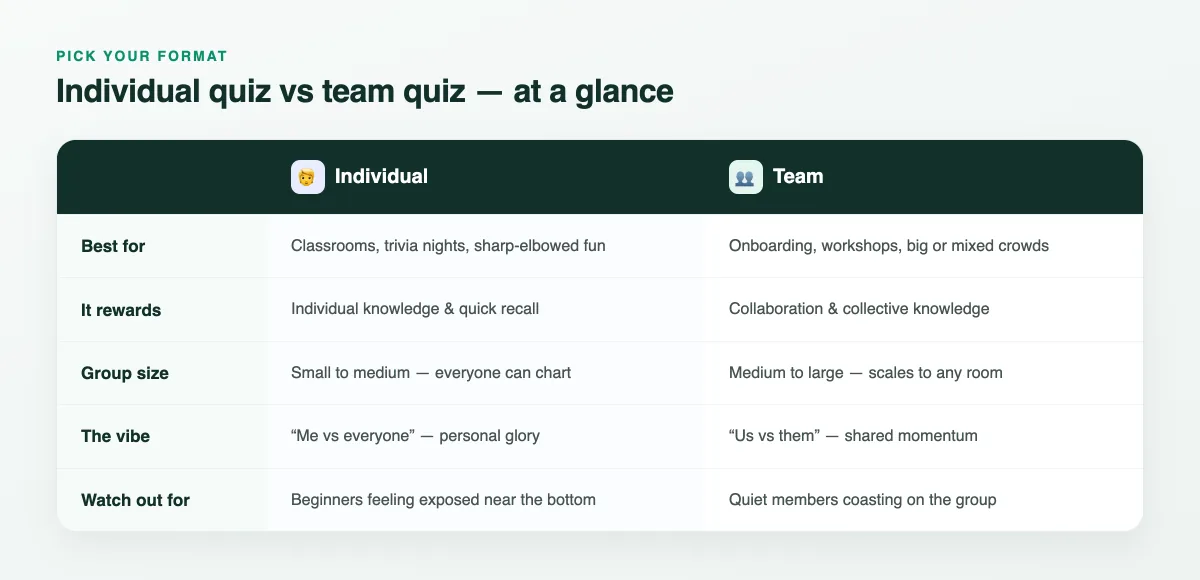
An individual quiz asks "what do you know?" A team quiz asks "what do we know together?" That shift changes who feels the pressure, who gets the glory, and who stays engaged when the questions get hard. Neither is better in the abstract — the right choice depends on your group's size, how well people know each other, and whether your goal is friendly competition or collective learning.
Picture the same ten trivia questions run two ways. As an individual quiz in a 25-person classroom, it's a personal race — hands hover over phones, and a clear champion emerges by name. Run those exact questions as a team quiz at a 150-person all-hands, and it becomes six tables leaning in, debating, and cheering when their table's colour jumps up the board. Same content, completely different room. That's why the format decision is worth a few seconds of thought before you present — it's the single biggest lever you have over the energy in the room.
When an individual quiz wins
Individual quizzes shine when personal recognition is part of the fun and everyone realistically has a shot at the top. They surface your sharpest players, create instant rivalries, and give each person a score they own. Reach for solo play when:
- The group is small to medium. With up to a few dozen players, everyone can see themselves climb the board and stay invested.
- You want accountability. In a classroom review or a training knowledge check, individual scores tell you exactly who has the material down and who needs another pass.
- People already know each other. Colleagues and classmates enjoy a bit of head-to-head banter when there's no real risk in coming mid-pack.
- Speed is part of the challenge. Solo play plus a speed bonus makes for a tense, fast trivia night where every second counts.
The thing to watch: beginners or newcomers can feel exposed near the bottom of a public board. Fun nicknames, avatars and a couple of gettable questions keep it light. If you're new to scoring, our guide on how to add a leaderboard to your quiz walks through points and speed bonuses in detail.
When a team quiz wins
Team quizzes are the better call whenever you want people working with each other instead of against each other. Splitting the room into teams lowers the social stakes, spreads confidence around, and turns a big anonymous crowd into a handful of rooting sections. Choose teams when:
- The crowd is large. A 200-person conference session feels chaotic as a free-for-all but electric as eight teams racing each other.
- Skill levels are mixed. Newer members can contribute and learn from stronger teammates without being singled out.
- Connection is the goal. Onboarding, offsites and workshops benefit more from "us vs them" energy than from isolating individuals.
- You want conversation. Teams debate answers before locking them in, which itself reinforces the learning.
Teams don't just change the scoreboard — they change who talks. A quiet room of individuals becomes a buzzing set of small groups arguing over the right answer.
The trade-off is that quieter members can coast on a strong team. Keep teams small (three to five people) so everyone has to pull their weight, and rotate who gets to lock in the answer.
How team mode actually works
In EngageSlide, team mode is a presentation setting, not a different product. Turn it on and each joining participant is placed into a team; every correct answer they give adds to their team's total. When you land on a Leaderboard slide, you get a live team ranking — with each team's colour, combined score, member count and roster — plus a one-tap toggle to flip to the individual Players view.
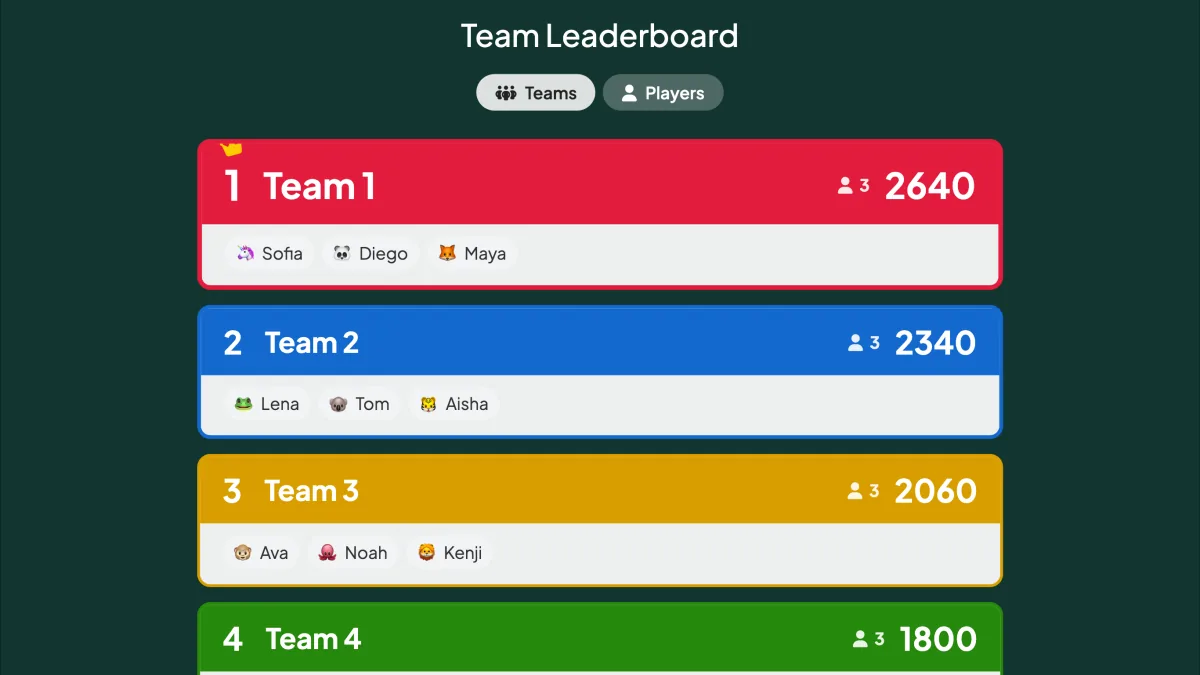
That toggle is the quiet superpower here: you can celebrate the winning team and the top individual scorer from the same slide, so nobody's personal effort disappears into the group total. Because the scores are computed from the same quiz slides either way, you don't rebuild anything to switch formats — the leaderboard simply groups the same points differently.
How to set it up
Running either format takes the same handful of steps inside your interactive presentation tool:
- Build your quiz slides. Add questions, correct answers and points — Select Answer, Puzzle, Match Pair and more all score automatically.
- Decide the format. Leave team mode off for individual play, or enable it in the presentation settings to split players into teams.
- Add a Leaderboard slide. Drop it after your quiz rounds. In team mode it opens on the team view; switch to Players anytime.
- Present and let it run. Participants join by QR code or link, pick an avatar, and start racking up points for themselves or their team.
Still not sure? Run both
Here's the move seasoned hosts use: open with a team round to warm up a cold room and get people talking, then finish with a short individual round for a personal-glory showdown at the end. The teams break the ice; the solo finale delivers a single winner and a big finish. You get collaboration and competition in one session, and the audience never sees it as two separate games.
Whichever you choose, the format should serve the room in front of you — energetic classroom, nervous new hires, a packed conference hall. For more ready-to-run formats, browse our live quiz ideas or start from the EngageSlide blog. The research backs the instinct, too: decades of work on cooperative learning show that well-structured group tasks can boost both engagement and retention — which is exactly what a good team quiz is built to do.