
A countdown clock changes everything about a quiz question. Add ten seconds of pressure and a sleepy room snaps to attention; add it to the wrong question and you punish your most thoughtful participants for thinking. The timer is one of the most powerful — and most misused — settings in any live quiz. Get it right and your session feels like a game show; get it wrong and it feels like a pop exam. This guide breaks down exactly when to time a quiz question, when to leave it open, and how to set the balance so every question does its job. If you're building your first quiz, start with our walkthrough on how to create a live quiz your audience will actually enjoy, then come back here to fine-tune the pacing.
What a timer actually does to your audience
A countdown does two things at once. It creates urgency — a shared, visible deadline that pulls everyone's attention to the same moment — and it creates arousal, the mild stress response that sharpens focus. Psychologists describe the sweet spot with the Yerkes–Dodson law: performance rises with pressure up to a point, then falls off as pressure tips into anxiety. A short timer on an easy recall question lands squarely in the productive zone. The same timer on a multi-step problem pushes people past the peak, and they guess or freeze instead of reasoning.
So the real question isn't "timed or untimed?" in the abstract. It's "what does this question need?" A timer is a tool for energy and fairness, not a default you apply to everything.
Time the question to the type of thinking it requires: seconds for recall and recognition, room to breathe for reasoning and reflection.
When to use timed quiz questions
Reach for a countdown when speed is part of the point, or when a shared deadline will do more good than the extra thinking time would. Timed questions shine in these moments:
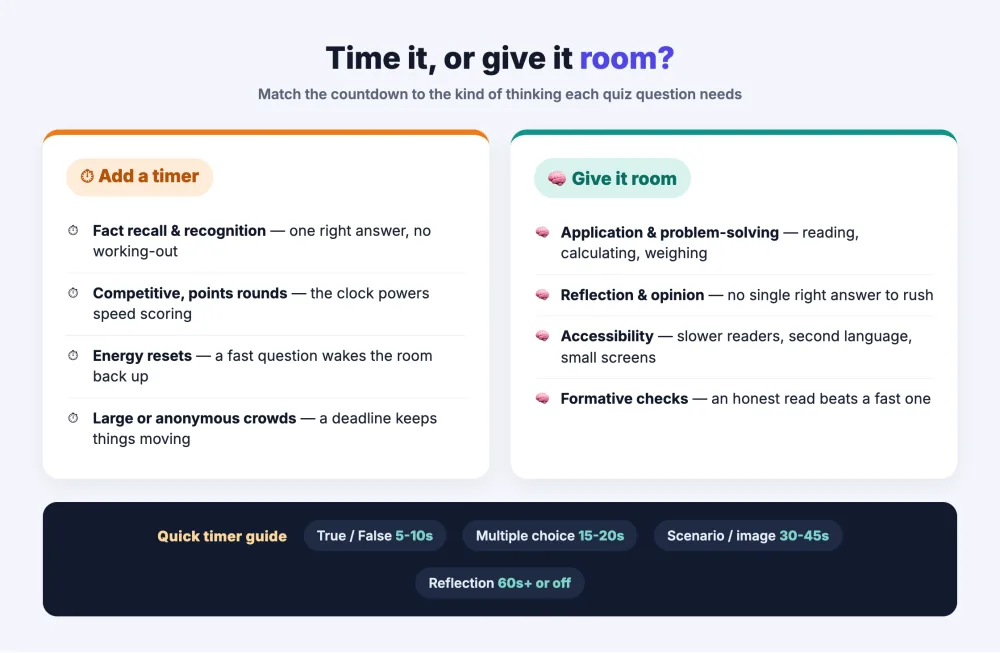
- Fact recall and recognition. "Which year did the company launch?" has one answer and no working-out. A 10–15 second timer keeps the pace brisk and stops people from second-guessing a right answer into a wrong one.
- Competitive, points-based rounds. If you're running a leaderboard, a timer is what makes the race real. It also enables speed scoring — more on that below — so the quickest correct answer earns the most points.
- Energy resets. After a dense stretch of slides, a fast timed question is a jolt of adrenaline that wakes the room back up. The ticking clock is doing emotional work, not just measuring time.
- Large or anonymous crowds. With hundreds of participants you can't wait for the last straggler. A deadline keeps the session moving and gives you a clean moment to reveal results and move on.
In EngageSlide you set this per question with the Seconds to answer field in the slide settings — so a single quiz can mix a snappy 10-second warm-up with a more generous 45-second closer.
When to leave questions untimed (or generous)
Turn the pressure down when the value of the question is in the quality of the answer, not the speed of it. Consider skipping or loosening the timer for:
- Application and problem-solving. Anything that requires reading a scenario, doing a calculation, or weighing options needs room. A rushed answer here tells you nothing about who actually understands the material.
- Reflection and opinion. If you're checking how people feel or what they'd decide, a clock signals "there's a right answer, hurry up" — exactly the wrong message.
- Accessibility. Participants who read more slowly, use a screen reader, are answering in a second language, or are joining on a small phone screen are all disadvantaged by tight timers. A little slack makes your quiz fairer without hurting anyone.
- Formative checks where learning matters more than ranking. When you're using a quiz to check understanding in real time, an honest read of the room beats a fast one. Give people the seconds they need to answer truthfully.
Setting the timer in EngageSlide
Timing is a per-slide setting, not an all-or-nothing switch. Open any quiz question, go to the settings panel on the right, and set Seconds to answer to the value that fits the question. Leave it long — or set it generously — when you effectively want "untimed" behavior. Because it lives on each slide, you control the rhythm of the whole quiz question by question.
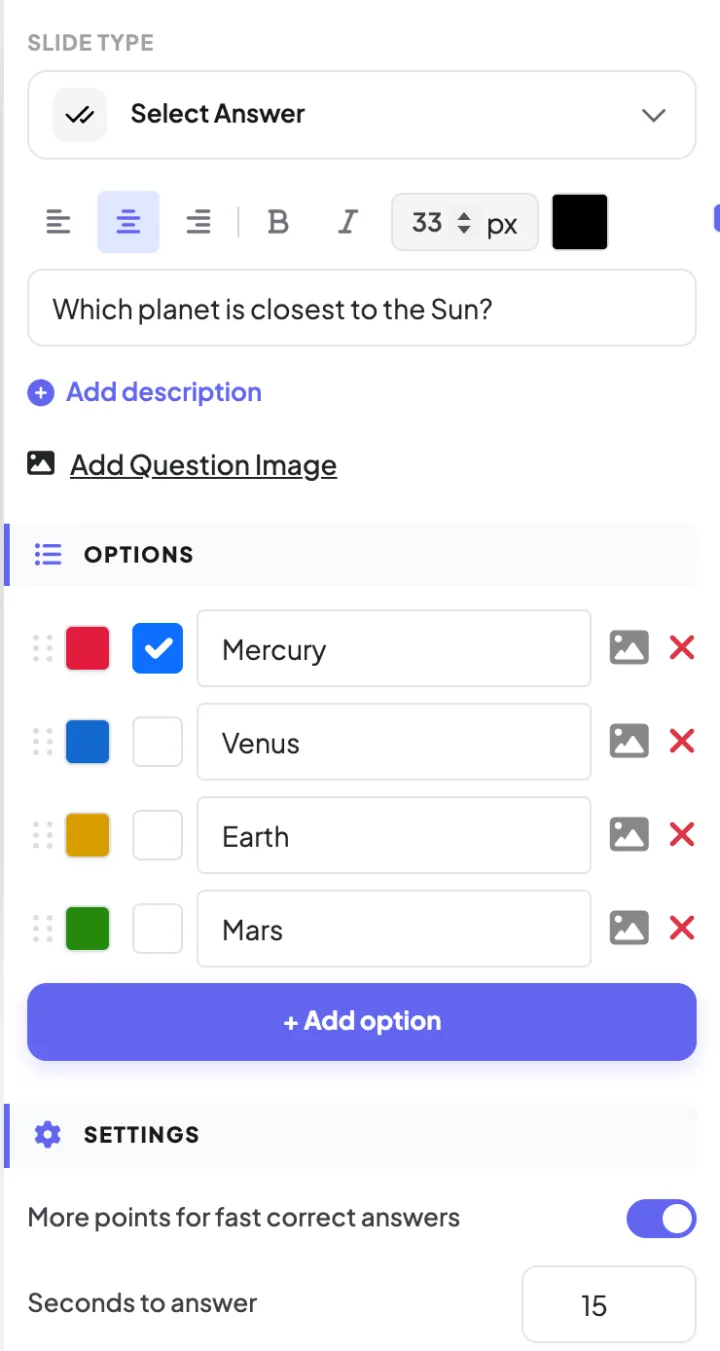
Two related settings turn a timer from a stopwatch into a scoring mechanic:
- More points for fast correct answers. Enable this and the countdown rewards speed — the sooner someone locks in the right answer, the more points they earn, down to a minimum you define. Pair it with a timer for genuinely competitive rounds.
- Partial scoring and max points. For questions with more than one correct option, partial scoring keeps a fast timer from feeling brutally all-or-nothing.
When speed scoring is on, the timer and the leaderboard work together: the clock decides the window, and the leaderboard turns quick, correct answers into standings people actually care about.
Finding the right number of seconds
There's no universal perfect timer, but these starting points work well and are easy to adjust after you watch one live round:
- 5–10 seconds — true/false and simple recognition. Fast, punchy, high-energy.
- 15–20 seconds — standard multiple choice with four options people need to read.
- 30–45 seconds — questions with a short scenario, an image to interpret, or a small calculation.
- 60+ seconds or untimed — reflection, open thinking, or anything you want people to get right rather than fast.
The single best diagnostic is watching the response count. If most answers land with the clock still ticking and a big chunk of time to spare, your timer is too long and the energy sags. If responses are still pouring in when time runs out, you've cut people off mid-thought — add five to ten seconds next time. Different quiz question types naturally need different windows, so tune per type rather than applying one number everywhere.
Common timer mistakes to avoid
A few patterns quietly wreck otherwise good quizzes:
- One timer for every question. The most common mistake. A blanket 20 seconds is too long for true/false and too short for a word problem. Vary it.
- Timing the thinking questions. If you want depth, don't attach a countdown — you'll get speed instead, and mistake it for understanding.
- Forgetting the join lag. On the first question, some people are still scanning the QR code and typing their name. Give question one a little extra breathing room before you crank up the pace.
- Racing past the reveal. The timer governs answering, not learning. Once time's up, slow down: show the correct answer, explain the "why," and let it sink in before the next question.
A simple rule of thumb
When you're unsure, ask one question: is this about how fast they know it, or how well they understand it? Speed questions get a tight timer and, if you like, speed scoring. Understanding questions get room — or no clock at all. Mix both across a single quiz and you get the best of both worlds: the crackle of a race where it belongs, and the calm of real thinking where that matters more. That deliberate rhythm is what separates a quiz people endure from one they ask you to run again.
Ready to put it into practice? Build your next quiz with EngageSlide's interactive presentation tool, set a different timer on each question, and watch the room respond. For the full setup from scratch, the EngageSlide blog has step-by-step guides on quizzes, leaderboards, and live polls.