
Virtual Halloween team building usually goes one of two ways. Either someone books an hour, says "wear a costume if you like", and twelve people sit in silence until the meeting ends early, or the hour actually works: people laugh, cameras come on, and the team talks about it the next day. The difference is rarely budget; it is a clear plan with short segments and something for everyone to do on their phone. This guide gives you exactly that: a 30-minute remote Halloween hour for Zoom, Microsoft Teams or Google Meet, with a minute-by-minute run of show, a facilitator script you can read word for word, and the EngageSlide slides that run each part.
Why a remote Halloween hour needs its own format
A remote event is not an office party on a screen. On a call only one person can talk at a time and quiet people disappear behind a grid of tiles. After a day of calls attention is thin, part of what is known as Zoom fatigue. So the format below follows three rules:
- Everyone plays at the same time. Votes, answers and taps happen on each person's phone or browser tab, so nobody waits for their turn to speak.
- Nothing lasts longer than ten minutes. Three short segments keep the energy up and make it easy for latecomers to jump in.
- Costumes are optional, fun is not. Someone with just a pumpkin mug can still vote, answer trivia and win the final race.
If you are looking for a list of everyday remote games instead, see our quick remote team building activities. If you want a longer, trivia-only evening, the virtual pub quiz for remote teams is the better fit. This post is the Halloween special: one tight half hour.
Before the call: 15 minutes of setup
You only need one presentation in the EngageSlide interactive presentation tool. Build it once and reuse it next year.
- Send the invite with a hint. "Costumes, hats and spooky backgrounds welcome. Bring your phone." The phone line matters: people answer on their phone while the call stays on their laptop.
- Collect costume names. Ask people to reply with a one-line costume title by the day before, for example "Vampire accountant" or "Ghost of Q3 deadlines". You will use these as poll options.
- Create the slides. In order: a Poll for the costume vote, five to eight trivia questions, a Leaderboard and a Zombie Race slide. That is the whole deck.
- Do a test run. Share your screen to a colleague and join from your phone at engageslide.com with the code. Participants need no app and no account.
The 30-minute run of show
Minutes 0–3: join and warm up
Share your screen with the first slide visible. The join code and QR code are on screen, so people can scan it or type the code at engageslide.com. Paste the code into the chat too.
Script: "Happy Halloween, everyone! Grab your phone and join with the code on screen. While we wait: unmute and tell us in one word what you are dressed as. No costume? Tell us your favourite Halloween candy."
Minutes 3–10: the costume reveal and vote
Ask everyone with a costume to turn their camera on, then go round the grid quickly: each person gets 20 seconds to show the costume and explain it. Switch Zoom or Teams to gallery view so everyone can see everyone.
Then open the Poll slide. Each option is a person plus their costume title, so the vote is about the costume, not just popularity. Turn on Hide result in the poll settings so the bars stay hidden while people vote, then press Show result for the reveal. When everyone has voted, use Stop submission to lock it. A poll takes up to 9 options; with a bigger team, run two polls (for example "Scariest" and "Most creative"), or attach a photo to each option.
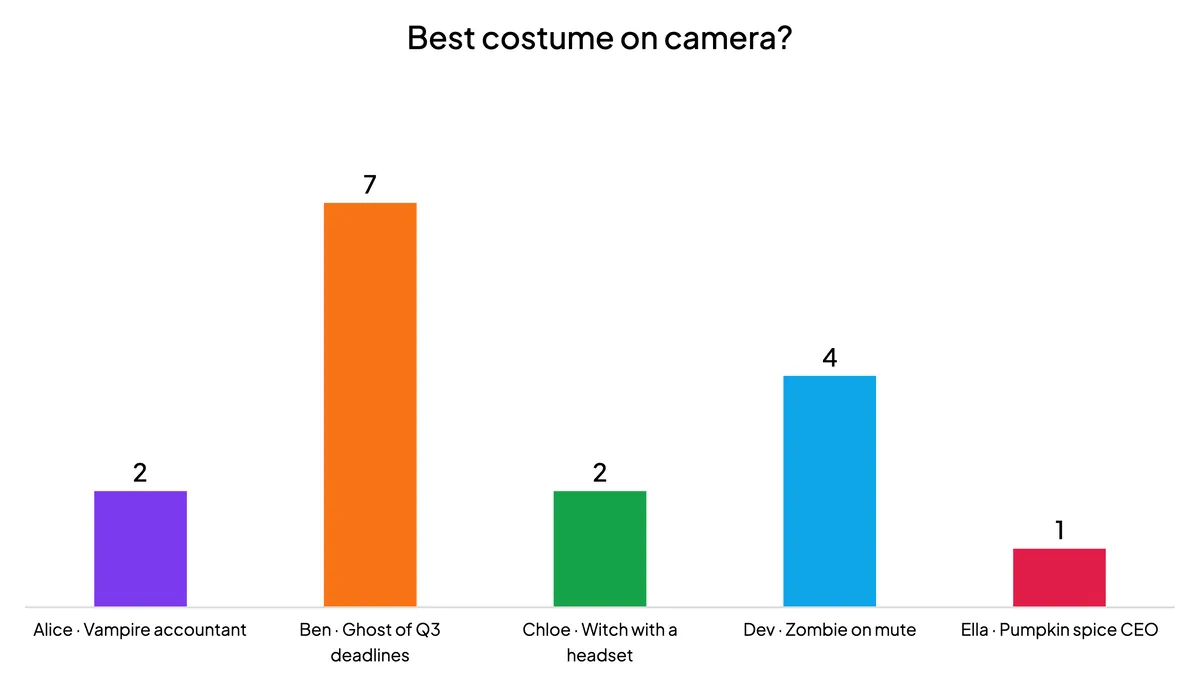
Script: "Voting is open. You cannot vote for yourself... well, you can, but we will all know. Results in three, two, one." Announce the winner and move on while the energy is high.
Minutes 10–22: spooky trivia
Next, a short quiz round of five to eight questions. Mix the quiz types so the round has rhythm:
- Select Answer. Four options on every phone, with faster correct answers earning more points. Great for easy openers.
- True or False. Fast myth-busting questions, such as "Jack-o'-lanterns were first carved from pumpkins." (False: turnips came first.)
- Type Answer. Players type the answer themselves. Use one or two for the hardest questions, so nobody can guess.
Need questions? Take them straight from our list of 30 Halloween trivia questions with answers, already sorted into easy, medium and hard rounds. EngageSlide adds a Leaderboard after each new quiz question; keep only the one at the end so the rankings move at the climax.
Script: "Points for speed, so do not overthink it. Answers lock when the timer ends." After the leaderboard: "Congratulations to our trivia champion! But it is not over. Everyone gets a second chance in the final event."
Minutes 22–28: the Zombie Race finale
End on something that needs no knowledge at all. Zombie Race is a Halloween race game in the Games tab: everyone picks one of 20 Halloween costumes on their phone (zombies, pumpkin heads, skeletons, a mummy, a vampire, a witch, a ghost, a werewolf and more), or taps Random zombie, and enters a name. Their racer appears on your shared screen right away.

Press GO and phones show a big TAP TO RUN! button with each player's live rank. The faster they tap, the faster their racer runs, while racers on the big screen stumble, hop, spin and shout "BRAAAINS!". Taps are capped at about 13 per second, so auto-clickers do not help. When time runs out, the leader crosses the finish line and a WINNER! card shows their costume, name and number of boosts. Press AGAIN for a rematch.
For a remote call, set the Race Duration to 20–30 seconds and pick a theme: Graveyard, Ruined City or Toxic Swamp. Leave Let the audience boost on, because hammering the phone screen gets people out of their chairs. If people only have a laptop, turn boost off for a hands-free race with a random winner. For every setting and tip, see the Zombie Race Halloween game guide.
Script: "Final event! Pick your monster on your phone. When I say go, tap as fast as you can. Trivia champions, this is your chance to lose. Ready? GO!"
Run it twice: a practice race and a "for the crown" race. Every finished race is saved, so you can reopen the results later with the 🏆 Past games button inside the slide or in the Report, which is handy for announcing winners in your team chat afterwards.
Minutes 28–30: wrap up
Recap the three winners (best costume, trivia champion, Zombie Race winner) and thank everyone. Announce any small prizes, such as a coffee voucher, and end on time. Finishing at minute 30 is what gets people to say yes next year.
A great virtual Halloween hour is not about how many activities you run. It is three short moments where everyone plays at once: a costume vote, a trivia round and one loud, silly race.
Facilitator tips for remote teams
- Mute during trivia. Keyboard noise drowns out your voice.
- Plan for time zones. For global teams, run the hour twice with the same deck.
- Make costumes inclusive. Celebrations differ across cultures, so frame it as "wear anything fun" and offer the "favourite candy" option. The history of Halloween costumes makes a good trivia question, too.
- Use Microsoft Teams? You can present from inside your meeting with the EngageSlide app for Microsoft Teams. On Zoom or Google Meet, simply share the presentation window.
Variations for bigger or smaller teams
Under 8 people
Skip the poll, run one trivia round and race three times. Small groups love rematches.
20 to 100 people
Only shortlisted costumes present on camera (collect nominations in the chat), and turn on team quiz mode so departments compete as teams. Zombie Race scales too: racers shrink a little so every lane stays readable.
Hybrid offices
Show the deck on the meeting-room screen and share it to the call; everyone joins with the same code. For in-office ideas, see our Halloween activities for work.
Your copy-paste checklist
- Invite: 30 minutes, "costumes welcome, bring your phone", costume titles by the day before.
- Deck: Poll (costume vote, Hide result on), 5–8 trivia questions, one Leaderboard, Zombie Race (20–30 s, boost on).
- Run of show: 0–3 join, 3–10 costumes and vote, 10–22 trivia, 22–28 Zombie Race, 28–30 winners.
- After: post the winners in the team chat and save the deck for next October.
Set it up once and your virtual Halloween team building is ready every year: swap a few questions, collect new costume titles and let the zombies run.