
Remote teams are great at getting work done and terrible at the stuff that used to happen around it — the hallway jokes, the Friday drink, the "how was your weekend?" that turns coworkers into actual friends. A virtual pub quiz is one of the simplest ways to win that back. It's low effort to host, genuinely fun to play, and it gives everyone a reason to switch their camera on and laugh together for half an hour. This guide walks through exactly how to run a virtual pub quiz for your remote team — from the kit you need to a six-round run sheet you can steal tonight.
Why a virtual pub quiz works for remote teams
The classic pub quiz already has the perfect shape for a distributed team: short rounds, mixed topics, teams of a few people, and a leaderboard that keeps everyone hooked until the final scores. Move it online and you keep all of that while dropping the only hard parts — nobody has to travel, book a venue, or live in the same city. It works because it does three things a normal video call can't:
- It levels the room. The quiz doesn't care about job titles. An intern can out-score a VP on the music round, and that's exactly the kind of moment that builds real rapport.
- It gives quiet people a way in. Answering on your own phone is far less intimidating than unmuting to speak, so shy teammates still take part.
- It creates shared stories. The absurd wrong answers and last-second comebacks become inside jokes that outlast the call.

What you need to host one
Less than you'd think. You need a video call for faces and chatter (Zoom, Meet or Teams — whatever your team already uses), a way to run the actual quiz, and a host willing to ham it up a little. For the quiz itself, an interactive presentation tool like EngageSlide does the heavy lifting: you build your rounds as quiz slides, share your screen on the call, and everyone joins on their phone or a second tab by scanning a QR code or clicking a link. No apps to install, no accounts for players to create.
Because scoring is automatic, you're free to actually host instead of tallying answers on a spreadsheet. Turn on team mode and EngageSlide sorts players into teams and keeps a running team leaderboard — perfect for a pub quiz, where half the fun is arguing with your teammates before you lock in an answer. If you're weighing solo play against teams, our guide on team quiz vs individual quiz breaks down when each one lands best.
Build your run sheet: 6 classic rounds
A good pub quiz mixes formats so it never gets samey. Aim for five or six rounds of five to eight questions each — roughly 30–40 minutes total. Here's a run sheet that works every time, with the EngageSlide feature to use for each:
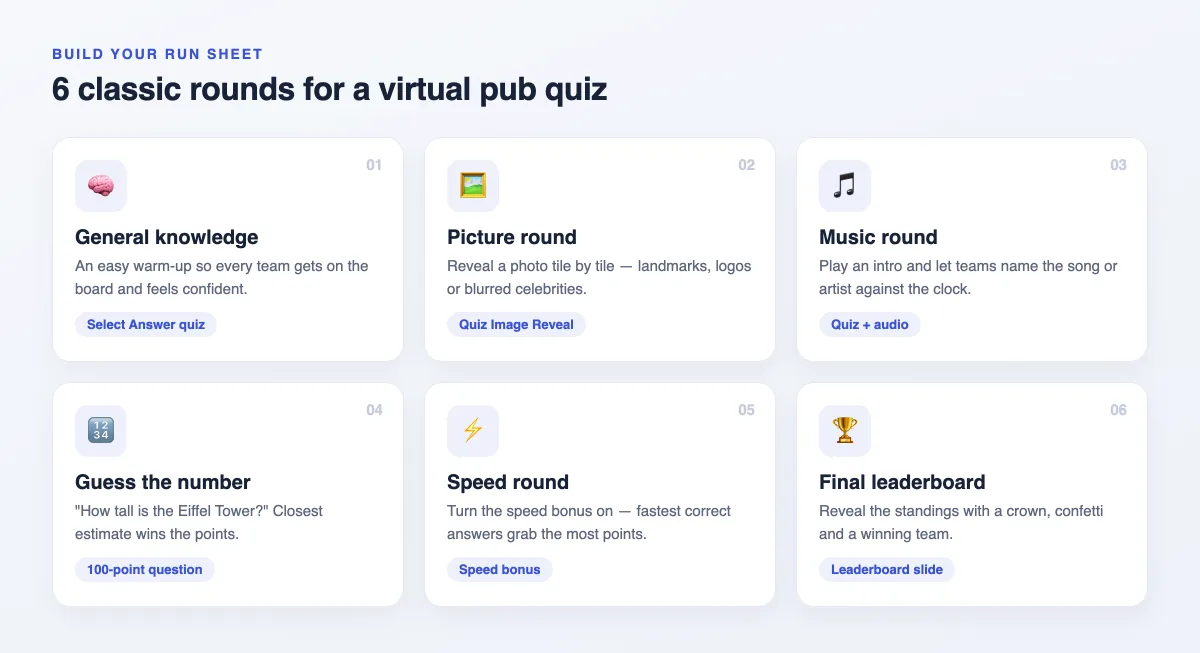
Start easy so every team gets on the board, then vary the pace. The picture round is a remote crowd favourite — reveal a photo tile by tile and let teams shout guesses as it uncovers. The music round plays an audio clip and rewards the fastest correct song title. Save a speed round with the speed bonus switched on for near the end, when a trailing team can still storm back. Then close on the final leaderboard for the big reveal. For more round inspiration, our live quiz ideas post has plenty to mix in.
How to host it on the night
The run-of-show is simple once your slides are built:
- Open the call 5 minutes early. Let people grab a drink and settle in. Music and small talk set the pub mood.
- Share your screen and the join code. Give everyone a minute to join, pick a nickname and avatar, and land in a team.
- Read each question out loud. Don't just rely on the slide — your commentary is the entertainment. Add a groan-worthy pun or two.
- Show the leaderboard between rounds. This is the suspense engine. React to the standings, call out the comeback, stir up some friendly trash talk.
- Reveal the winner with fanfare. The final leaderboard brings a crown and confetti — lean into it and let the winning team take a bow.
Tips to keep the banter flowing
The tech runs itself; the atmosphere is on you. A few small things make the difference between a quiz people tolerate and one they ask for again:
The goal isn't to find the smartest person on the team — it's to give everyone 30 minutes where work feels like play and the whole team is laughing at the same thing.
- Encourage funny team names. "Quizzy McQuizface" energy sets the tone before the first question.
- Keep rounds short. Momentum beats depth. Five sharp questions land better than ten that drag.
- Mix easy and hard. A couple of gettable questions late keep every team mathematically alive and paying attention.
- Rotate the host. Let a different teammate build and run the quiz each time — it spreads ownership and keeps the style fresh.
- Add a wildcard round. A "guess the colleague's baby photo" or "office trivia" round makes it unmistakably your team's quiz.
Make it a ritual, not a one-off
The real payoff comes from repetition. A monthly Friday quiz becomes something the team looks forward to — a low-pressure reason to show up as people, not just avatars in a meeting grid. Keep a rolling champion, hand the hosting baton around, and let the running jokes build. Done consistently, a virtual pub quiz is one of the cheapest, most reliable forms of remote team building you can run — no budget, no logistics, just your team and a good set of questions.
Ready to host your first one? Build a few quiz slides, turn on team mode, and send the link. For more ways to keep a distributed crowd engaged, browse the EngageSlide blog — then pour a drink and let the rounds begin.