
Every room has a mood — the quiet tension before a reorg announcement, the restless energy of a Friday afternoon workshop, the flat silence of week six in an online course. Good facilitators read that mood and adjust. The trouble is that mood is invisible, and asking "How's everyone feeling?" out loud rarely gets an honest answer. A live word cloud fixes that: in ten seconds it makes the emotional temperature of a room visible, anonymous, and impossible to fake. This guide shows you how to use word clouds to capture the mood of any room — and, more importantly, what to do with what you find.
Why mood is worth measuring
Mood isn't a soft, optional thing. It shapes how much people absorb, whether they speak up, and how they'll remember the session afterward. A tense room won't volunteer ideas. An exhausted room won't retain your key points. If you barrel through your agenda without reading the emotional state of the people in front of you, you're presenting to a version of the audience that doesn't exist.
The problem is that the usual signals are unreliable. Nodding heads and polite smiles hide boredom and confusion. The one person who speaks up is rarely representative of the silent majority. And in remote sessions, where cameras are often off, you're flying almost completely blind. You need a way to hear from everyone at once, honestly — and that's exactly what a word cloud does.
Why a word cloud is the perfect mood sensor
A live word cloud asks everyone the same simple question and shows the collective answer as a single picture, where the most common feelings grow the largest. Three properties make it ideal for capturing mood:
- It's anonymous. People will type "anxious," "overwhelmed," or "bored" from their phone when they'd never say it to your face. Anonymity is what turns a polite non-answer into the truth.
- It's fast and low-effort. One word takes seconds. Even a checked-out or shy participant will contribute, so you hear from the whole room, not just the vocal few.
- It's visual and shared. The dominant emotions literally appear biggest. Everyone — including the audience — sees the room's real state at a glance, which is often a powerful moment in itself.
You can't respond to a mood you can't see. A word cloud turns the invisible emotional state of a room into something you can point at and talk about.
If you're brand new to the format, start with our guide to what a live word cloud is and how it works, then come back for the mood-specific playbook below.
Questions that capture mood
The prompt matters. Vague questions produce vague clouds. These are tested prompts that reliably surface the emotional temperature of a room — run them in EngageSlide's interactive presentation tool, where your audience joins with a QR code and answers from their phones.
- At the start: "In one word, how are you arriving today?" or "What's your energy level right now — in a word?"
- Mid-session: "One word for how this project feels right now." Great for surfacing hidden frustration before it festers.
- After hard news: "What's one word for how you're feeling about this change?" Naming the emotion is the first step to addressing it.
- At the end: "Sum up today's session in one word." An honest, unfilterable read on how it actually landed.
Notice the pattern: always ask for one word, always keep it about feelings rather than facts, and always make it specific to the moment. For a wider bank of prompts across meetings, classrooms, and team settings, see our list of 12 creative word cloud questions.
How to read the cloud
Once the words appear, resist the urge to skip past them. Reading the cloud well is a skill:
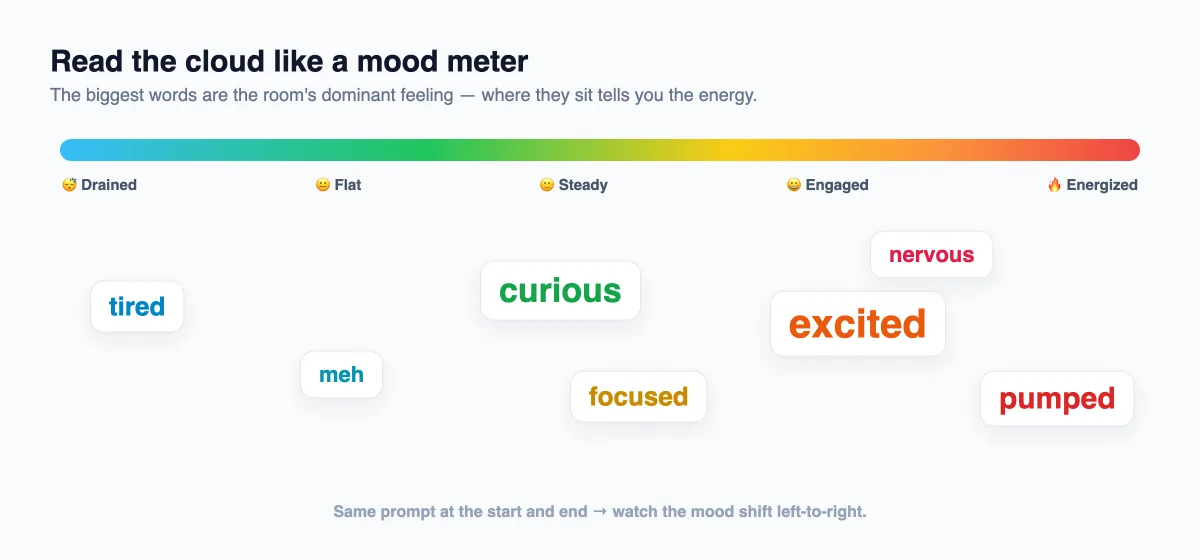
- Size tells you the dominant mood. The biggest word is what most of the room is feeling. If "tired" towers over everything, that's your headline.
- Spread tells you about alignment. A cloud dominated by one or two words means a unified mood. A scattered cloud of many small, different words means the room is fragmented — some energized, some drained — and you may need to meet several needs at once.
- Outliers are worth a gentle look. A lone "angry" or "confused" in the corner is a quiet signal. You don't have to single anyone out, but you can acknowledge it: "I see someone's feeling stuck — let's make space for that."
- Contradictions are information too. "Excited" and "nervous" side by side is completely normal before a big launch, and naming both makes people feel understood.
The most important part: act on what you see
Capturing the mood is worthless if you ignore it. The entire value comes from your response. If the cloud shows exhaustion, call a five-minute break or cut a section. If it shows confusion, stop and re-explain before moving on. If it shows anxiety before an exam or a reorg, acknowledge it out loud — that alone lowers the temperature. Adjusting visibly in response to the cloud also builds enormous trust: it shows the audience you're actually listening, not just performing a check-in.
One of the most persuasive uses is the before-and-after mood cloud. Run the same prompt at the start and end of a session. When a room that began with "skeptical" and "tired" ends with "motivated" and "clear," you have vivid, visual proof that the session worked — for you and for them. For deeper follow-up beyond a single word, pair the closing cloud with a short feedback survey to capture the "why" behind the mood.
A quick word of caution
Don't over-measure. Checking the mood every ten minutes turns a powerful tool into an annoying tic and makes people cynical about it. Two or three well-placed mood checks — an opener, maybe a mid-point, and a close — are plenty for most sessions. And when the cloud surfaces something difficult, don't rush past it to protect your agenda. The moment you acknowledge a hard mood honestly is the moment the room decides whether to trust you.
Start reading the room
You already read body language and tone instinctively. A live word cloud just gives you a clearer, fuller, more honest signal — from every person in the room, in seconds. Add one mood-check word cloud to your next session, read it carefully, and let it change what you do next. For more ways to run genuinely two-way sessions, browse the EngageSlide blog.