
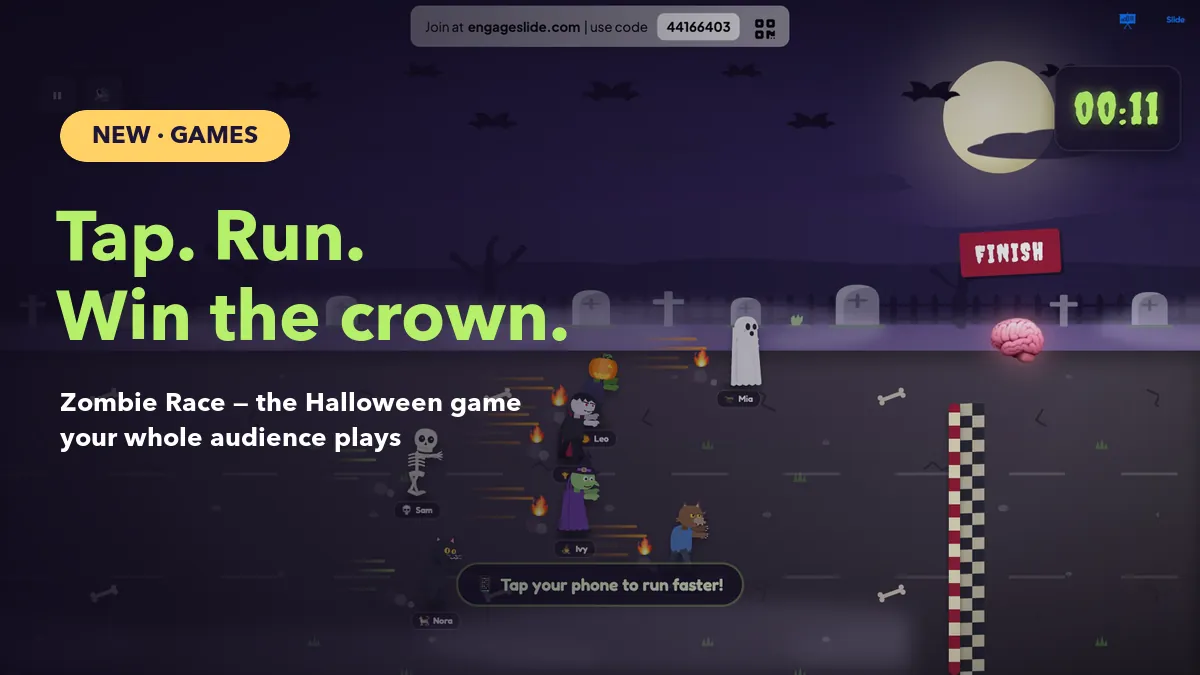
Every presenter knows the moment: forty minutes in, phones come out, eyes glaze over and the room goes quiet in the wrong way. You don't need another slide to fix it. You need sixty seconds where everyone is playing at once. Zombie Race is EngageSlide's newest game slide, built for exactly that. Your audience picks a Halloween costume on their phone, you press GO, and the whole room taps as fast as it can to push its racer across the finish line. This guide covers how it works, how to set it up, and when to use it.
What is Zombie Race?
Zombie Race is a live racing game that runs on your big screen while players control their racers from their own phones. There is nothing to install: people join with your code or QR, choose one of 20 Halloween costumes, type their name and appear on the starting line. When you start the race, every tap on a phone makes that player's racer run a little faster. Whoever is in front when the clock runs out wins the crown.
It sits in the Games tab next to Duck Race, Spinner Wheel and Draw & Guess, and it works anywhere you present with EngageSlide, including the PowerPoint add-in and Google Slides.
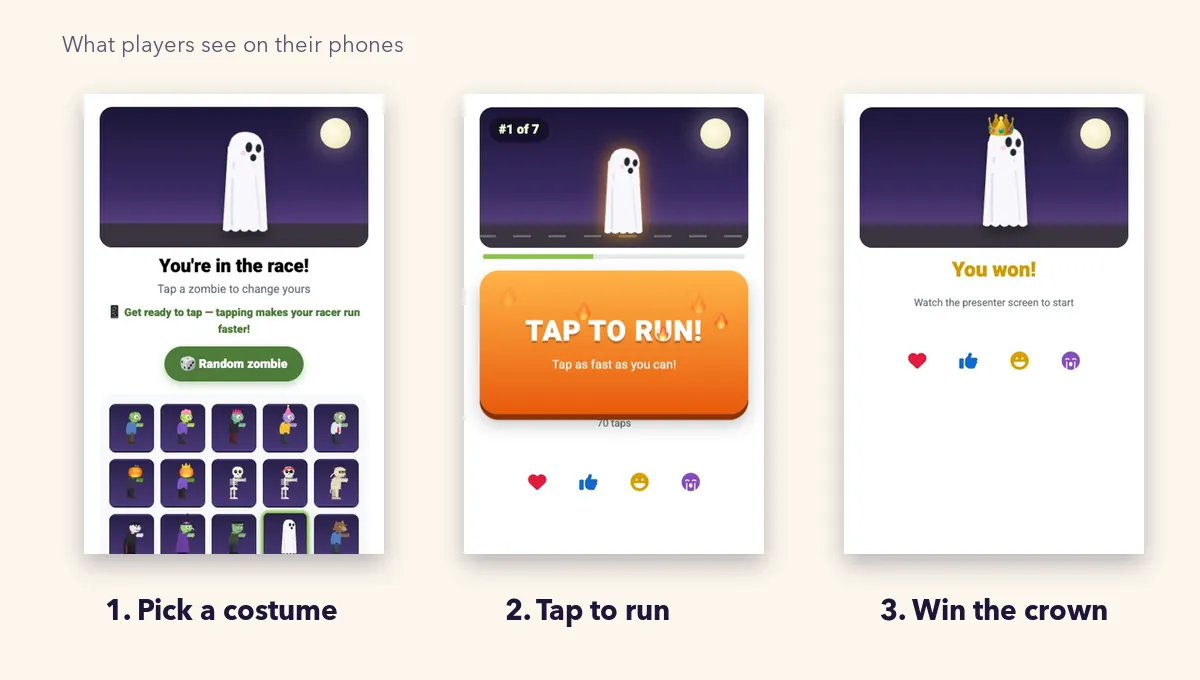
What players see on their phones
The phone side is deliberately simple, because a game that needs instructions has already lost the room.
- Pick a costume. Zombies, pumpkin heads, skeletons, a mummy, a vampire, a witch, a ghost, a werewolf, a devil, a clown, a scarecrow, a black cat and a grim reaper. Players can tap Random zombie if they can't decide, and they can switch costume right up to the start. The big screen updates instantly.
- Tap to run. During the race the phone turns into one big TAP TO RUN! button with a live rank, such as #2 of 12. Tap fast enough and the button glows orange with flames. Each tap also gives a small vibration so it feels physical.
- See the result. When time runs out, the winner's phone says You won! with a crown, and everyone else sees the place they finished.
What happens on the big screen
The big screen is the show. Racers shamble along a moonlit road with dust kicking up behind them. Fast tappers get speed lines and flames, so the room can see who is really trying. The race is also full of small surprises: racers stumble, faceplant, hop, spin, and occasionally lose their heads and catch them again. Some shout in character, like a zombie groaning "BRAAAINS!", a ghost wailing "BOOO!" or a werewolf howling "AWOOO!". A spooky soundtrack speeds up for the final sprint.
The finish line, marked by a giant glowing brain, rolls in exactly as the timer hits zero. The leader crosses it, and a WINNER! card shows their costume, their name and how many boosts they tapped. Press AGAIN for a rematch.
Audience boost: a real race or a random reveal
The most important setting is Let the audience boost, and it changes what kind of game you're running.
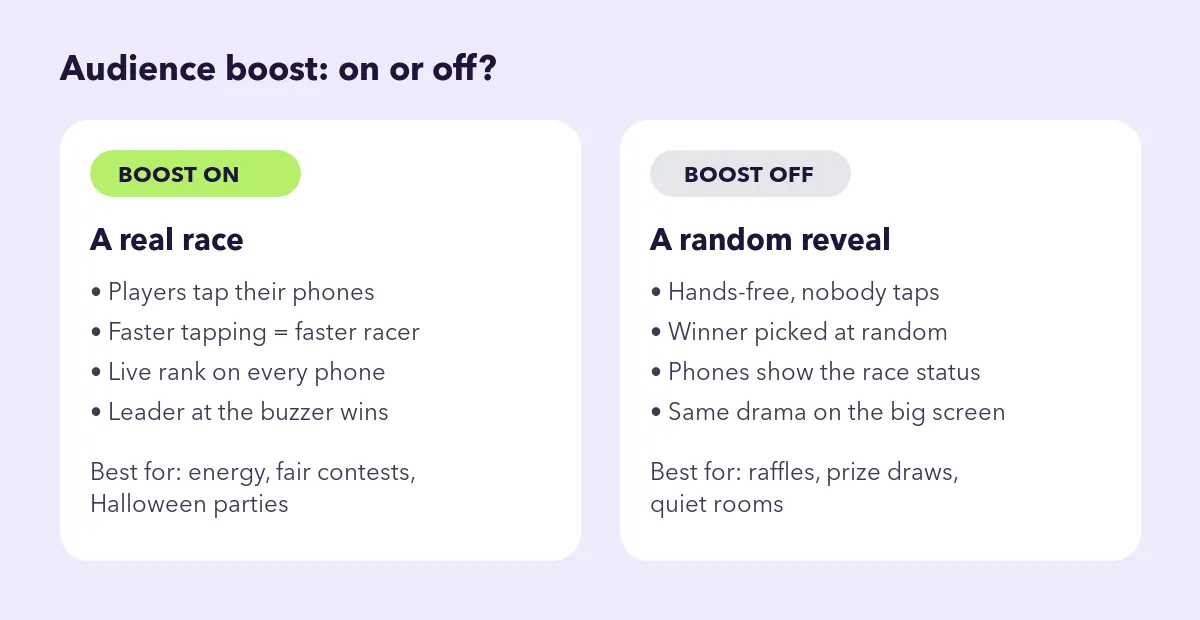
Boost on (the default)
Tapping matters. Each player's speed comes from how fast they tap, and whoever has run furthest at the buzzer wins. That makes it a genuine, fair contest that rewards effort, which is ideal when you want energy in the room. To keep it fair, taps are capped at about 13 per second, so auto-clickers and frantic two-handed mashing don't run away with it. Players who join late start at the back of the pack and can still catch up.
Boost off
Nobody taps. The winner is picked at random and the race is pure entertainment, just like a Duck Race. Phones simply show that the race is on and who won. Choose this for raffles, prize draws, or rooms where you'd rather people watch than play.
How to set up a Zombie Race slide
- In the editor, click New Slide, open the Games tab and choose Zombie Race.
- Set the Race Duration in seconds. Anything from 15 to 30 seconds works well; the minimum is 5.
- Pick a Theme: Graveyard (tombstones, bats and the occasional lightning flash), Ruined City (a burning skyline at dusk) or Toxic Swamp (glowing green water and fireflies).
- Leave Let the audience boost on for a tapping race, or turn it off for a random winner.
- Present the slide. Show the join code or QR, give people a minute to pick their costumes, then press GO (or hit Enter).
Zombie Race is a standalone game, so it doesn't need a quiz before it. If you want to show quiz scores, use a Leaderboard or a Duck Race, which races players by their accumulated points.
A great game slide doesn't explain itself. It's obvious within five seconds. Pick a costume, tap the button, win the crown: that's the whole rulebook.
When to use Zombie Race
- Halloween parties and events. The obvious one. A costume-themed race is a perfect seasonal icebreaker for offices, schools and community events, and it pairs nicely with a real costume contest.
- Mid-session energizers. When attention drops after a long block of content, a 20-second tapping race gets every person moving and laughing at the same time.
- Classroom breaks. Students love choosing a character. Use it as a reward after a quiz or as a quick reset between topics.
- Team events. Run heats by department, then a final between the winners for bragging rights.
- A finale. End a training day or a company trivia night on a high, with the whole room cheering at the finish line.
Tips for a race people talk about afterwards
Give costume time
Half the fun is picking a character. Leave a minute in the lobby before you press GO, and call out a few costumes as they appear ("I see three vampires and a very brave scarecrow").
Keep races short
Fifteen to twenty-five seconds is the sweet spot. Long enough for lead changes, short enough that thumbs don't get tired. Run best-of-three if you want more.
Make the winner a moment
The WINNER! card shows how many boosts the champion tapped, which is a great stat to read out. Have a small prize ready, or let the winner choose the next activity.
Mix it into a bigger session
Zombie Race works best as a punctuation mark. Pair it with a Fact or Myth round about Halloween legends, a costume vote with a live poll, or a few of these live quiz ideas, then let the race close it out. Short bursts of play like this are a simple, proven form of gamification: they turn passive listeners into participants.
Lean into the theme
Dress the room to match. If people come in Halloween costumes, invite them to pick the racer closest to their outfit. The Graveyard theme is the most spooky; Ruined City and Toxic Swamp keep it fun for any time of year.
Frequently asked questions
How many people can play?
As many as your plan allows. With large groups the racers shrink a little so every lane stays readable on the big screen.
Do players need an account?
No. They join from the browser with your code or QR, pick a costume and type a name.
Can I run it remotely?
Yes. Share your screen on Zoom or Teams; remote players join from their phones exactly like people in the room.
Start your first race
Zombie Race takes about a minute to set up and needs zero explanation, which makes it one of the easiest ways to wake up a room. Add one to your next deck in the EngageSlide interactive presentation tool, pick your theme, and let the costumes do the rest. Happy haunting.