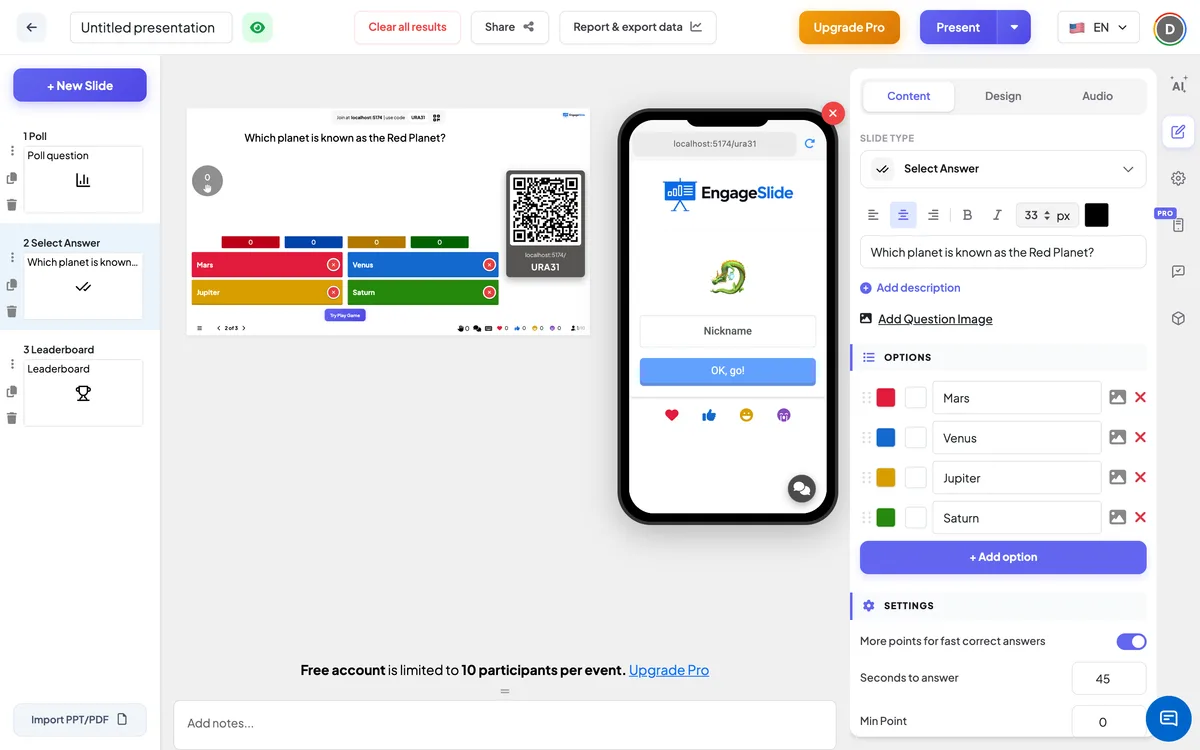
Select Answer is the classic multiple-choice quiz. You ask a question, players pick an answer on their phone against the clock, and faster correct answers score more points — all tracked on a live leaderboard.
Opens in the editor instantly — no sign-up, no app.
What you can use Select Answer for
Classroom review
Check what students remember at the end of a lesson and reteach whatever the results reveal.
Training & onboarding
Reinforce key policies or product facts with a scored quiz that makes the material stick.
Team socials & pub quizzes
Run a fun trivia night where colleagues compete in teams for the top spot.
Webinars & events
Break up a talk with a quick quiz to re-engage a drifting audience.
How to set up a Select Answer slide
1Add a Select Answer slide and type your question and options.
2Mark the correct answer and set a time limit.
3Players join with a QR code and answer live — the leaderboard updates instantly.
Setting up the Select Answer slide in the EngageSlide editor.
Try the Select Answer slide free
Click play and the Select Answer slide opens in the editor right away — no sign-up, no app, no limits. Add your email later only if you want to keep it.