📝Content Slides 3 min read
Instructions
Show the join address, the code and a large QR so everyone can get in before you start.
What is Instructions?
An Instructions slide shows your audience exactly how to join the session: the web address to go to, the join code, and a large QR code they can scan instead. It fills in the address and code automatically, so there is nothing to type or update. Put it at the very start of your presentation and leave it on screen while people arrive, or show it again before an activity for latecomers.

Create a Instructions slide
- 1On Home, click + Create new presentation (or add a slide to an existing one).
- 2In Choose Slide Type, pick Instructions. You can also type it into Search slide types….
- 3The slide is created and the right panel opens on the Content tab.
Set up the content
- 1Type a heading in the title field (Enter your question or title), for example Join the session on your phone. Use the buttons above it to change the alignment, make it bold or italic, set the size in px (33 by default) and pick a colour.
- 2Optional: click Add description to add a short note. It appears as a tooltip when you hover over the title on the slide.
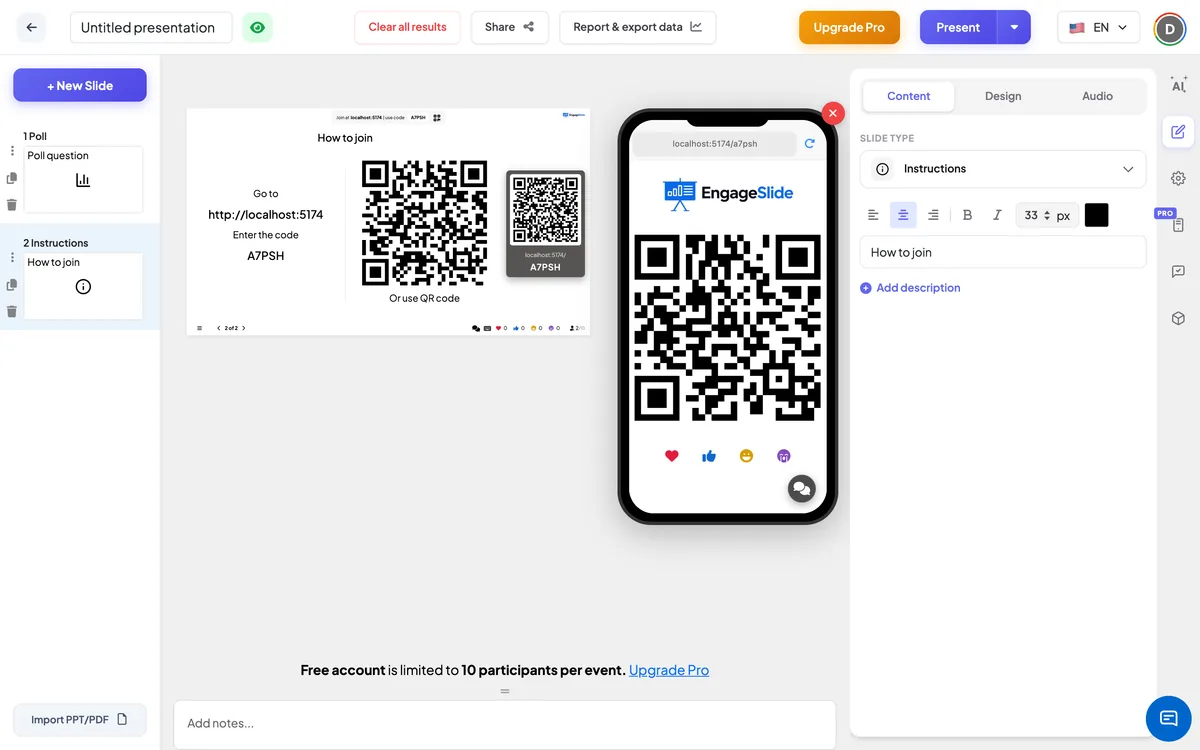
- 3That’s it — the rest of the slide is filled in for you: Go to + the join address, Enter the code + your presentation’s code, and the QR code (Or use QR code).
- 4Optional: use the Design tab to change the text colour, font and background so the slide matches your deck.
On the audience side
Participants who have already joined see the same QR code large on their phone. They can hold it up for a neighbour to scan — handy in a big room where the screen is far away. There is nothing to answer on this slide.
View results
No responses are collected; this slide’s job is to get everyone into the room. The big screen shows your title, the join address and code on the left, and the QR code on the right. Scanning the QR opens the join address with your code included. Move on with the next button or arrow key once everyone is in.
Good times to show it
- Before you begin: as the first slide while people take their seats or join the call.
- After a break: so anyone who closed their browser can join again.
- Before a quiz or game: a last call for latecomers before scores start counting.
Frequently asked
Do I have to type the code or link myself?
No. The join address, the code and the QR code are added automatically from your presentation.
Can I change the text “Go to” and “Enter the code”?
No, those lines are fixed. You can change the heading above them and the slide’s colours, font and background.
Why does the QR code also show on participants’ phones?
So people who are already in can help others join by letting them scan it from their phone.
Can I have more than one Instructions slide?
Yes. Add one at the start and another before a quiz or after a break — they all show the same code.