📊Interactive Question Slides 4 min read
100 Points
Distribute 100 points across options to show priorities.
What is 100 Points?
A 100 Points slide gives every participant 100 points to spread across a list of options however they like — all 100 on one favourite, or a few points on everything. Because the budget is limited, people have to make real trade-offs, so you learn not just what they like but how much more they care about one thing than another. The big screen shows the average number of points each option received. It is the classic “100 dollar test” used for feature and roadmap prioritisation, budget discussions, choosing training topics, or deciding as a class which project or trip to do next.

Presenter creates the slide Click Present Share code / QR Audience enters code Respond & submit Real-time results
Create a 100 Points slide
- 1On Home, click + Create new presentation (or add a slide to an existing one).
- 2In Choose Slide Type, pick 100 Points. You can also type it into Search slide types….
- 3The slide is created and the right panel opens on the Content tab.
Set up the content
- 1Type your question in Enter your question or title, for example How would you spend our budget next quarter?. The toolbar above the field sets alignment, bold, italic, font size and colour.
- 2Optionally click Add description to explain what the points stand for, e.g. You have 100 points. Give more points to what matters most to you.
- 3Optionally click Add Question Image. It appears on every phone above the options, and on the big screen a Show image / Hide image button switches between the image and the results.
- 4Under Options, click + Add option for each choice — for example Faster checkout, Dark mode, Offline support, Better search. You can add up to 9. Press Enter or Tab to add the next option, drag the handle to reorder, and click the colour square to pick each option’s bar colour.
- 5Choose the settings below: whether results are hidden at first and whether submissions are open.
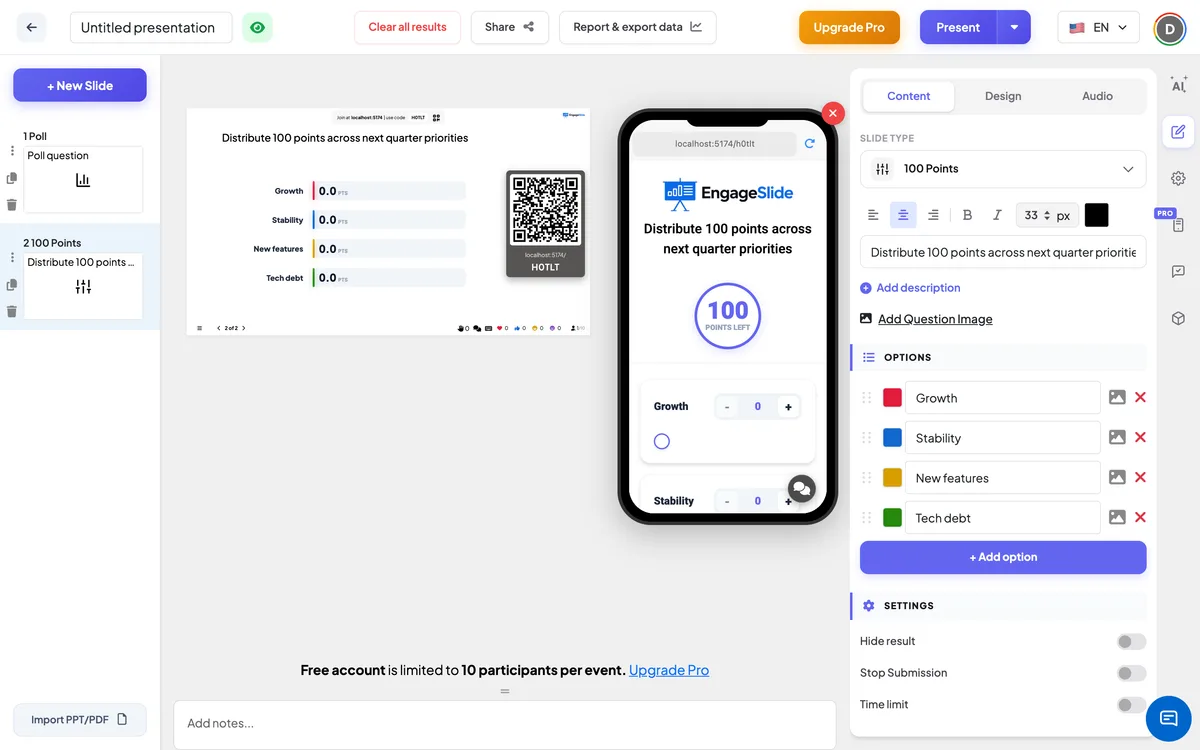
100 Points settings
Hide result
Off by default. When on, all bars stay at zero while people answer; click Show result on the big screen to reveal the averages.
Stop Submission
Off by default. When on, phones show Submission stopped. Click Enable Submission on the big screen to reopen.
Clear result this slide
Under Actions: deletes all answers on this slide so you can run it again.
Present & share the join code
- 1Click Present in the top bar to put the slide on the big screen.
- 2A join code and a QR code appear (e.g.
36Y56). - 3Participants open the Audience app at join.engageslide.com, type the code and press Enter — or simply scan the QR.
- 4When everyone has joined, the responses start flowing in live.
How the audience responds
Participants see the question (and the image, if any) and a sticky Points left counter that starts at 100. Each option has its own card with a − / + stepper, a number field they can type into, and a slider from 0 to 100. As they give points to one option, Points left goes down; the app never lets the total go above 100 — a value that would push it over is trimmed to what is left. They do not have to spend all 100 points. When they are done they press Submit; the button changes to Submitted and the points lock.
View results
The big screen shows one horizontal bar per option, in the colours you chose and in the order of your option list. Each bar shows the average points that option received, for example 32.5 pts, and its length is that average out of 100. Bars grow and the numbers count up as each new answer arrives, and the response counter shows how many people have submitted. Use Show result if results are hidden, Show image to switch to the question image, and Enable Submission to reopen the slide. In the presentation report each option is listed with its average (Avg: … pts) and every participant’s split — see Results & export.
Ideas for 100 Points
- Product & roadmap: Which features should we build next? Spread 100 points.
- Budget: How would you split the team-event budget — food, venue, activities, transport?
- Training: Which topics do you want more time on in tomorrow’s session?
- Meetings & retros: Which problems should we fix first?
- Classroom: Which book, project or field trip should the class choose? · How much did each cause contribute to the event we studied?
Frequently asked
What does the number on each bar mean?
It is the average number of points that option received from everyone who submitted. People who gave an option 0 points count too, so the averages together add up to at most 100.
Do participants have to use all 100 points?
No. They can submit with points left over. They cannot go over 100 — the counter and the inputs stop them.
How many options can I add?
Up to 9. With more than 7 options the points get spread thinly, so a shorter list usually gives clearer results.
Can participants change their split after submitting?
No. After Submit the inputs are locked. To start a new round, use Clear result this slide.
Why are all the bars at zero?
Either nobody has submitted yet, or Hide result is on — click Show result under the chart to reveal the averages.