⚙️Presentation Settings 4 min read
Keyboard Magic, transitions and a clean screen
Shortcuts for confetti, drumrolls and curtains, slide transitions and auto-hiding controls.

The settings
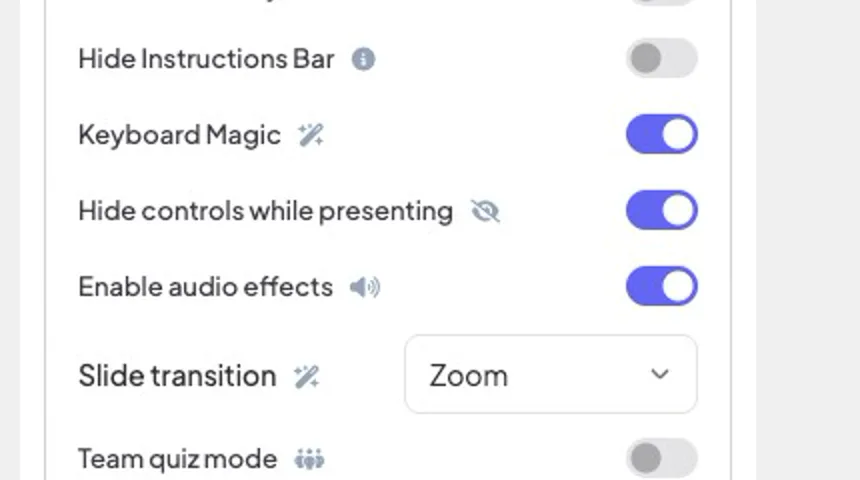
Keyboard Magic
Enables the effect shortcuts below while presenting. On by default.
Slide transition
The animation when you move to the next or previous slide: Fade (default), Slide up, Slide from right, Zoom or None. Applies to every slide in the presentation.
Hide controls while presenting
The bottom-left controls fade out after 3 seconds without mouse movement and come back when you move the mouse.
Hide Instructions Bar
Hides the “Join at … use code …” bar at the top. It reappears when you hover over the top edge of the presentation.
Enable audio effects
Built-in sounds: quiz lobby and question music, countdown ticks, podium music and applause, game sounds and Keyboard Magic sounds. Turn off to mute them all (your own background music is not affected).
Keyboard Magic shortcuts
While presenting, press a key — or hover the ⌨️ keyboard icon in the bottom controls to see the list and click an effect:
C confetti · D drumroll · M mic drop · U curtain · B blur · Q quiet (“shhh”) · O bubbles · X clear every effect.
Shortcuts only work while presenting, and not while you are typing in a box.
C confetti · D drumroll · M mic drop · U curtain · B blur · Q quiet (“shhh”) · O bubbles · X clear every effect.
Shortcuts only work while presenting, and not while you are typing in a box.

Example: an award reveal
- 1Close the curtain with U before the big moment.
- 2Move to the winner’s slide with → — your transition plays behind the curtain.
- 3Press D for a drumroll, then X to open the curtain.
- 4Press C for confetti and M for the mic drop.


real screenshots
Frequently asked
How do I clear an effect?
Press X to clear every effect and stay in present mode. Escape also clears the blur, quiet and curtain, but it leaves present mode at the same time.
Do the audience phones show the effects?
The effects play on the big screen, which is what the room is watching.