🎮Quiz & Game Slides 4 min read
Leaderboard
Show the running scores of your quiz — rankings move live, and the final leaderboard crowns the winner with fireworks.
What is Leaderboard?
A Leaderboard slide shows everyone’s total score from the quiz questions before it in your presentation, ranked from first to last. Each time you show one, the players start in their previous order and then move up or down as the points from the latest question are added — the moment players wait for. On the last leaderboard of the presentation, the winner gets fireworks and a CONGRATULATIONS! card. There is nothing to set up: it adds up the scores for you. Use one after every question for a fast-paced game, after every few questions in a longer quiz, or only at the end to crown the winner.

Create a Leaderboard slide
- 1On Home, click + Create new presentation (or add a slide to an existing one).
- 2In Choose Slide Type, pick Leaderboard. You can also type it into Search slide types….
- 3The slide is created and the right panel opens on the Content tab.
Set up the content
- 1You often don’t need to add it yourself: when you create a quiz question, a Leaderboard slide is added right after it automatically (unless the next slide already is one). Delete the ones you don’t want.
- 2To add one by hand, place it after the quiz slides it should count. It adds up the points from every quiz slide before it in the presentation — not just the last one.
- 3Optionally change the heading in the title field (it shows Leaderboard as a placeholder) and click Add description to add a line under it, such as Halfway there!.
- 4Read the note under Settings: points come only from quiz slides (such as Select Answer, Puzzle and Match Pair). Polls, word clouds and other interactive slides do not give points.
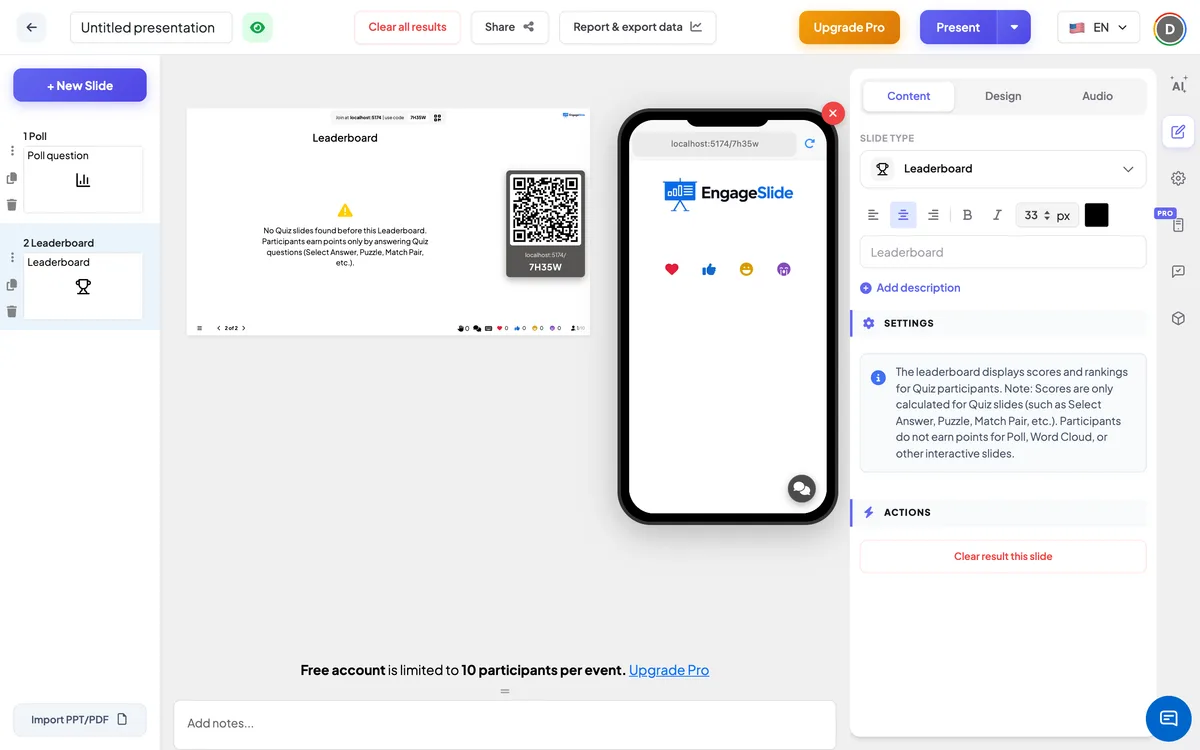
Leaderboard settings
Which slides count
All quiz slides placed before this leaderboard: Select Answer, True or False, Puzzle, Type Answer, Match Pair, Fill in the Blank, Bet / Wager, Estimate, Pin Answer and Vote · Discuss · Revote. Move the leaderboard to change what it counts.
Team quiz mode
In the Settings tab under General Settings. When it is on, the leaderboard gets a Teams / Players switch and opens on the team ranking. Team scoring can be Total points (sum of members), Average points (shared equally) or Fastest answer per question.
On the audience side
Every phone shows the same ranked list as the big screen, with each player’s rank, emoji, nickname and score. The player’s own row is highlighted, and the list scrolls to it automatically so nobody has to search for their name. Nobody needs to do anything on this slide.
View results
The big screen shows the number of players and a ranked list with the rank, emoji, nickname and total score of every player; the top three rows are highlighted and the leader gets a 👑. When there was more than one quiz question before the leaderboard, the list first appears in the order from before the latest question and then re-sorts with the new totals after a second, so players see who moved up. After a Bet / Wager question, each row also shows how many points the player won or lost. Podium music plays unless your presentation or slide has its own audio. If no quiz question comes after this leaderboard and someone has scored, it is the final leaderboard: fireworks start and a CONGRATULATIONS! card shows RANK 1 with the winner’s name and points (or the winning team and its members). Click × or anywhere outside the card to close it and see the full list. If there is no quiz slide before the leaderboard, a warning explains that players earn points only by answering quiz questions.
Ways to use the leaderboard
- Classroom: a lesson-review quiz with a leaderboard at the end; reward the top three.
- Training: turn on team quiz mode so departments compete as teams, with average scoring to keep big and small teams fair.
- Events and parties: a pub-quiz format with a leaderboard after each round.
- Meetings: a two-question warm-up and a quick leaderboard to wake the room up.
Frequently asked
Where do the scores come from?
From every quiz slide placed before the leaderboard in the same presentation. Each player’s points from all those questions are added up.
What happens with a tie?
Players with the same score share the same rank. For example, two players on 250 points are both #1, and the next player is #3.
Do players who didn’t answer appear?
Players appear once they have an answer recorded for one of the quiz questions. A question they didn’t answer gives them 0 points.
How do I reset the scores?
Use Clear result this slide on each quiz slide, under Actions on the Content tab. The leaderboard is calculated from the saved answers, so it updates with them.
Does Draw & Guess or Duck Race count?
No. Only quiz slides give leaderboard points. Draw & Guess shows its own final scores, and the races pick their own winners.