🎮Quiz & Game Slides 5 min read
Match Pair
Players match each item with its partner — words and meanings, terms and definitions — and score for every correct pair.
What is Match Pair?
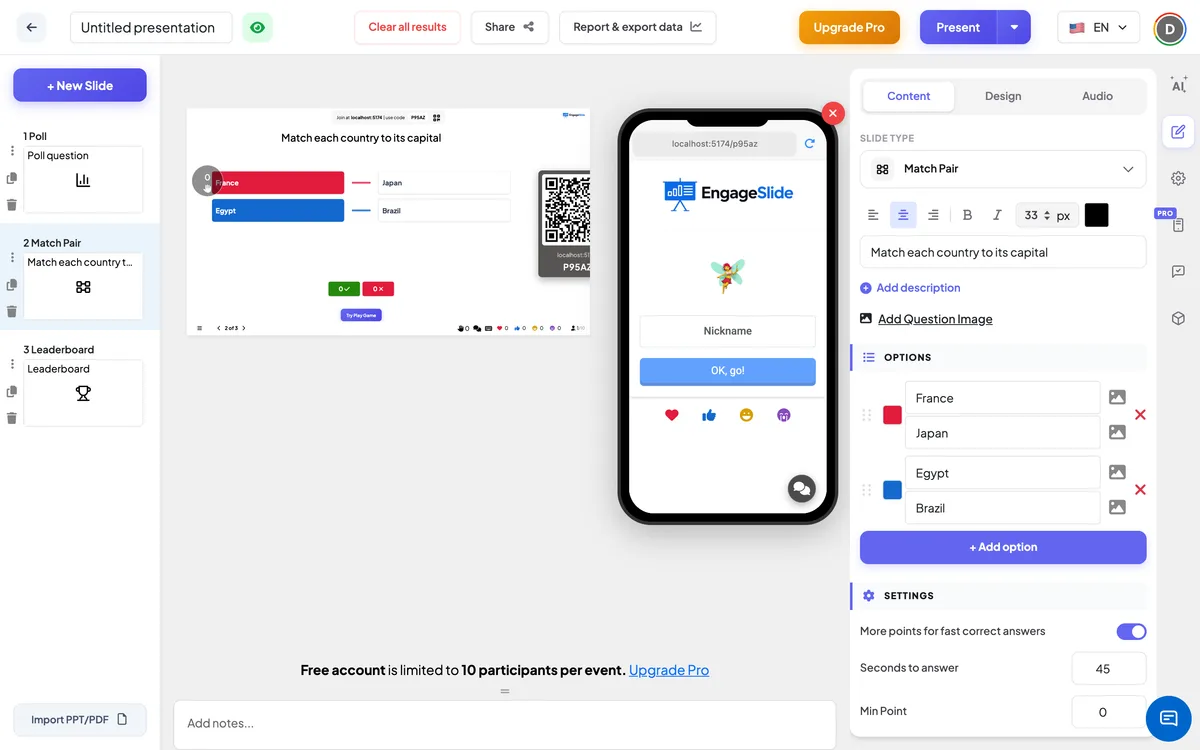
A Match Pair slide is a quiz question with two columns: items on the left and their partners on the right. Each player matches every item with the right partner on their phone and submits. Every correct pair counts, so a player who gets three out of four pairs right still earns most of the points, and faster answers earn more. At the reveal, the big screen lines up each item with its real partner and shows how many players answered correctly. It is ideal for vocabulary and translations, terms and definitions, countries and capitals, people and quotes, or symptoms and causes.

Presenter creates the slide Click Present Share code / QR Audience enters code Respond & submit Real-time results
Create a Match Pair slide
- 1On Home, click + Create new presentation (or add a slide to an existing one).
- 2In Choose Slide Type, pick Match Pair. You can also type it into Search slide types….
- 3The slide is created and the right panel opens on the Content tab.
Set up the content
- 1Type your question in Enter your question or title, for example Match each word with its meaning. Optionally click Add description and Add Question Image (with an Image reveal if you like).
- 2Under Options, each row is one pair. Type the left item in Option text and its partner in Pair text — for example Happy and Feeling or showing pleasure.
- 3Click + Add option (or press Enter in the last field) to add the next pair. You can add up to 6 pairs.
- 4Optionally click the picture icon next to Option text or Pair text to add an image to either side — for example a flag on the left and a country name on the right. Click the colour square to change a pair’s colour.
- 5Drag a row by its handle to change the order of the left column; click × to delete a pair. You don’t need to mix anything up yourself — the right column is shuffled automatically.
- 6Under Settings, set the time and points (see below).
Match Pair settings
More points for fast correct answers
On by default. Faster answers score closer to Max Point; the slowest still get Min Point. Off: the points depend only on how many pairs are correct.
Seconds to answer
How long players have to match all pairs and submit (45 seconds on a new slide). Matching takes several taps per pair, so allow enough time for longer texts.
Min Point / Max Point
The points for a fully correct answer — 0 and 100 on a new slide. Partly correct answers get a share of them. With the speed bonus off there is a single Point field.
Quiz Audio (Optional)
Upload an audio file to play during the countdown instead of the game music.
Clear result this slide
Under Actions: deletes the answers to this question so you can play it again.
Present & share the join code
- 1Click Present in the top bar to put the slide on the big screen.
- 2A join code and a QR code appear (e.g.
36Y56). - 3Participants open the Audience app at join.engageslide.com, type the code and press Enter — or simply scan the QR.
- 4When everyone has joined, the responses start flowing in live.
How the audience responds
Players join with your code, pick an emoji and a Nickname, and wait in the lobby. When the question starts, the phone shows Question X of Y with the question for a 5-second countdown, then the instruction Match each item with its correct pair and a card for every left item. Players tap Select Match on a card and choose its partner in the Choose a match list, where the partners are shuffled. Partners that are already taken are marked Used; choosing one again moves it to the new card. Tap a matched card to change it. Submit Answer becomes active once every card has a match. At the reveal players see a ✓ and their points (Good job, you answered partially correctly and earned… if only some pairs were right), or Oh sorry, you answered incorrectly.
View results
Press Start Game in the lobby. After the 5-second intro, the big screen shows the left items in your order and the partners shuffled in the right column, with the countdown and a ✋ counter of how many have answered. End Quiz stops the countdown early, and Show Image / Hide Image switches to the question image. When time is up, the right column slides into place so that every item stands next to its real partner, connected by a coloured line, and two badges show how many players answered correctly (✓, including partly correct answers) and incorrectly (✗). Points go straight to the leaderboard; a Leaderboard slide is added after the question automatically when you create it.
Ideas for Match Pair questions
- Languages: match dog, cat, bird and fish with perro, gato, pájaro and pez.
- Science: match each organ with what it does, or each element with its symbol.
- Training: match each product with its target customer, or each policy with its owner.
- Team meetings: match each team member with their weekend hobby or their first job.
Frequently asked
Do players get points if only some pairs are right?
Yes. Each correct pair earns its share of the points: 3 of 4 correct pairs earns three-quarters of what a fully correct answer would get. With no correct pair the answer scores 0.
How are points calculated?
The points for a fully correct answer depend on the speed bonus (between Max Point and Min Point by time left, or Max Point with the bonus off); that number is then multiplied by the share of correct pairs.
Can players submit before matching everything?
No. Submit Answer only becomes active once every item has a match.
How many pairs can I add?
Up to 6 pairs. Each side of a pair can have a text and an image.
Is the right column the same for everyone?
No. The partners are shuffled separately on each phone, and again on the big screen.