🎮Quiz & Game Slides 4 min read
Spinner Wheel
A lucky wheel that picks a random name, prize or topic — type your own entries or put your audience on the wheel.
What is Spinner Wheel?
A Spinner Wheel picks one entry at random, with a spin everyone can watch. Type the entries — names, prizes, topics, forfeits — one per line, then press SPIN: the wheel turns for a few seconds while the box next to it flicks through the entries, and the winner is announced with a Congratulations! card. You can also let the audience join the wheel from their phones, so everyone in the room has a fair chance. Use it to pick a volunteer or the next speaker, draw a raffle winner, choose a random discussion topic or decide which team goes first.

Create a Spinner Wheel slide
- 1On Home, click + Create new presentation (or add a slide to an existing one).
- 2In Choose Slide Type, pick Spinner Wheel. You can also type it into Search slide types….
- 3The slide is created and the right panel opens on the Content tab.
Set up the content
- 1Optionally type a heading in Enter your question or title, for example Who presents next?, and click Add description for a line under it.
- 2Optionally click Add Question Image to add a picture, for example of the prize. A Show image / Hide image button then appears under the wheel.
- 3Type the entries in the box next to the wheel, under Enter entries (one per line). A new wheel starts with Prize 1 to Prize 8 — replace them with your own. Empty lines are ignored, and the counter shows how many entries there are. Changes are saved automatically.
- 4To put your audience on the wheel, switch on Allow the audience to participate under Settings (off by default). Everyone who joins with a name is added as an extra entry, and the box shows + 12 audience members, for example.
- 5Present the slide and click SPIN in the middle of the wheel.
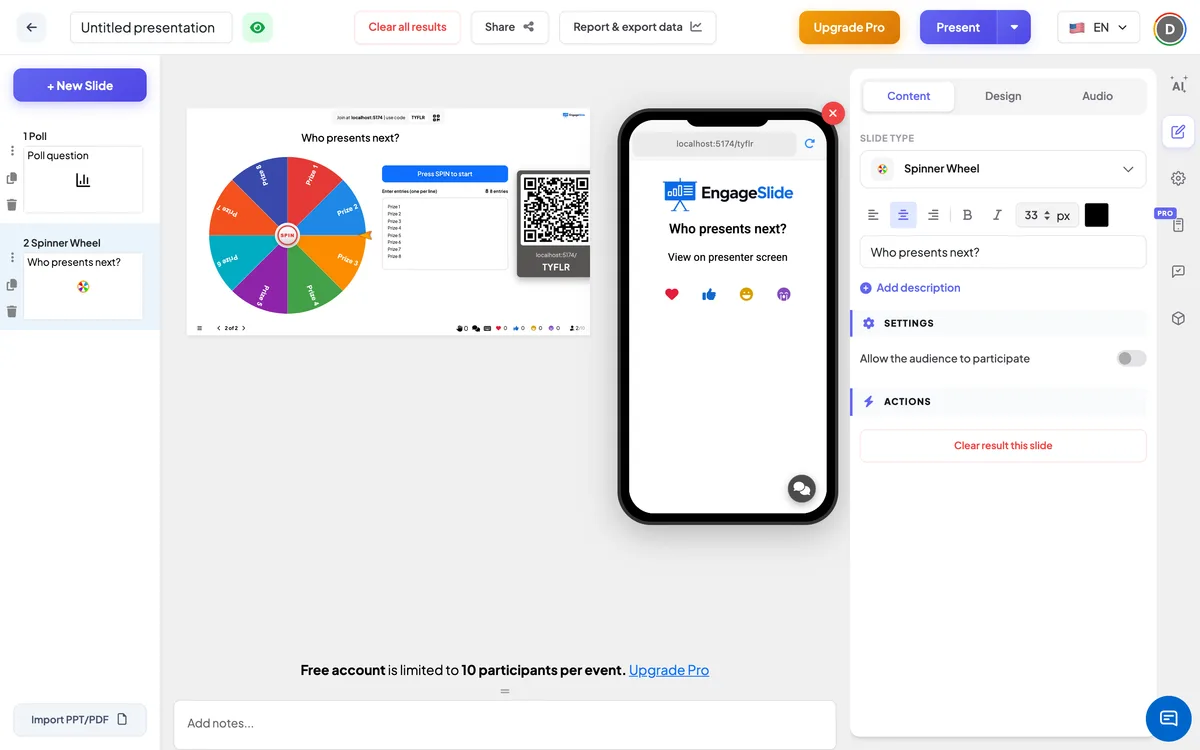
Spinner Wheel settings
Allow the audience to participate
Off (default): only the entries you typed are on the wheel. On: participants who join with their name are added to the wheel next to your entries.
Entries
Typed in the box next to the wheel, one per line. The wheel draws up to 30 segments; with more entries, it shows a random 30 of them, but the winner is still drawn from all entries.
On the audience side
Phones show the slide title and the message View on presenter screen — everyone watches the spin on the big screen. When Allow the audience to participate is on, phones also show a Your name box and a Send button: once a participant sends their name, they are on the wheel. Participants who already gave a name earlier in the presentation (for example in a quiz) are added automatically.
View results
The big screen shows the wheel with a gold pointer, the SPIN button in the centre and the entry box on the right (Press SPIN to start). Click SPIN: the wheel spins for about six seconds while the box flicks through the entries. When it stops, the pointer points at the winner, the winner appears in the box and a 🎉 Congratulations! 🎉 card shows the winning entry and is the winner! Click Spin Again (or outside the card) to close it and spin again. The winning entry stays on the wheel, so the same entry can win twice; delete its line first if you want a different winner each time. The last winner is remembered and shown in the box when you come back to the slide.
Ideas for the Spinner Wheel
- Classroom: pick who answers the next question, or which chapter the class reviews today.
- Training: spin for the next role-play scenario or the next case study.
- Meetings: choose who gives their update first, or a random icebreaker question.
- Events: draw lucky-draw prizes on stage with the whole room watching.
Frequently asked
Is the result really random?
Yes. Every entry — typed or from the audience — has the same chance of being picked on each spin.
Is there a limit on entries?
The wheel shows up to 30 segments so the text stays readable. You can type more entries: the wheel then shows a random selection of 30, and the winner is still drawn from the full list.
Does the winner get removed from the wheel?
No. Entries stay on the wheel after they win. Delete the line from the entry box if you don’t want it to win again.
Does the Spinner Wheel give quiz points?
No. It only picks a winner; it does not add anything to the Leaderboard.