
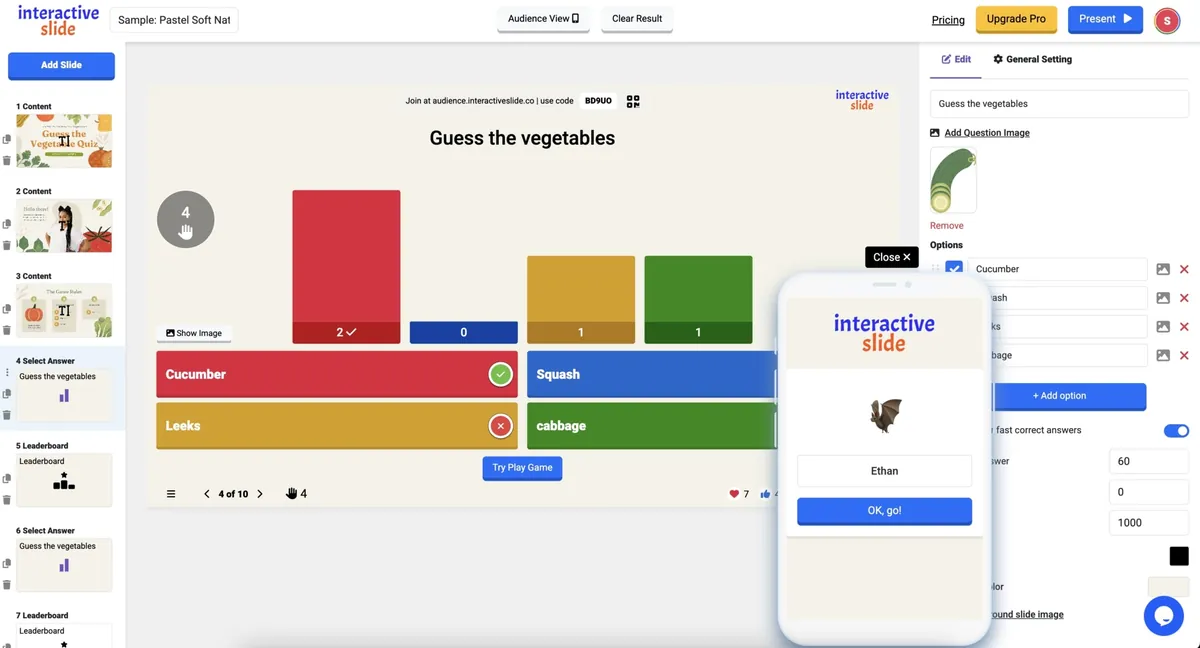
Most interactive presentation platforms today restrict key features behind paywalls. Kahoot limits the number of question types, Mentimeter locks advanced slides, and Slido restricts Q&A and customization unless you upgrade.
EngageSlide takes a completely different approach.
It offers full access to every feature — with no feature limitations, no locked slide types, and no “Pro-only” tools. Everything is free to use from the very first moment.
Below is your SEO-friendly article using your screenshots to demonstrate real features.
Full Access, Zero Restrictions — All Features Are Free
Unlike other platforms that limit:
number of slide types
advanced polls
word cloud usage
reactions
design customization
branding
quiz scoring
presentation cover image
background images
EngageSlide allows absolutely every feature with no upgrade required.
There is no feature limit across the entire platform.
You can create:
Unlimited polls
Unlimited quizzes
Unlimited Q&A slides
Unlimited word clouds
Unlimited scale ratings
Unlimited “pin on image” slides
All free, all unlocked, all available.
Customize Each Slide Freely
Figure 1 – Slide-Specific Settings (Your Screenshot)
You get full slide-level control:
Add question image
Enable/disable submission
Change text color
Change slide font
Add background image
Set custom background color
No paid plan required — every customization is free.
Presentation-Wide Settings Without Any Paywall
Figure 2 – General Presentation Settings (Your Screenshot)
EngageSlide gives you global presentation controls:
Toggle question visibility
Enable reactions (❤️ 👍 😊 🎁)
Add a presentation logo
Choose global font
Add cover image to your presentation
In other platforms, these branding tools are locked behind “Pro” tiers —
but here, they are free with no feature limit.
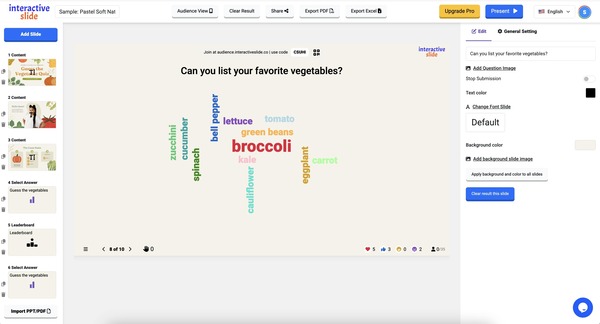
Real-Time Word Cloud – Free, Unlimited, Unlocked
EngageSlide’s word cloud feature goes far beyond simply displaying words on a screen. It is designed to enhance engagement by helping presenters visualize collective opinions, ideas, or emotional responses instantly. As participants submit their answers, the cloud evolves in real time—growing, shifting, and animating to reflect the most common or impactful words.
This makes it extremely effective for:
Brainstorm sessions
Ice-breakers
Classroom warm-ups
Feedback collection
Creative workshops
Rapid sentiment checks
Because there are no feature limits, you can create multiple word cloud slides in a single presentation, repeat the activity across different segments, or even layer word clouds with customization options such as colors, fonts, and background images. Other tools restrict these options behind paywalls, but Interactive Slide keeps them completely free.
All Slide Types Fully Unlocked
EngageSlide does not hold anything back. While many competing platforms make users upgrade to access more than a few slide types, Interactive Slide ensures every interactive component is instantly available.
Below is a deeper look into each feature:
✔ Live Polls
Create instant polls with different visualization options (bar chart, donut chart, percentage mode, and more). Polls can be used to gather feedback, check opinions, make decisions quickly, or simply energize your audience.
✔ Quizzes with Leaderboard
Run competitive, fully animated quizzes with timers, scoring rules, and a dynamic leaderboard. Perfect for educational environments, corporate training, and gamified meetings.
✔ Word Cloud
Collect ideas visually through real-time word animation. Words automatically resize based on frequency, making it easy to see the most popular contributions.
✔ Open-Ended Questions
Encourage deeper conversations by letting participants submit longer text responses. Use it for reflections, creative input, discussions, reviews, or problem-solving.
✔ Pin on Image
Let participants click on a specific location on an image—maps, UI mockups, diagrams, product images, and more. Perfect for UX feedback, geography lessons, or visual surveys.
✔ Scale & Rating
Quickly measure opinions or sentiments using a numerical scale. Great for event feedback, understanding audience confidence levels, or gauging emotional reactions.
✔ Reactions
Let the audience tap ❤️ 👍 😂 🎁 to express themselves instantly during your presentation. Reactions add energy and real-time feedback without interrupting the flow.
✔ Q&A
Host live Q&A sessions where participants can submit questions anonymously or publicly. You can pin questions, highlight answers, and manage the flow of discussion easily.
✔ Background and Theme Customization
Customize each slide with colors, images, and fonts. Your branding stays consistent across the entire presentation.
Why This Matters
When organizing any interactive session, the last thing you need is to hit a paywall at the moment you need engagement the most. Many popular platforms force you to upgrade before you can access useful slide types or allow more than a limited number of interactive blocks.
This creates friction in:
Lesson planning
Corporate training workflows
Event preparation
Team-building sessions
Online teaching
Community workshops
EngageSlide removes those barriers, letting you focus on delivering real engagement instead of worrying about subscription limits. You can create long, content-rich presentations with unlimited interactive elements — something most platforms charge for.
Because everything is free and fully unlocked, you can experiment, mix multiple slide types, and design experiences that feel dynamic and enjoyable.
Conclusion
Interactive Slide stands out because it removes all the limitations that hold presenters back.
✔ All features free
✔ No slide-type limits
✔ No design limits
✔ No reaction limits
✔ No premium upgrade required
If you want a modern interactive presentation tool with no feature limit, EngageSlide is one of the best choices available.
Try Interactive Slide for Free
Experience the full power of interactive presentations — with no feature limits and all tools unlocked for everyone.
Start creating your interactive slides here: